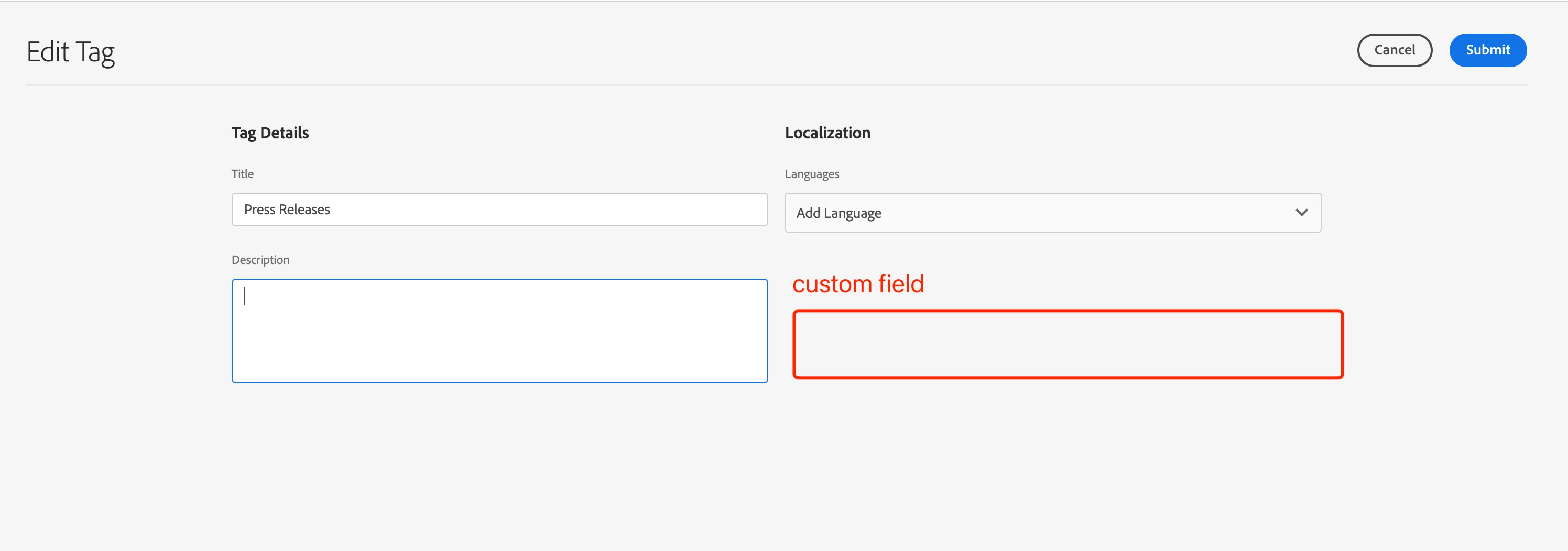
How to add custom field to AEM Tag | Community
Skip to main content
This post is no longer active and is closed to new replies. Need help? Start a new post to ask your question.
Best answer by aanchal-sikka

Hello @krist_wang 


We can add more fields to "Edit Tag" wizard via "/libs/cq/tagging/gui/content/tags/tagedit/jcr:content/body/items/form/items/wizard/items/editStep/items/fixedColumns/items"


We would need to overlay and append the required fields.

1 reply

aanchal-sikka
Community Advisor
aanchal-sikkaCommunity AdvisorAccepted solution
Community Advisor
May 31, 2023

Hello @krist_wang 


We can add more fields to "Edit Tag" wizard via "/libs/cq/tagging/gui/content/tags/tagedit/jcr:content/body/items/form/items/wizard/items/editStep/items/fixedColumns/items"


We would need to overlay and append the required fields.

Aanchal Sikka
Level 2
June 1, 2023

Hi,  I add a field to  "Edit Tag" wizard via "/libs/cq/tagging/gui/content/tags/tagedit/jcr:content/body/items/form/items/wizard/items/editStep/items/fixedColumns/items"

and I assign the “tag color" value,  but when I open the "edit tag" again, the "tag color"  field does not show the value.