How to add Audios filter in side panel while page authoring | Community
Skip to main content
ajayk51367852
Level 2
July 11, 2017
Solved

How to add Audios filter in side panel while page authoring

  • July 11, 2017
  • 2 replies
  • 977 views

Hi,

For one of my POCs ( in AEM 6.3), i am developing an audio component by overlaying the OOTB video component and customizing it.

While authoring the page, we get to drag-drop the assets from side panel onto the page.

  By default we can filter the assets like Images,Videos,Pages, Products etc.. I need to add an Audio filter and make audio files uploaded in DAM appear here.
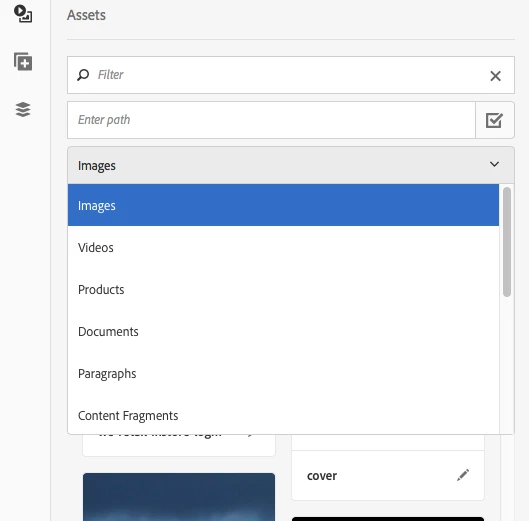
    

  Please suggest me like where in crx structure can we add that predicate to filter the Audio assets, and what steps i need to perform to achieve my goal.

Regards,

Ajay.

This post is no longer active and is closed to new replies. Need help? Start a new post to ask your question.
Best answer by edubey

ajayk51367852

Take a look at the documentation

Configuring Search Forms

Thanks

2 replies

kautuk_sahni
Community Manager
Community Manager
July 13, 2017

edubey Any help?

~kautuk

Kautuk Sahni
edubey
edubeyAccepted solution
Level 10
July 13, 2017

ajayk51367852

Take a look at the documentation

Configuring Search Forms

Thanks