
How to access CRXDE in publish instance? | Community
Skip to main content
kdagestany
Level 2
May 24, 2022
Solved

How to access CRXDE in publish instance?

  • May 24, 2022
  • 6 replies
  • 5354 views

Hi All, 


I am new to AEM and would appreciate all the help I can get. just one request, Please keep it simple and small as I am still taking baby steps to this huge platform. ^_^


Now, I know how to access CRXDE in Author instance (I would go to tools> General > CRXDE Lite), but I am not sure how to access CRXDE in publish instance


Thank you in advance for participating to answer my question. 
This post is no longer active and is closed to new replies. Need help? Start a new post to ask your question.
Best answer by SantoshSai

Hi @milind_bachani 

Navigating to http://localhost:4503/crx/packmgr/index.jsp doesn't help (If you are on AEM 6.5.5)


One should login it via console here http://localhost:4503/libs/granite/core/content/login.html as I mentioned above.

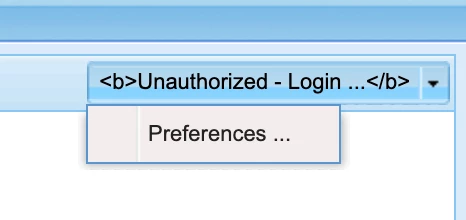
“The login and logout buttons have been removed on purpose from CRXDE for security reasons (internal ID: GRANITE-27790). Back ported to AEM 6.5.5.0 as part NPR-33521.”

Reference: https://www.techinnovia.com/how-to-easily-access-crx-de-after-aem-6-5-5-upgrade-sp5/

Regards,
Santosh

6 replies

SantoshSai
Community Advisor
Community Advisor
May 24, 2022

Hi @kdagestany 

You can access CRXDE on publish as you do access on author by these steps

1. Firstly, login to AEM publish instance via Login console (If you are on AEM                6.5.5http://localhost:4503/libs/granite/core/content/login.html
(If you want to have a full access to CRXDE)
2. Secondly, do follow the same steps as you mentioned above (Tools--> General--> CRXDE Lite) or 
3. Visit CRXDE http://localhost:4503/crx/de/index.jsp directly.

For more details visit this article https://www.techinnovia.com/how-to-easily-access-crx-de-after-aem-6-5-5-upgrade-sp5/

Hope that helps!

Regards,
Santosh

Santosh Sai
milind_bachani
Adobe Employee
Adobe Employee
May 24, 2022

Hi @kdagestany ,


In addition to what @santoshsai mentioned should help. But in case you are directly accessing :
http://localhost:4503/crx/de/index.jsp but you are unable to login from top right login option, you can navigate to 
http://localhost:4503/crx/packmgr/index.jsp and try logging in. 

P.S. Make sure you have user created to access the publisher CRX. However, if you are trying on localhost you can use default admin creds.

Thanks,

Milind

SantoshSai
Community Advisor
SantoshSaiCommunity AdvisorAccepted solution
Community Advisor
May 24, 2022

Hi @milind_bachani 

Navigating to http://localhost:4503/crx/packmgr/index.jsp doesn't help (If you are on AEM 6.5.5)


One should login it via console here http://localhost:4503/libs/granite/core/content/login.html as I mentioned above.

“The login and logout buttons have been removed on purpose from CRXDE for security reasons (internal ID: GRANITE-27790). Back ported to AEM 6.5.5.0 as part NPR-33521.”

Reference: https://www.techinnovia.com/how-to-easily-access-crx-de-after-aem-6-5-5-upgrade-sp5/

Regards,
Santosh

Santosh Sai
milind_bachani
Adobe Employee
Adobe Employee
May 24, 2022

Agreed @santoshsai 😄

kdagestany
Level 2
May 24, 2022

@milind_bachani  @santoshsai 


Hello guys, Thank you for your contribution to answer my question. 


For some reason every time I try to open this link, I end up getting a message (Site can't be reached) so I wonder if your instructions will work for AEM cloud ? 

http://localhost:4503/libs/granite/core/content/login.html


P.S I should have clarified that I am using AEM cloud service 


Thank you Again  

SantoshSai
Community Advisor
Community Advisor
May 24, 2022

@kdagestany 


AEM as a Cloud Service on local? Did you checked your AEM instance is up and running on the port you are accessing? In above case it's 4503.

Santosh Sai
Level 4
May 25, 2022

You cannot access crxde in any publish instance of Cloud (unless its a local instance of the sdk). 


You can only access on dev author instances.


You can however, view the repository of any cloud publish  instance through development tools repository browser.

sukumard
Level 3
May 25, 2022

There few points to check :-

1- check the port on which your AEM publish instance is running, by default its running on port 4503. access by http://localhost:PORT/crx/packMgr & then navigate to crx/de

2- If you have configured dispatcher in front of your publish instance & accessing via dispatcher , check dispatcher configuration and allow /crx/de in dispatcher configuration and restart dispatcher

Level 4
May 25, 2022

What I do for local environments and our on-premise is to pass in the resource (bookemark it) to take me directly to the crxde :

localhost:4503/libs/granite/core/content/login.html?resource=/crx/de/index.jsp

I might also ask... have you actually set up the publish instance?  I see you are new to AEM so just wanted to make sure you have started an author instance AND a publish instance.