How much time does publishing an image to S7 cloud take? | Community
Skip to main content
Level 2
July 11, 2023
Solved

How much time does publishing an image to S7 cloud take?

  • July 11, 2023
  • 1 reply
  • 1014 views

We have recently started using smartcrops and when we publish an image we are able to see the smartcrop renditions in the dam asset file but on page it does not reflect immediately. I was able to see the renditions the next day though. Does it run by some scheduler? if so can we edit the scheduler timing and how?

This post is no longer active and is closed to new replies. Need help? Start a new post to ask your question.
Best answer by Saravanan_Dharmaraj

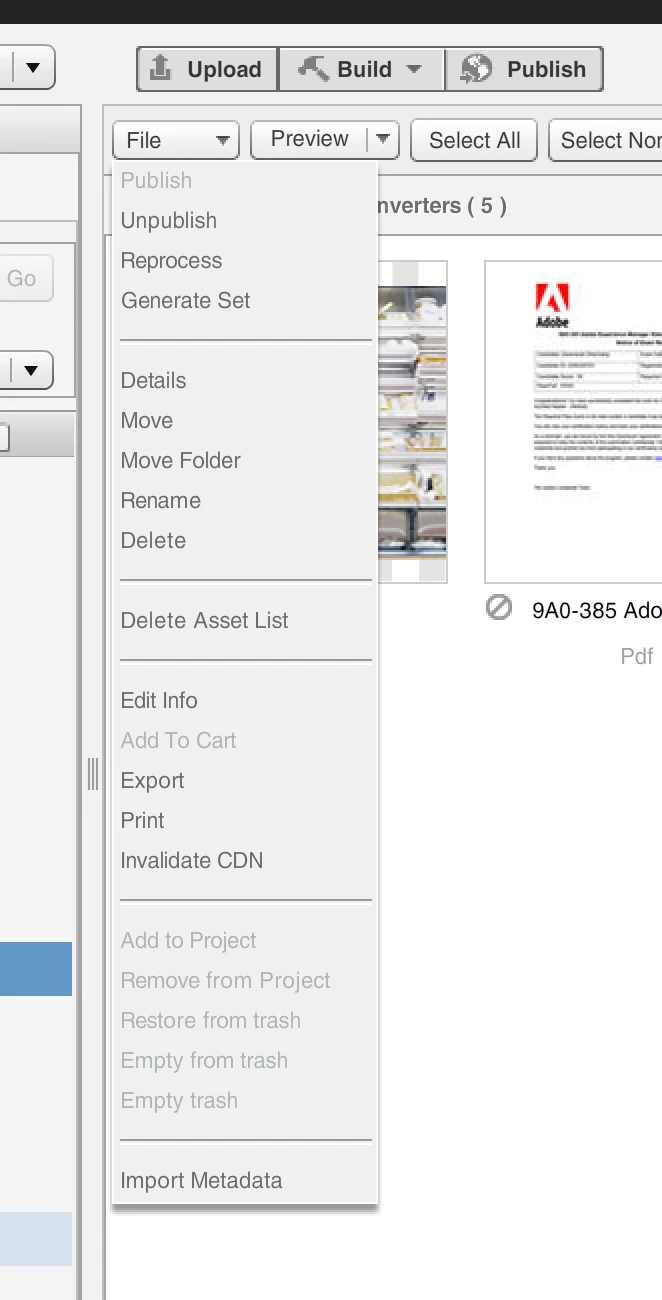
@sri9686 If you want to clear the cache immediately, you can use Classic App and select the image and do select "Invalidate CDN", it removes the cache. 

The default cache setting for 10 hours is present under Settings ->Application Set up -> Publish Set up -> Image Server -> Default Client Cache Time to Live, you can play with that too.


1 reply

EstebanBustamante
Community Advisor and Adobe Champion
July 11, 2023

If you are able to see the renditions on the asset it means those are published on S7, it sounds to me that your issue is more related to cache, did you try to hit the page which is not reflecting the renditions appending a queryParam to invalidate the cache, in an incognito window?, can you also hit directly the URL which is set in the image to make sure that is not cached? I remember once the image on S7 was cached and as you mentioned it took a day to flush the cache and then we were able to see the image properly. But you can discard this is cache issue as i explained before.

Esteban Bustamante
sri9686Author
Level 2
July 12, 2023

Hi Esteban666,

 
When an image in uploaded to my DAM, assigned smart crops and used on page with the same the Image is picking up the renditions. When i change one or two renditions with focus on what i want and save and re-publishing the image, the page is still shows the old smart crop image. If I hit the image url (S7 url) directly on the browser, then also it gives me the cached image, but if I append a query parameter to the image url(S7 url), it gives me the changed image.

sri9686Author
Level 2
July 21, 2023

@sri9686 If you want to clear the cache immediately, you can use Classic App and select the image and do select "Invalidate CDN", it removes the cache. 

The default cache setting for 10 hours is present under Settings ->Application Set up -> Publish Set up -> Image Server -> Default Client Cache Time to Live, you can play with that too.


Thank you!! this helped me solve my problem.