How do I view installed AEM 6.2 documentation? | Community
Skip to main content
Level 2
February 4, 2022
Solved

How do I view installed AEM 6.2 documentation?

  • February 4, 2022
  • 2 replies
  • 2145 views

Hello.  I have a need to view the AEM 6.2 documentation for an older installation we have, so I found this site which describes how to download and install the docs:  https://experienceleague.adobe.com/docs/experience-manager-release-information/aem-release-updates/previous-updates/aem-previous-versions.html?lang=en#


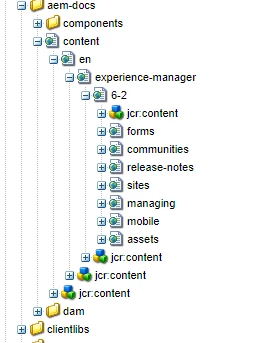
However once I have them installed in a local version of AEM 6.5 I can't figure out the url to actually access them.  The closest I can figure is something like http://localhost:4502/libs/aem-docs/content/en/experience-manager/6-2/  but nothing I tried in regards to an *.html or or *.jsp file seems to work.  Any suggestions?


Thanks,


Ray

 

This post is no longer active and is closed to new replies. Need help? Start a new post to ask your question.
Best answer by vikram1285

Hi @rayhundley 

Welcome to Adobe Community !!
I faced this same issue about 2 weeks ago.

As a workaround or a possible fix, I found, you need to install that AEM 6.2 documentation package on an AEM 6.2 author.

Note : There might be some dependencies issues, due to which AEM 6.5 Author is not able to render those .html and .jsp pages (created , when you install AEM 6.3, AEM 6.2 or AEM 6.1 documentation package)

Also, installing that documentation package will create "aem-docs" folder under "libs" folder and when you access them via CRDXE (double clicking), it should open a new browser tab or window and then you should be able to view them.


Thanks,

Vikram Gaur

2 replies

Nitin_laad
Community Advisor
Community Advisor
February 4, 2022

Hi @rayhundley 

below URL should work, you should get homepage wrt 6.2 version. 

localhost:4502/libs/aem-docs/content/en/experience-manager/6-2.html

Keep an eye on error.log, you should be able see errors in case of failure. 

Level 2
February 4, 2022

Hello @nitin_laad,


Thank you for the URL.  However trying it just returns a blank page in the browser. Checked the error.log file,  no activity. Very strange.  Anything else I can check?


Thanks again,


Ray


Nitin_laad
Community Advisor
Community Advisor
February 4, 2022
vikram1285Adobe EmployeeAccepted solution
Adobe Employee
February 7, 2022

Hi @rayhundley 

Welcome to Adobe Community !!
I faced this same issue about 2 weeks ago.

As a workaround or a possible fix, I found, you need to install that AEM 6.2 documentation package on an AEM 6.2 author.

Note : There might be some dependencies issues, due to which AEM 6.5 Author is not able to render those .html and .jsp pages (created , when you install AEM 6.3, AEM 6.2 or AEM 6.1 documentation package)

Also, installing that documentation package will create "aem-docs" folder under "libs" folder and when you access them via CRDXE (double clicking), it should open a new browser tab or window and then you should be able to view them.


Thanks,

Vikram Gaur

Level 2
February 7, 2022

Thanks @vikram1285 !  I installed the docs package in our older 6.2 installation and it works just fine. 


Thanks again,


Ray