How do I set the href property on a customized node to be read from a web config? | Community
Skip to main content
robin97009708
March 16, 2018
Solved

How do I set the href property on a customized node to be read from a web config?

  • March 16, 2018
  • 4 replies
  • 1149 views

I created an overlay in apps/cq/core/content/nav which I have named Moodle. I am trying to avoid having to manually configure the href value for deployment to multiple environments. I have tried using a relative path, but that does not work, (I get a 404 error). A full path works, but I need a different path for each environment.
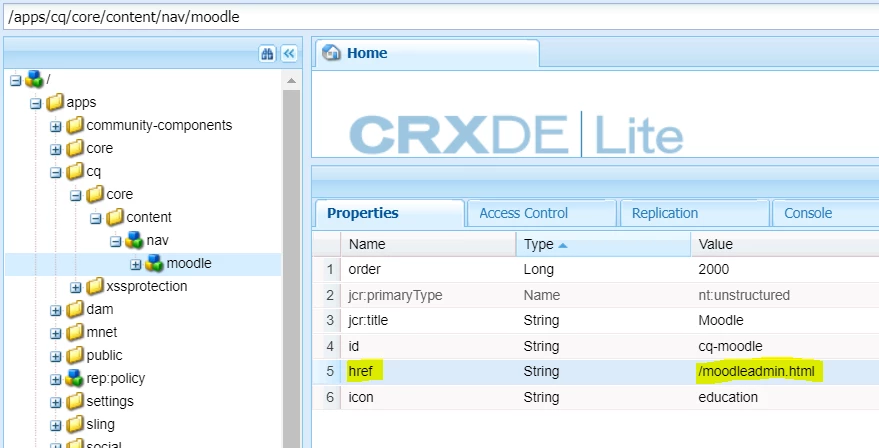
A component that has been created for another page that has similar desired behavior has been configured to use the web config file to access the proper URL for each environment.

Is there a way to apply this sort of method to setting the href for the nav/moodle node programatically to the setting in the config file for each environment?

This post is no longer active and is closed to new replies. Need help? Start a new post to ask your question.
Best answer by joerghoh

From what I understand you want to configure the properties of a JCR node based on runmodes. By default that is not possibe, the only chance I see is to deploy different content packages based on runmodes.

Another chance is to configure your moodle link to a fixed location inside the AEM namespace (e.g. /apps/myapp/content/moodle), configure a sling:resourceType for that node (e.g. myapp/components/moodle) and bind a servlet to this resourcetype; in this servlet you do a redirect to the final resource.

That's a bit of a workaround, but it offers you a very flexible way to deal with it. And it's inline with the AEM way of doing things :-)

ps: You are aware that Classic UI is deprecated?

Jörg

4 replies

smacdonald2008
Level 10
March 16, 2018

The only thing i can think of is to write a tool to that knows which environment is being used and updates this node property based on that value. OOTB - i am not aware of any AEM feature that will do this.

joerghoh
Adobe Employee
joerghohAdobe EmployeeAccepted solution
Adobe Employee
March 16, 2018

From what I understand you want to configure the properties of a JCR node based on runmodes. By default that is not possibe, the only chance I see is to deploy different content packages based on runmodes.

Another chance is to configure your moodle link to a fixed location inside the AEM namespace (e.g. /apps/myapp/content/moodle), configure a sling:resourceType for that node (e.g. myapp/components/moodle) and bind a servlet to this resourcetype; in this servlet you do a redirect to the final resource.

That's a bit of a workaround, but it offers you a very flexible way to deal with it. And it's inline with the AEM way of doing things :-)

ps: You are aware that Classic UI is deprecated?

Jörg

robin97009708
March 23, 2018

Hi Jörg,

Per your suggestion, I have been trying to configure my moodle link to a location inside of AEM, (/apps/mnet/components/content/moodleforward/moodleforward.html) from which to set up my redirect.

When I include the moodleforward.html at the end of the url in the href property on the moodle node, AEM tries to download the file. When I don't, I receive a message that I am forbidden from accessing this location, (Cannot serve request to /apps/mnet/components/content/moodleforward/ in org.apache.sling.servlets.get.DefaultGetServlet).

Clearly, I don't understanding the process I am trying to invoke. I have been searching support and Google for the past two days without any success. Do you have any suggestions for how to make this work?

joerghoh
Adobe Employee
Adobe Employee
March 26, 2018

I suggested this approach:

* Implement a servlet, which is invoked to handle a specific resource type. See the documentation at Apache Sling :: Servlets and Scripts  ; bind it to the resource type myapp/components/moodle; the implementation of this servlet (on GET request) performs the redirect according to your needs.

* Create a new node (nt:unstructured) at apps/myapp/content/moodle

* Create a second new node (nodetype jcr:content) at apps/myapp/content/moddle/jcr:content, and add the property "sling:resourceType" with the value "myapp/components/moddle".

Then do the testing:

* A request to /apps/myapp/content/moddle.html should execute the redirect.