How do I implement the out of the box button component within a custom component? | Adobe Higher Education
Skip to main content
Level 2
February 14, 2023
解決済み

How do I implement the out of the box button component within a custom component?

  • February 14, 2023
  • 5 の返信
  • 3506 ビュー

I want the button component to come onto my custom component. The button should be customizable like so:
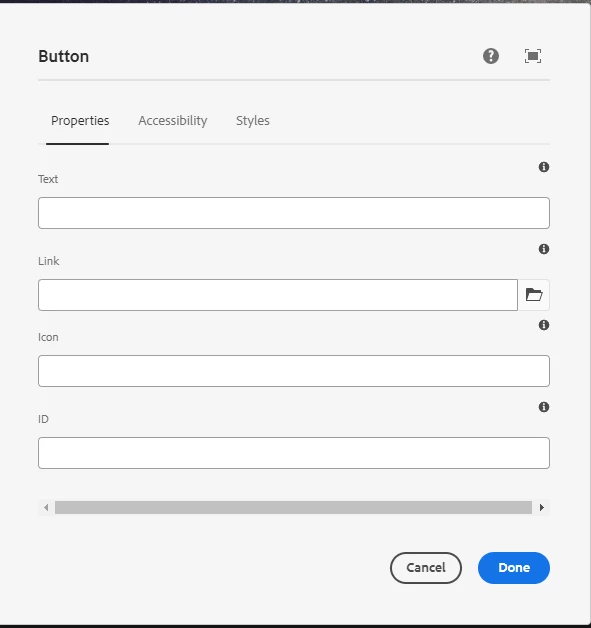
This is dialog box that comes up when you try to configure the button. I would like this to come up when I click on the implemented button within the custom component I built.

 

For less confusion, the buttons have rendered since I added it to the html file. But I would like to able to configure the button with the dialog box popping up.


Is this possible?


@kautuk_sahni @BrianKasingli @arunpatidar @DEBAL_DAS @santoshsai 
このトピックへの返信は締め切られました。
ベストアンサー arunpatidar

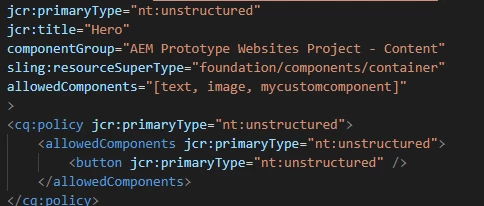
Hi, so I tried that by editing the content xml file. I changed the supertype to a container. 


Do I have to change something else as well? So far, it's not allowing me to add any components.


you don't need to allow button component in your customcomponent.

Add isContainer property to your component.


Example

https://github.com/arunpatidar02/aemaacs-aemlab/blob/master/ui.apps/src/main/content/jcr_root/apps/aemlab/oneweb/concept/components/adaptive-image/adaptive-image.html 

5 の返信

Himanshu_Jain
Community Advisor
Community Advisor
February 14, 2023

Embed the OOTB component in your custom one by adding a placeholder like for tabs , accordion where you can drag and drop any other existing component .

Himanshu Jain
cosmicthief作成者
Level 2
February 14, 2023

Hi, thank you for your response. I'm very new to AEM so I don't quite understand what you mean by adding a placeholder. How would I do that? 
Thanks

Manu_Mathew_
Community Advisor
Community Advisor
February 14, 2023

@cosmicthief You could probably include the dialog of the OOTB button components via /libs/granite/ui/components/coral/foundation/include and customize the HTML/CSS as you would like.

arunpatidar
Community Advisor
Community Advisor
February 14, 2023

you can embed those button using data-sly-resource in custom component.


<div class="custom-comp"> ...... <div class="cmp-custom-bt1" data-sly-resource="${@path='btn1', resourceType='mypass/content/button'}"></div> <div class="cmp-custom-bt2" data-sly-resource="${@path='btn2', resourceType='mypass/content/button'}"></div> </div>


Arun Patidar
cosmicthief作成者
Level 2
February 14, 2023

Hi, thank you for your response. I have already added that to my HTL file. With that only the empty button is rendered. I would like the button to have the options to edit text etc (exactly like the dialog box I attached to the original question). Do you have any recommendations of what I should do? (I am very new to AEM so I may need extra steps that are considered obvious haha.)

Thanks

arunpatidar
Community Advisor
Community Advisor
February 15, 2023

you need to create your custom component as a container and make button components editable within custom components. It is like composite component.


check the button components from left trail content tree 


Arun Patidar
Magicr
Level 6
February 14, 2023

@cosmicthief An off topic question: What is the purpose of mentioning the below users? Does it mean that other users of this forum shall not answer your question?

arunpatidar
Community Advisor
Community Advisor
February 14, 2023

According to me

Intentions to tag certain users in the post so that they will get notified and see the question from notication.

Arun Patidar
Adobe Employee
February 14, 2023

Hello @cosmicthief 


There would be 2 pieces for using OOTB Button component in another component"


1. Dialog: Possible approaches to configure:

-- Add fields to custom component, with property names as OOTB button.

-- Reuse the tabs of the OOTB button component by including it.

2. HTL: Use data-sly-resource to render the button component

<div data-sly-resource="${ 'foo' @ resourceType='<myapp/content/button>' }">

This Sling Model for "myapp/content/button" would use the properties from the foo resource, to render the button component


cosmicthief作成者
Level 2
February 14, 2023

How would include/reuse the tabs of OOTB component? Sorry, I'm new to AEM so I don't how to do that.


Thanks

Adobe Employee
February 15, 2023

Hello @cosmicthief 


For including tabs of another component's dialog, please refer to an example on https://competitiveprogrammingarchives.home.blog/2020/05/09/aem-reusing-touch-dialog-fields-tabs-using-include/ 


I hope that helps !