How do I access the properties of child pages?
I am building a small site using a dashboard,which provides thumbnail links for all of its child pages. You can think of it as a products page/dashboard, and each child page is a detail page for a single product. The attached image shows the custom property Product Group added to the page property sheet.
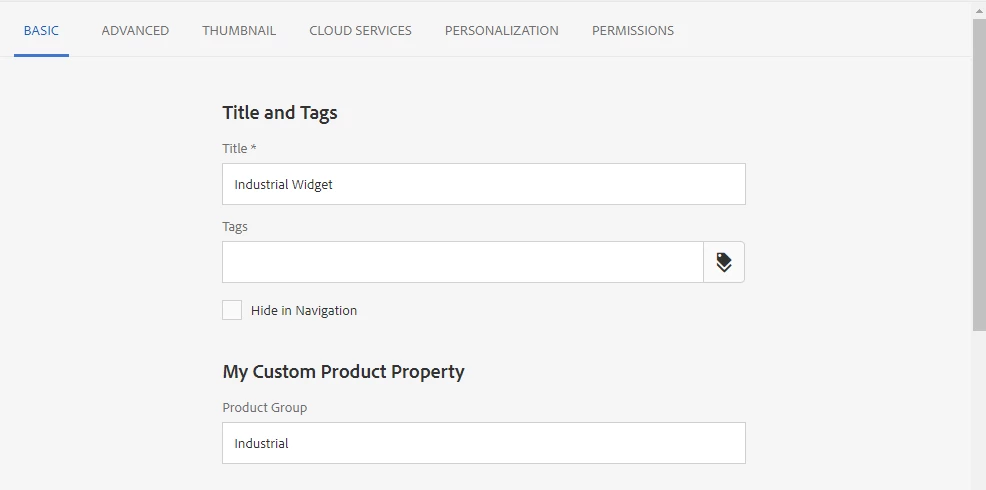
Here is the configuration for the custom property:
<group
jcr:primaryType="nt:unstructured"
sling:resourceType="granite/ui/components/coral/foundation/form/textfield"
cq-msm-lockable="jcr:group"
fieldLabel="Product Group"
name="./jcr:group"
renderReadOnly="{Boolean}true"
required="{Boolean}false"/>
Then from the dashboard, I am attempting to read the child page properties Page object API and then dynamically build my dashboard. My first attempt was to use the getProperties() method, hoping that the page properties would be available there The code looks something like this:
use(function() {
var data = {
child_data: [],
};
var children = currentPage.listChildren();
while (children.hasNext()){
var child = children.next(),
child_props = child.getProperties();
data.child_data.push(child_props);
}
return data;
});
This does not return all of the page properties, however, just a small subset, e.g., jcr:title, jcr:created, etc. What I need to build my dashboard is the title, my custom property, group, and the path to the page thumbnail. I would really appreciate some guidance.
Cheers,
Sean