How Do AEM Tags Appear in Final HTML Content | Community
Skip to main content
bigbaldbasso
Level 2
January 22, 2019
Solved

How Do AEM Tags Appear in Final HTML Content

  • January 22, 2019
  • 3 replies
  • 3978 views

Hi there.

Full disclaimer - I am only semi-literate in AEM. The rest of the Experience Cloud?  Pretty solid.  But AEM is a different beast.

In a help article about AEM tags, I read this:

...tags applied as page properties will automatically show up in the metatags of the page ...

What <meta> tag name will these show up under?  Does it truly happen automatically, or does something need to be added to the page template to get it written to the final content?

We are investigating using the tags applied in AEM as input to Target recommendations for categorization.  I figure if they can end up as a <meta> tag I can read that in a Launch data element and manipulate them as needed.

Thanks - I appreciate the assistance!

This post is no longer active and is closed to new replies. Need help? Start a new post to ask your question.
Best answer by Lokesh_Shivalingaiah

Hi,

Yes, Any tags you add to a page it will be automatically added to the metadata keywords property

Ex:

<meta name="keywords" content="Men"/>

Steps to follow:

1. Edit any page (Ex: http://localhost:<port>/editor.html/content/we-retail/us/en/men.html )

2. Open page properties

3. Add 'Tags"

4. Click on 'Save and Close'

5. Then view page as published (ex: http://localhost:<port>/content/we-retail/us/en/men.html?wcmmode=disabled )

6. View page source

You should find all the tags added in the metatag keywords property.

3 replies

smacdonald2008
Level 10
January 23, 2019

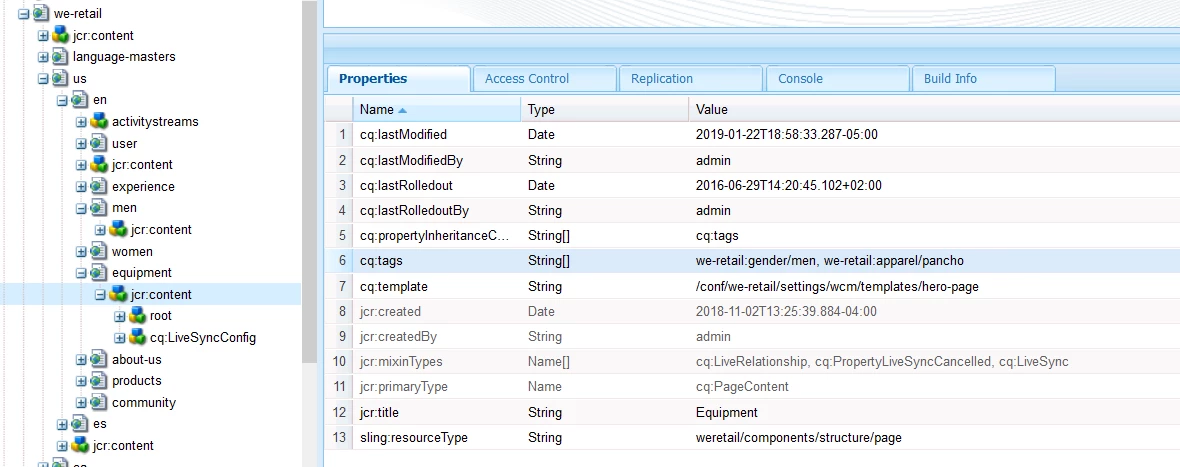
FRom a JCR Perspective - tags are added as a node here when you apply a tag to an AEM page:

You can also create a component that uses the Tag Manager to search for Tags.

Adobe Experience Manager Help | Developing HTL Components that search for Adobe Experience Manager 6.4 Content Tags

See this general AEM Doc topic for more information about tags -- Using Tags

Lokesh_Shivalingaiah
Lokesh_ShivalingaiahAccepted solution
Level 10
January 23, 2019

Hi,

Yes, Any tags you add to a page it will be automatically added to the metadata keywords property

Ex:

<meta name="keywords" content="Men"/>

Steps to follow:

1. Edit any page (Ex: http://localhost:<port>/editor.html/content/we-retail/us/en/men.html )

2. Open page properties

3. Add 'Tags"

4. Click on 'Save and Close'

5. Then view page as published (ex: http://localhost:<port>/content/we-retail/us/en/men.html?wcmmode=disabled )

6. View page source

You should find all the tags added in the metatag keywords property.

smacdonald2008
Level 10
January 23, 2019

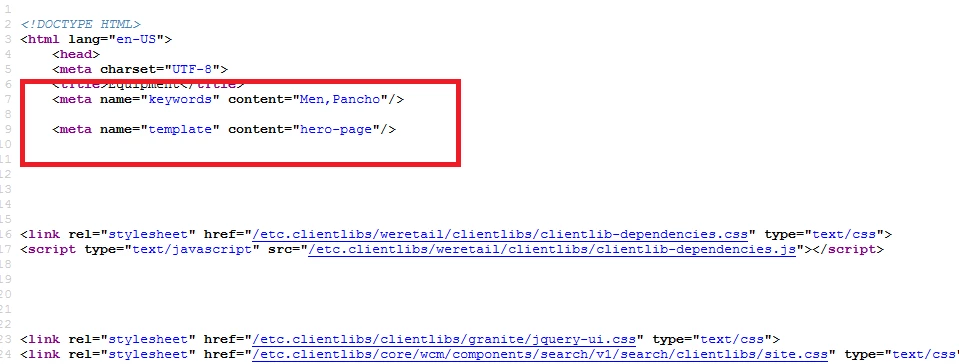
Lokesh answer is correct - i confirmed the steps: