How can we organize dropdown values into groups within an AEM dialog? | Community
Skip to main content
Mario248
Level 7
August 25, 2025
Solved

How can we organize dropdown values into groups within an AEM dialog?

  • August 25, 2025
  • 2 replies
  • 2146 views

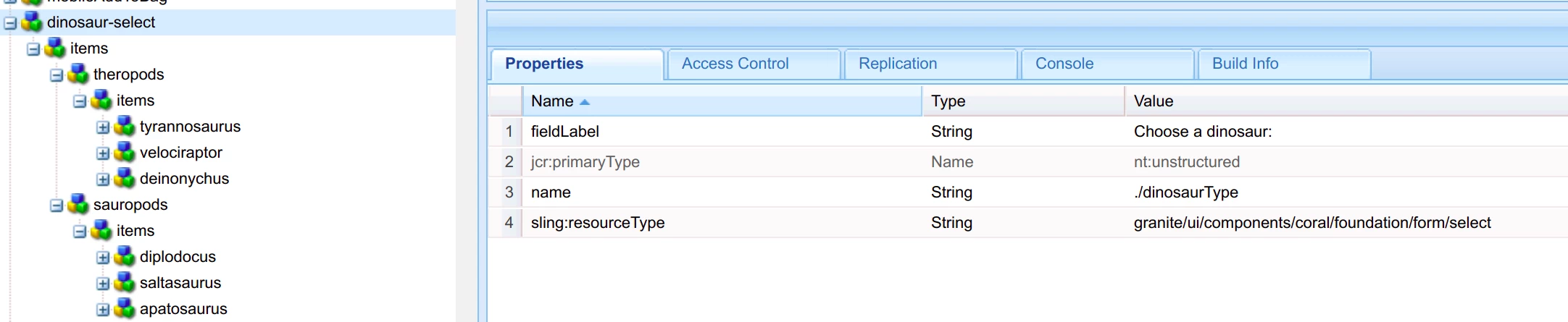
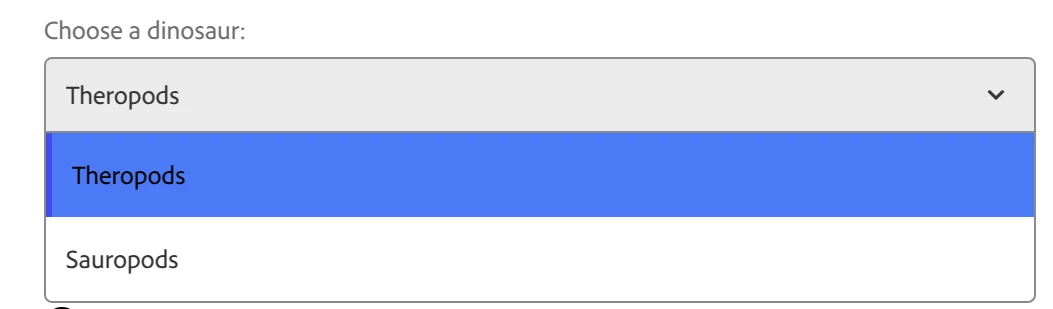
I want to create a dropdown in an AEM component dialog with grouped options. For example, Theropods containing three items and Sauropods containing three items. I tried using granite/ui/components/coral/foundation/form/select/optgroup, but it didn’t work. Is this poiible  in an AEM component dialog?
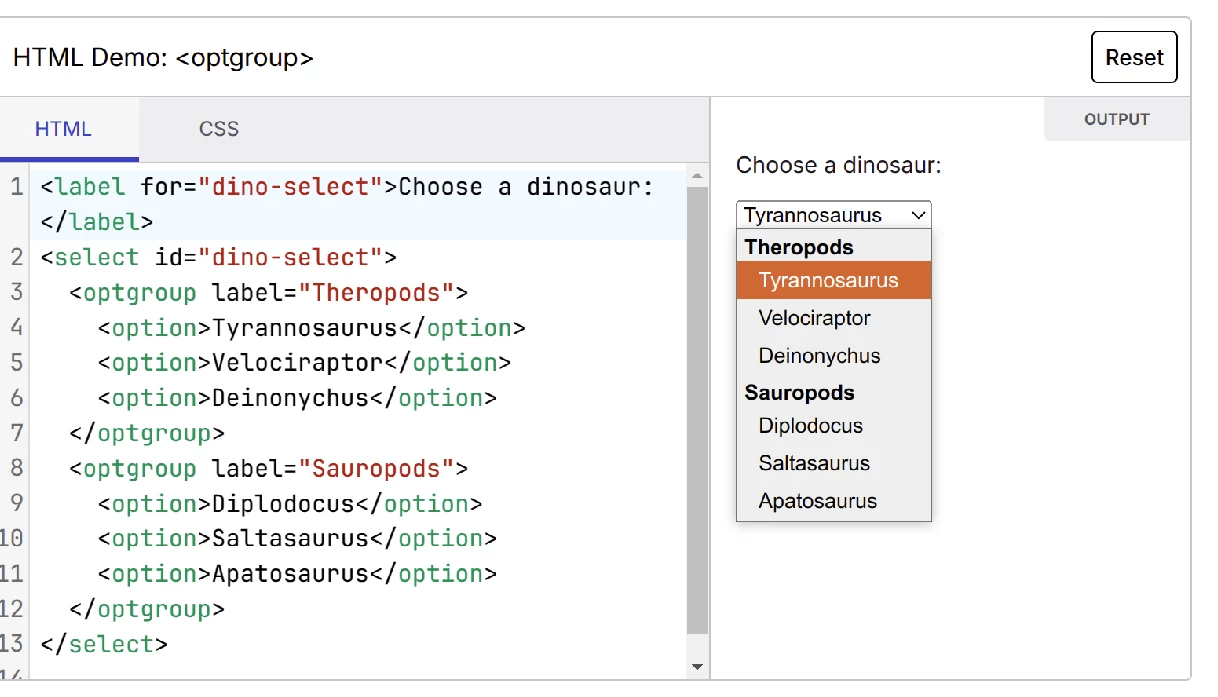
 

Example 


Dialog


Dialog output


This post is no longer active and is closed to new replies. Need help? Start a new post to ask your question.
Best answer by arunpatidar

Hi @mario248 

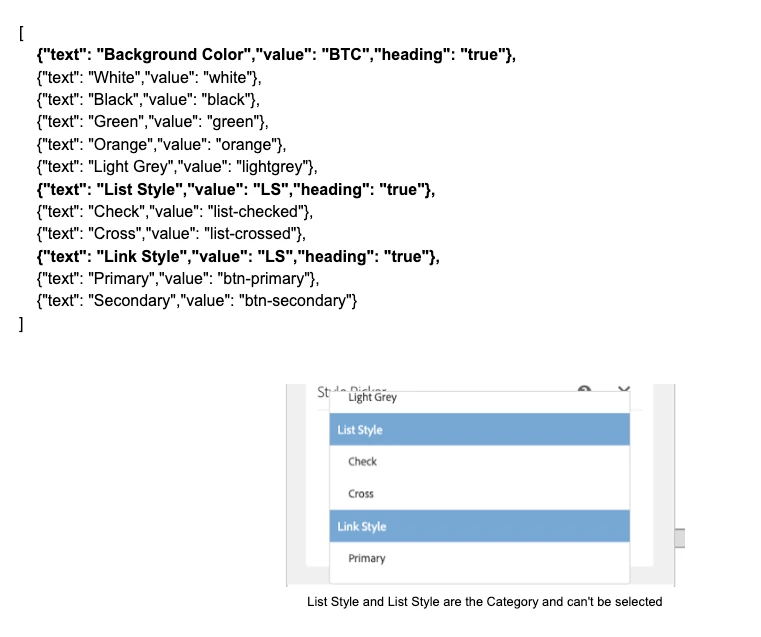
Its not possible to create dropdown with groups for AEM dialog. However you can use CSS to style your dropdown option like a groups.

you may need additional data attribute which contains the group titles.


https://aemlab.blogspot.com/2019/07/aem-rte-custom-plugins-1.html 


2 replies

SantoshSai
Community Advisor
Community Advisor
August 25, 2025

Hi @mario248,

I don't think so you can use <optgroup> inside an AEM Granite UI dialog the same way you would in plain HTML. The granite/ui/components/coral/foundation/form/select resource type does not support the optgroup element.


Rather do you think these might helpful as an alternateive options?

  1. Prefix the options with a "group label"
    Example:

    Theropods - T-Rex
    Theropods - Velociraptor
    Theropods - Allosaurus
    Sauropods - Brachiosaurus
    Sauropods - Diplodocus
    Sauropods - Apatosaurus

    (Simple, but not visually grouped)

  2. Use a custom Granite UI widget

    • Extend the Coral Select widget by overlaying or creating a custom rendercondition/datasource that outputs real <optgroup> markup.

    • This requires a clientlib override and isn’t OOTB.

  3. Use checkboxes/radio groups inside a fieldset

    • If the UX requires groups, you can switch to a fieldset with multiple checkbox or radio items. That way you get the visual grouping.

Example (what you can do OOTB with checkboxes)

<dinosaurs
    jcr:primaryType="nt:unstructured"
    sling:resourceType="granite/ui/components/coral/foundation/form/fieldset"
    jcr:title="Dinosaurs">
    <theropods
        jcr:primaryType="nt:unstructured"
        sling:resourceType="granite/ui/components/coral/foundation/form/checkboxgroup"
        jcr:title="Theropods">
        <trex
            jcr:primaryType="nt:unstructured"
            text="T-Rex"
            value="trex"/>
        <raptor
            jcr:primaryType="nt:unstructured"
            text="Velociraptor"
            value="velociraptor"/>
    </theropods>
    <sauropods
        jcr:primaryType="nt:unstructured"
        sling:resourceType="granite/ui/components/coral/foundation/form/checkboxgroup"
        jcr:title="Sauropods">
        <brachiosaurus
            jcr:primaryType="nt:unstructured"
            text="Brachiosaurus"
            value="brachiosaurus"/>
        <diplodocus
            jcr:primaryType="nt:unstructured"
            text="Diplodocus"
            value="diplodocus"/>
    </sauropods>
</dinosaurs><dinosaurs
    jcr:primaryType="nt:unstructured"
    sling:resourceType="granite/ui/components/coral/foundation/form/fieldset"
    jcr:title="Dinosaurs">
    <theropods
        jcr:primaryType="nt:unstructured"
        sling:resourceType="granite/ui/components/coral/foundation/form/checkboxgroup"
        jcr:title="Theropods">
        <trex
            jcr:primaryType="nt:unstructured"
            text="T-Rex"
            value="trex"/>
        <raptor
            jcr:primaryType="nt:unstructured"
            text="Velociraptor"
            value="velociraptor"/>
    </theropods>
    <sauropods
        jcr:primaryType="nt:unstructured"
        sling:resourceType="granite/ui/components/coral/foundation/form/checkboxgroup"
        jcr:title="Sauropods">
        <brachiosaurus
            jcr:primaryType="nt:unstructured"
            text="Brachiosaurus"
            value="brachiosaurus"/>
        <diplodocus
            jcr:primaryType="nt:unstructured"
            text="Diplodocus"
            value="diplodocus"/>
    </sauropods>
</dinosaurs>


Santosh Sai
arunpatidar
Community Advisor
arunpatidarCommunity AdvisorAccepted solution
Community Advisor
August 26, 2025

Hi @mario248 

Its not possible to create dropdown with groups for AEM dialog. However you can use CSS to style your dropdown option like a groups.

you may need additional data attribute which contains the group titles.


https://aemlab.blogspot.com/2019/07/aem-rte-custom-plugins-1.html 


Arun Patidar
Mario248
Mario248Author
Level 7
August 26, 2025

Thank you Arun for sharing your input. Can you tell the steps to create this ? I use ACS common generic list to main the value but your screenshot contain a json. Also the link you shared is for RTE, is it work on regular component dialog ?

arunpatidar
Community Advisor
Community Advisor
August 27, 2025

Hi @mario248 

The dialog is granite nt the RTE but used inside RTE plugin but its the same. I used json to create Granite Dropdown options because I wan to add custom attribute. I am not sure if you can achieve same with ACS common Generic list.


https://experienceleaguecommunities.adobe.com/t5/adobe-experience-manager/acs-aem-commons-generic-list-modification/td-p/731926 

Arun Patidar