
How can I keep jcr:lastModified updated when using a content package? | Community
Skip to main content
jkpanera
Level 4
July 23, 2019
Solved

How can I keep jcr:lastModified updated when using a content package?

  • July 23, 2019
  • 2 replies
  • 2137 views

I created this content package:

-> jcr_root -> tmp -> .content.xml:

<?xml version="1.0" encoding="UTF-8"?>

<jcr:root xmlns:sling="http://sling.apache.org/jcr/sling/1.0" xmlns:jcr="http://www.jcp.org/jcr/1.0"

          jcr:primaryType="sling:Folder"

          property1="property 1"/>

-> META-INF -> filter.xml:

<?xml version="1.0" encoding="UTF-8"?>

<workspaceFilter version="1.0">

    <filter root="/tmp" mode="update" />

</workspaceFilter>

Before I install:

After:
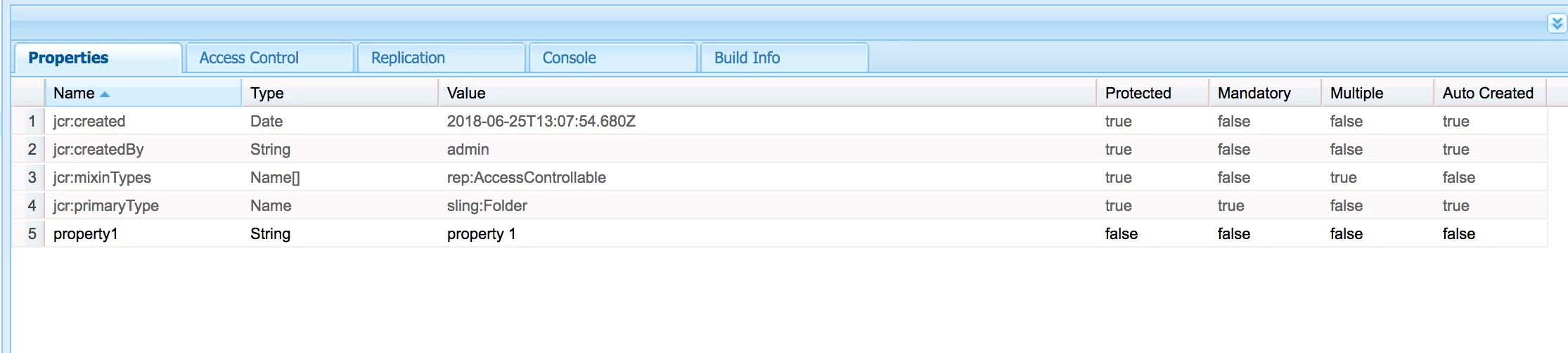
As you can see, my package updates the property but it doesn't update the jcr:lastModified date (in fact there isn't one). Is there a way that I can configure it so that the jcr:lastModified date will be updated when the package is installed?

This post is no longer active and is closed to new replies. Need help? Start a new post to ask your question.
Best answer by Himanshu_Singhal

You can write custom resource listener. So, if there's any change happens in content hierarchy then whichever paths gets updated, you can update jcr:modified property for it.

2 replies

joerghoh
Adobe Employee
Adobe Employee
July 23, 2019

the PackageManager does not support this.

Himanshu_Singhal
Community Advisor
Himanshu_SinghalCommunity AdvisorAccepted solution
Community Advisor
July 23, 2019

You can write custom resource listener. So, if there's any change happens in content hierarchy then whichever paths gets updated, you can update jcr:modified property for it.