Hide Particular field in page properties Dialog. | Community
Skip to main content
Level 2
November 28, 2021
Solved

Hide Particular field in page properties Dialog.

  • November 28, 2021
  • 1 reply
  • 5035 views

Hi Team,
I would like to hide some fields in page properties dialog. which is coming from OOB page properties.

for example: hide SEO [OOB] option from Advanced Tab in page properties dialog.
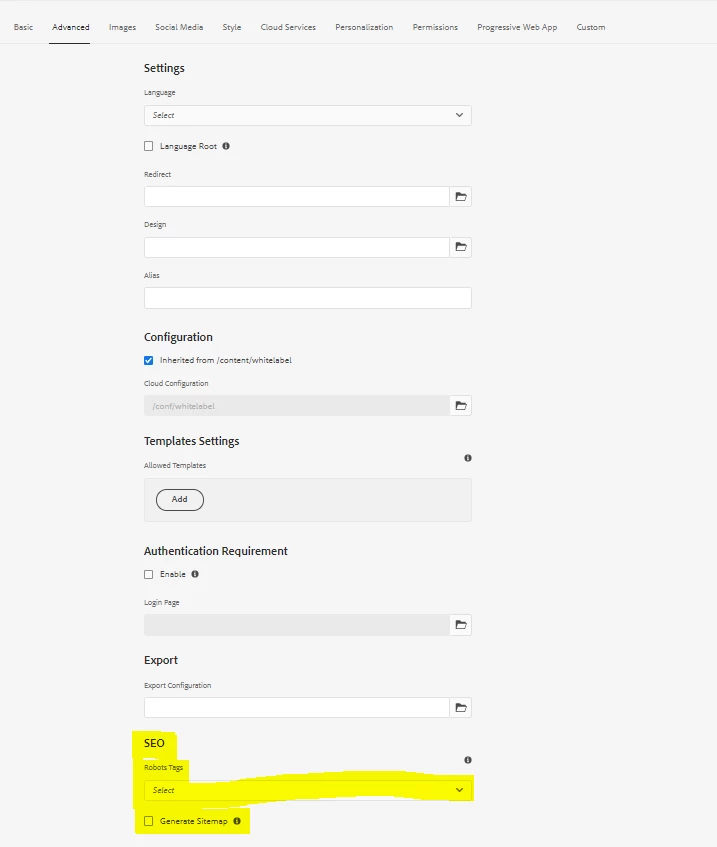
 

Scenario:
I have created a page by inheriting core/cif/components/structure/page/v1/page
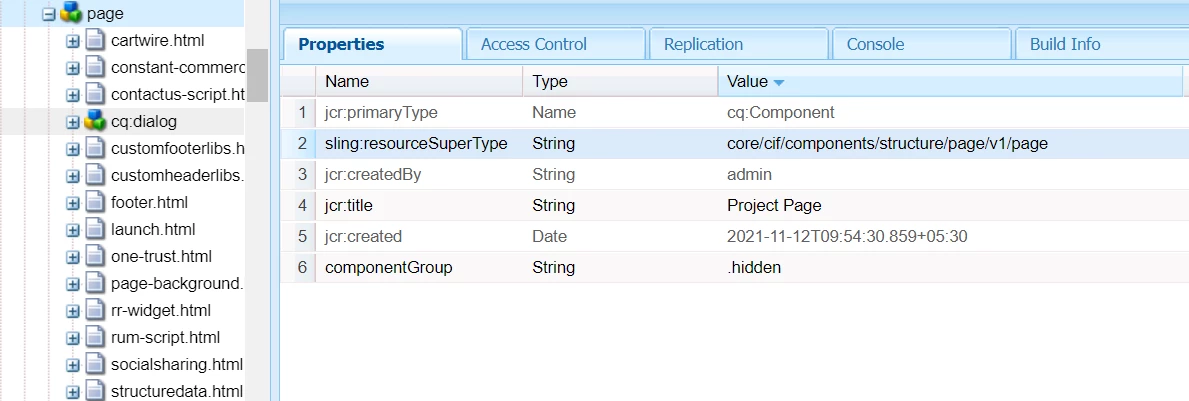


which is then inheriting from "/libs/core/wcm/components/page/v3/page"
which is finally inheriting from: "/libs/wcm/foundation/components/basicpage/v1/basicpage"

So, my Adnavced tab is coming from: /libs/wcm/foundation/components/basicpage/v1/basicpage/cq:dialog/content/items/tabs/items/advanced
i.e. /libs/wcm/foundation/components/basicpage/v1/basicpage/tabs/advanced


Now requirement here is to Hide SEO from Advanced tab.


I tried to copy the advanced tab and SEO node and used sling:hideResource true to hide, but then I cannot see any fields in Advance tab.

So how to hide only SEO node from OOB Advanced tab.

@kautuk_sahni  @arunpatidar   @vijayalakshmi_s  @himanshu_singhal 


This post is no longer active and is closed to new replies. Need help? Start a new post to ask your question.
Best answer by arunpatidar

1. Create a dialog cq:dialog

<?xml version="1.0" encoding="UTF-8"?>
<jcr:root xmlns:cq="http://www.day.com/jcr/cq/1.0" xmlns:jcr="http://www.jcp.org/jcr/1.0" xmlns:nt="http://www.jcp.org/jcr/nt/1.0"
    jcr:primaryType="nt:unstructured">
    <content jcr:primaryType="nt:unstructured">
        <items jcr:primaryType="nt:unstructured">
            <tabs jcr:primaryType="nt:unstructured">
                <items jcr:primaryType="nt:unstructured">
                    <advanced
                        jcr:primaryType="nt:unstructured"
                        path="/mnt/override/apps/aemlab/components/page/tabs/advanced"/>
                </items>
            </tabs>
        </items>
    </content>
</jcr:root>


2. Create a tabs node with advanced tab and hide as a resource e.g. configuration properties


<?xml version="1.0" encoding="UTF-8"?>
<jcr:root xmlns:sling="http://sling.apache.org/jcr/sling/1.0" xmlns:jcr="http://www.jcp.org/jcr/1.0" xmlns:nt="http://www.jcp.org/jcr/nt/1.0"
    jcr:primaryType="nt:unstructured">
    <advanced
        jcr:primaryType="nt:unstructured"
        jcr:title="Advanced">
        <items jcr:primaryType="nt:unstructured">
            <column
                jcr:primaryType="nt:unstructured"
                sling:resourceType="granite/ui/components/coral/foundation/container">
                <items jcr:primaryType="nt:unstructured">
                    <configuration
                        jcr:primaryType="nt:unstructured"
                        sling:hideResource="{Boolean}true"/>
                </items>
            </column>
        </items>
    </advanced>
</jcr:root>

1 reply

arunpatidar
Community Advisor
arunpatidarCommunity AdvisorAccepted solution
Community Advisor
November 28, 2021

1. Create a dialog cq:dialog

<?xml version="1.0" encoding="UTF-8"?>
<jcr:root xmlns:cq="http://www.day.com/jcr/cq/1.0" xmlns:jcr="http://www.jcp.org/jcr/1.0" xmlns:nt="http://www.jcp.org/jcr/nt/1.0"
    jcr:primaryType="nt:unstructured">
    <content jcr:primaryType="nt:unstructured">
        <items jcr:primaryType="nt:unstructured">
            <tabs jcr:primaryType="nt:unstructured">
                <items jcr:primaryType="nt:unstructured">
                    <advanced
                        jcr:primaryType="nt:unstructured"
                        path="/mnt/override/apps/aemlab/components/page/tabs/advanced"/>
                </items>
            </tabs>
        </items>
    </content>
</jcr:root>


2. Create a tabs node with advanced tab and hide as a resource e.g. configuration properties


<?xml version="1.0" encoding="UTF-8"?>
<jcr:root xmlns:sling="http://sling.apache.org/jcr/sling/1.0" xmlns:jcr="http://www.jcp.org/jcr/1.0" xmlns:nt="http://www.jcp.org/jcr/nt/1.0"
    jcr:primaryType="nt:unstructured">
    <advanced
        jcr:primaryType="nt:unstructured"
        jcr:title="Advanced">
        <items jcr:primaryType="nt:unstructured">
            <column
                jcr:primaryType="nt:unstructured"
                sling:resourceType="granite/ui/components/coral/foundation/container">
                <items jcr:primaryType="nt:unstructured">
                    <configuration
                        jcr:primaryType="nt:unstructured"
                        sling:hideResource="{Boolean}true"/>
                </items>
            </column>
        </items>
    </advanced>
</jcr:root>
Arun Patidar
Level 2
November 28, 2021

Thank you It worked 🙂. I am new to this concept. could you please help me with any Adobe document for the same. 

arunpatidar
Community Advisor
Community Advisor
November 29, 2021

Hi @tushaarsrivastava 

There are no Adobe documentation for this specific use case but you can follow the implementation of supertype page resource. there tabs are included via path.

here we just did the same

Arun Patidar