help need to add RTE strikethrough plugin in CFM | Community
Skip to main content
Level 4
June 7, 2024
Solved

help need to add RTE strikethrough plugin in CFM

  • June 7, 2024
  • 2 replies
  • 3281 views

Hi Team,

          I have a requirement, i want to add Strikethrough plugin for Content fragment. when we create a content fragment we need to select CFM model. in that model, while we select MF line text and default type as Rich text, can we add Strikethrough plugin in this RTE? Kindly please suggest.
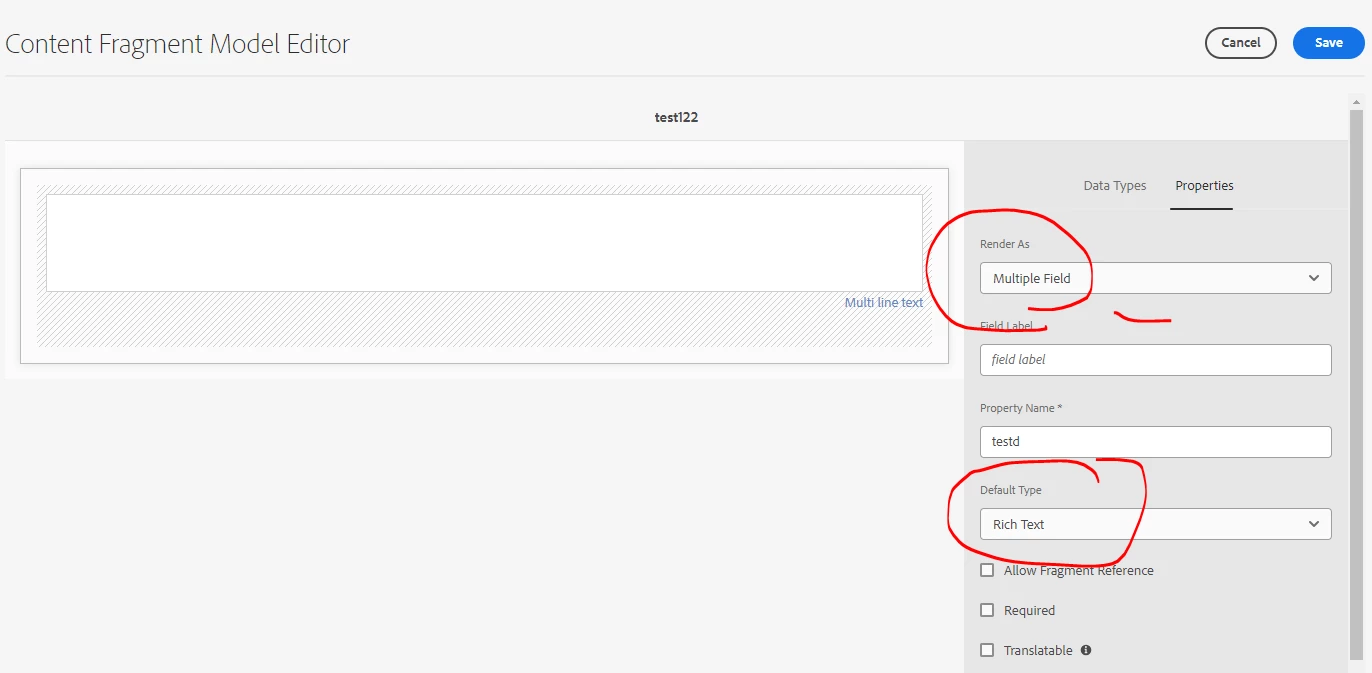
 

Environment  : AEMasCS.

This post is no longer active and is closed to new replies. Need help? Start a new post to ask your question.
Best answer by Keerthi0555

Kindly please share your sample package over github or my email rajathannasi168@gmail.com


INside StyledTextEditor.js please add styles in different places as below 
"inline": {
            "toolbar": [
              "#styles"
            ],
            "popovers": {
              "styles": {
                "ref": "styles",
                "items": "styles:getStyles:styles-pulldown"
 
              }
            }
          },
 
and here 
   "multieditorFullscreen": {
            "toolbar": [
              "#styles"
            ],
"popovers": {
"paraformat": {
                "ref": "paraformat",
        "items":"paraformat:getFormats:paraformat-pulldown"
              }
            "styles": {
                "ref": "styles",
                "items": "styles:getStyles:styles-pulldown"
           },
            }
          },
Hope this will help.

2 replies

HrishikeshKagne
Community Advisor
Community Advisor
June 7, 2024

Hi @rajat168 ,

To add the Strikethrough plugin to the Rich Text Editor (RTE) in a Content Fragment Model (CFM), you will need to modify the XML configuration of the RTE.

Here are the steps to add the Strikethrough plugin to the RTE in CFM:

  1. Open the CFM model in your AEM instance.
  2. Navigate to the "Elements" tab in the CFM editor.
  3. Find the "MF line text" element and click on it to edit its properties.
  4. In the "Default Type" dropdown, select "Rich Text".
  5. In the "Configurations" section, click on the "Edit" button next to the RTE configuration.
  6. In the RTE configuration dialog, locate the "Plugins" section.
  7. Add the following code to the "Plugins" section to enable the Strikethrough plugin:


<plugin> <name>strikethrough</name> <title>Strikethrough</title> <icon>coral-Icon--strikethrough</icon> <pluginFqn>com.adobe.granite.ui.components.StrikethroughPlugin</pluginFqn> </plugin> ​


  1. Save the changes to the RTE configuration.
  2. Save the changes to the CFM model.

After following these steps, the Strikethrough plugin should be enabled in the RTE for the "MF line text" element in your CFM model.

Hrishikesh Kagane
rajat168Author
Level 4
June 7, 2024

Hi @hrishikeshkagne , thanks for your response, i gone through till step 4 in above response, but i couldn't find the configuration section 5 .In the "Configurations" section, click on the "Edit" button next to the RTE configuration. Kindly help on this...


rajat168Author
Level 4
June 10, 2024

Hi @rajat168 ,

I apologize for the confusion. It seems that the step numbering in the previous response was incorrect. To clarify, here are the correct steps to add the Strikethrough plugin to the RTE in a CFM:

  1. Open the CFM model in your AEM instance.
  2. Navigate to the "Elements" tab in the CFM editor.
  3. Find the "MF line text" element and click on it to edit its properties.
  4. In the "Default Type" dropdown, select "Rich Text".
  5. In the "Configurations" section, locate the RTE configuration and click on the "Edit" button next to it.
  6. In the RTE configuration dialog, locate the "Plugins" section.
  7. Add the following code to the "Plugins" section to enable the Strikethrough plugin:


<plugin> <name>strikethrough</name> <title>Strikethrough</title> <icon>coral-Icon--strikethrough</icon> <pluginFqn>com.adobe.granite.ui.components.StrikethroughPlugin</pluginFqn> </plugin> ​


  1. Save the changes to the RTE configuration.
  2. Save the changes to the CFM model.

After following these steps, the Strikethrough plugin should be enabled in the RTE for the "MF line text" element in your CFM model.


Hi @hrishikeshkagne , i have checked RTE CFM editor, we don't have any name like "configuration", i also shared the above screenshot. Kindly please check, also kindly please share your screenshot.

Level 2
June 9, 2024

Hi @rajat168 ,

First overlay styledTextEditor.js from /libs/dam/cfm/admin/clientlibs/v2/authoring/contenteditor/editors/StyledTextEditor.js and add strikethrough in styles as below in styledTextEditor.js

 "styles": {
          "features": "*",
          "styles": {
            "strikethrough": {
              "text": "StrikeThrough",
              "cssName": "strikethrough"
         },
}
}
and add 
span.strikethrough {
text-decoration:line-through;
} in css 
This should work.
Thanks.
rajat168Author
Level 4
June 10, 2024

Hi @keerthi987 , thanks for your response, i was able to overlay the node but kindly help me the css path to add the span style as mentioned above. 

css contains two less file: /apps/dam/cfm/admin/clientlibs/v2/authoring/contenteditor/css.txt - should we overlay below two less file as well?

fragmenteditor.less
multieditor.less


Keerthi0555
Level 5
June 10, 2024

Hi,

This css

span.strikethrough {
text-decoration:line-through;
}

u can add anywhere in you are  present css file which loads when base page loads and let me know if it works.