Having problem in creating custom metadata. | Community
Skip to main content
June 29, 2021
Solved

Having problem in creating custom metadata.

  • June 29, 2021
  • 3 replies
  • 1070 views

Hi,


I am using AEM 6.5. I want to configure custom meta data to create additional tab in asset properties. I have a package containing the details of metadata. I am facing problem in installing the package. I also want to highlight that there is no default metadataschema present in /conf/global/settings/dam/adminui-extension/metadataschema. I am facing error following error in installing the package. 
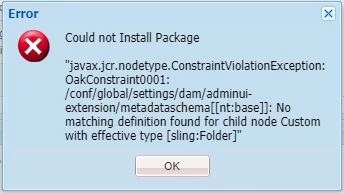
Please help to resolve the issue.


Thank you

 

This post is no longer active and is closed to new replies. Need help? Start a new post to ask your question.
Best answer by MarkusBullaAdobe

Hi @hs06!

This error message usually indicates an issue with the content structure of your package.

Most probably you are missing resource types on one or multiple levels of the hierarchy (resulting in defaults being applied) or you have set wrong resource types in your .content.xml files.

Please make sure that the content structure of your package has all relevant resource types set/defined and that you are following the given constraints.

Please check that the sub-nodes below the defined "sling:Folder" reflect resource types that are allowed for this location.

You may also want to check the existing structure in your JCR repository. If there are wrong resource types present you may want to delete the structure that's covered by your package before attempting a new deployment of your fixed package.


Hope that helps!


3 replies

MarkusBullaAdobe
Adobe Employee
MarkusBullaAdobeAdobe EmployeeAccepted solution
Adobe Employee
June 29, 2021

Hi @hs06!

This error message usually indicates an issue with the content structure of your package.

Most probably you are missing resource types on one or multiple levels of the hierarchy (resulting in defaults being applied) or you have set wrong resource types in your .content.xml files.

Please make sure that the content structure of your package has all relevant resource types set/defined and that you are following the given constraints.

Please check that the sub-nodes below the defined "sling:Folder" reflect resource types that are allowed for this location.

You may also want to check the existing structure in your JCR repository. If there are wrong resource types present you may want to delete the structure that's covered by your package before attempting a new deployment of your fixed package.


Hope that helps!


Adobe Employee
June 29, 2021
arunpatidar
Community Advisor
Community Advisor
June 30, 2021

Hi,

Try to create thses folders as sling:OrderedFolder

/conf/global/settings/dam/adminui-extension

/conf/global/settings/dam/adminui-extension/metadataschema

Arun Patidar
