Groovy console not available in AEM as Cloud for PROD alone | Community
Skip to main content
Level 2
January 30, 2025
Solved

Groovy console not available in AEM as Cloud for PROD alone

  • January 30, 2025
  • 4 replies
  • 912 views

The lower level environments like QA or DEV which are also hosted in AEM Cloud does have groovy console enabled where I could execute the groovy scripts.

In PROD, we don't have the groovy console available to perform any action.

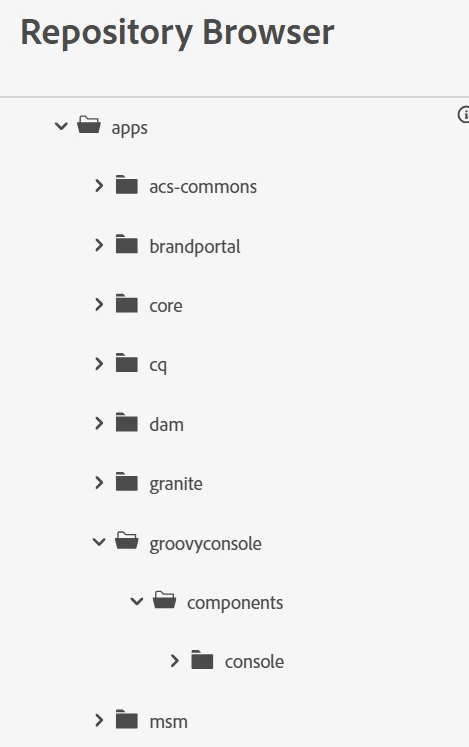
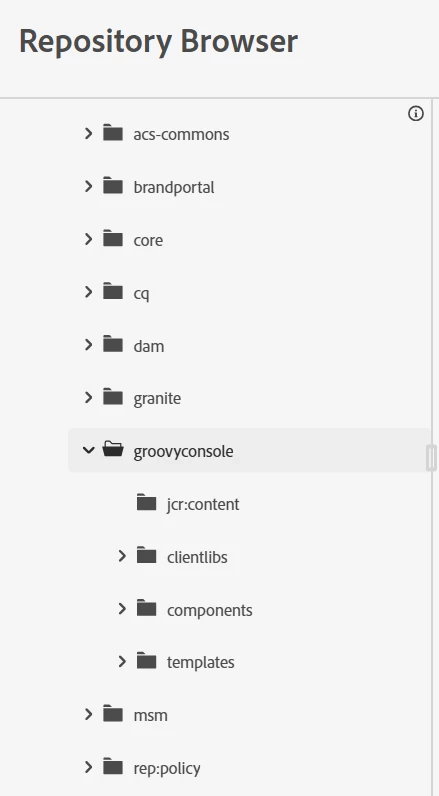
I was checking on few things like package availability and pom.xml containing the needed dependencies all are same. Except the Repository Browser which is bit different (refer below screenshots for QA and PROD).
Kindly let me know how to enable groovy console for PROD environment (Author and Publish). 


PROD: 


QA:


Best answer by narendiran_ravi

Please confirm if you are able to see the Groovy Console when you access this URL:

https://your-aem-url/groovyconsole

Ideally, if the same code is installed, you should see the console in PROD as well. If you are not able to execute scripts, it means the necessary access is not available for your user account. This will be configured in the following file, where the allowedGroups setting is added:

be.orbinson.aem.groovy.console.configuration.impl.DefaultConfigurationService.cfg.json

Also, are you adding these dependencies in the code?

https://github.com/orbinson/aem-groovy-console?tab=readme-ov-file#embedded-package

Let me know if you need further clarification.

4 replies

narendiran_ravi
narendiran_raviAccepted solution
Level 6
January 30, 2025

Please confirm if you are able to see the Groovy Console when you access this URL:

https://your-aem-url/groovyconsole

Ideally, if the same code is installed, you should see the console in PROD as well. If you are not able to execute scripts, it means the necessary access is not available for your user account. This will be configured in the following file, where the allowedGroups setting is added:

be.orbinson.aem.groovy.console.configuration.impl.DefaultConfigurationService.cfg.json

Also, are you adding these dependencies in the code?

https://github.com/orbinson/aem-groovy-console?tab=readme-ov-file#embedded-package

Let me know if you need further clarification.

Level 3
January 30, 2025

https://github.com/icfnext/aem-groovy-console/releases

Install groovy package from here.

Allow users to use groovy through config.

Level 2
January 31, 2025

Ideally groovyconsole should present on PROD as well if same code is installed.

For Enabling groovy console on AEMaaCS follow this :

https://medium.com/@arunpatidar26/essential-tools-for-aemaacs-bda4c042f038

AmitVishwakarma
Community Advisor
Community Advisor
February 1, 2025

To enable the Groovy console in AEM Cloud PROD:

1. Check URL: Access via https://your-aem-url/groovyconsole.
2. User Access: Ensure the allowedGroups in DefaultConfigurationService.cfg.json grants access to your user group.
3. Dependencies: Ensure the necessary Groovy console dependencies are included in pom.xml.
4. Install Package: Install the Groovy console package from GitHub https://github.com/icfnext/aem-groovy-console/releases if not available.
5. Permissions: Check user permissions to execute scripts if access is blocked.