Getting the hostname and server url in sericeImpl | Community
Skip to main content
Level 4
February 19, 2024
Solved

Getting the hostname and server url in sericeImpl

  • February 19, 2024
  • 4 replies
  • 2159 views

Hi All,

I have a requirement where i am generating a report in the AEM cloud and storing the file under /var/dam/reports/../filename.csv after a successful generation of report i want to send the report link with the AEM environment link via mail. I am not using any servlet to generate a report, using schedulers and services. so i dont have the SlingHttpServletRequest to get it. Can anyone please let me is there any way to get the instance url directly in service. Thanks in advance.


Regards,

Bhavani Bharanidharan

This post is no longer active and is closed to new replies. Need help? Start a new post to ask your question.
Best answer by Imran__Khan

Yes, we have to create a separate config for every run mode. It will decide host name depending on run mode. Externalizer will provide hostname depending on the run mode. You can validate same in local also.

externalizer.publishLink(resourceResolver,"/var/dam/reports/../filename.csv");


  1. Update OOTB Externalize OSGI configuration com.day.cq.commons.impl.ExternalizerImpl.xml as part of our code base as shown below:
<?xml version="1.0" encoding="UTF-8"?>
<jcr:root xmlns:sling="http://sling.apache.org/jcr/sling/1.0"
xmlns:jcr="http://www.jcp.org/jcr/1.0"
jcr:primaryType="sling:OsgiConfig"
externalizer.contextpath=""
externalizer.host=""
externalizer.encodedpath="{Boolean}false"
externalizer.domains="[author\ https://author-practice.adobecqms.net, publish\ practice.abc]"/>


 @OSGiService
Externalizer externalizer;


3. below code will give complete URL -> domain + uri

externalizer.publishLink(resourceResolver,link);

4 replies

Imran__Khan
Community Advisor
Community Advisor
February 19, 2024

@bhavanibharani We can user sxternalizer to append hostname depending on the environment. Visit below link for more info.

https://medium.com/@toimrank/aem-externalizer-and-multisiteexternalizer-e3afad105b8

Before: /var/dam/reports/../filename.csv
Post Externalizer Implementation:  https://www<hostname>.com/var/dam/filename.csv%20After 


Follow below steps to implement Externalizer for single site heirarchy as part of current implementation:

  1. Update OOTB Externalize OSGI configuration com.day.cq.commons.impl.ExternalizerImpl.xml as part of our code base as shown below:
<?xml version="1.0" encoding="UTF-8"?>
<jcr:root xmlns:sling="http://sling.apache.org/jcr/sling/1.0"
xmlns:jcr="http://www.jcp.org/jcr/1.0"
jcr:primaryType="sling:OsgiConfig"
externalizer.contextpath=""
externalizer.host=""
externalizer.encodedpath="{Boolean}false"
externalizer.domains="[author\ https://author-practice.adobecqms.net, publish\ practice.abc]"/>


2. Create Sling Model Java Class to generate end User URL for both author and publish Link:

package com.javadoubts.core.models;

import com.day.cq.commons.Externalizer;
import org.apache.sling.api.resource.Resource;
import org.apache.sling.api.resource.ResourceResolver;
import org.apache.sling.models.annotations.Model;
import org.apache.sling.models.annotations.Optional;
import org.apache.sling.models.annotations.injectorspecific.OSGiService;
import org.apache.sling.models.annotations.injectorspecific.SlingObject;
import org.slf4j.Logger;
import org.slf4j.LoggerFactory;

import javax.annotation.PostConstruct;
import javax.inject.Inject;

@Model(adaptables = Resource.class)
public class ButtonModel {

private final Logger logger = LoggerFactory.getLogger(getClass());

@Inject
@Optional
protected String link;

@SlingObject
ResourceResolver resourceResolver;

@OSGiService
Externalizer externalizer;

private String publishLink;

private String authorLink;

@PostConstruct
protected void init() {
publishLink = externalizer.publishLink(resourceResolver,link);
authorLink = externalizer.authorLink(resourceResolver,link);
}

public String getLink() {
return link;
}

public void setLink(String link) {
this.link = link;
}

public String getPublishLink() {
return publishLink;
}

public void setPublishLink(String publishLink) {
this.publishLink = publishLink;
}

public String getAuthorLink() {
return authorLink;
}

public void setAuthorLink(String authorLink) {
this.authorLink = authorLink;
}
}

3. Create a component to author link having below sightly code within it as shown below:

<div data-sly-use.button="com.javadoubts.core.models.ButtonModel">
<div>Link - ${button.link}</div>
<div>Author Link - ${button.authorLink}</div>
<div>Publish Link - ${button.publishLink}</div>
</div>

4. Below is the output of the link component:

Link → This is authorable path browser link field.

Author Link → This is showing externalized Author URL having author domian.

Publish Link → This is showing externalized Publish URL having publish domain.


Level 4
February 19, 2024

Hi @imran__khan ,

Thanks for your suggestion. can you please help to give a clarifications for the below

is it like getting the hostname and serviceuri from OSGI configuration for all the author and publish environments? do i need to create a separate config for all the environments under ui.config?


Regards,

Bhavani Bharanidharan
 

Imran__Khan
Community Advisor
Imran__KhanCommunity AdvisorAccepted solution
Community Advisor
February 19, 2024

Yes, we have to create a separate config for every run mode. It will decide host name depending on run mode. Externalizer will provide hostname depending on the run mode. You can validate same in local also.

externalizer.publishLink(resourceResolver,"/var/dam/reports/../filename.csv");


  1. Update OOTB Externalize OSGI configuration com.day.cq.commons.impl.ExternalizerImpl.xml as part of our code base as shown below:
<?xml version="1.0" encoding="UTF-8"?>
<jcr:root xmlns:sling="http://sling.apache.org/jcr/sling/1.0"
xmlns:jcr="http://www.jcp.org/jcr/1.0"
jcr:primaryType="sling:OsgiConfig"
externalizer.contextpath=""
externalizer.host=""
externalizer.encodedpath="{Boolean}false"
externalizer.domains="[author\ https://author-practice.adobecqms.net, publish\ practice.abc]"/>


 @OSGiService
Externalizer externalizer;


3. below code will give complete URL -> domain + uri

externalizer.publishLink(resourceResolver,link);
Raja_Reddy
Community Advisor
Community Advisor
February 19, 2024

Hi @bhavanibharani 

In AEM, you can get the instance URL directly in a service by using the `SlingSettingsService`. Here's an example of how you can retrieve the instance URL in your service:


import org.apache.sling.settings.SlingSettingsService; import org.osgi.service.component.annotations.Component; import org.osgi.service.component.annotations.Reference; @Component(service = YourService.class) public class YourService { @Reference private SlingSettingsService slingSettingsService; public void sendReportEmail() { String instanceUrl = slingSettingsService.getSlingId().getScheme() + "://" + slingSettingsService.getSlingId().getServerId(); // Use the instanceUrl to construct the report link and send it via email } }


the above example, the SlingSettingsService is injected into the service using the @Reference annotation. The getSlingId() method returns a SlingId object, which contains information about the current AEM instance, including the scheme (http or https) and the server ID.

Level 4
February 19, 2024

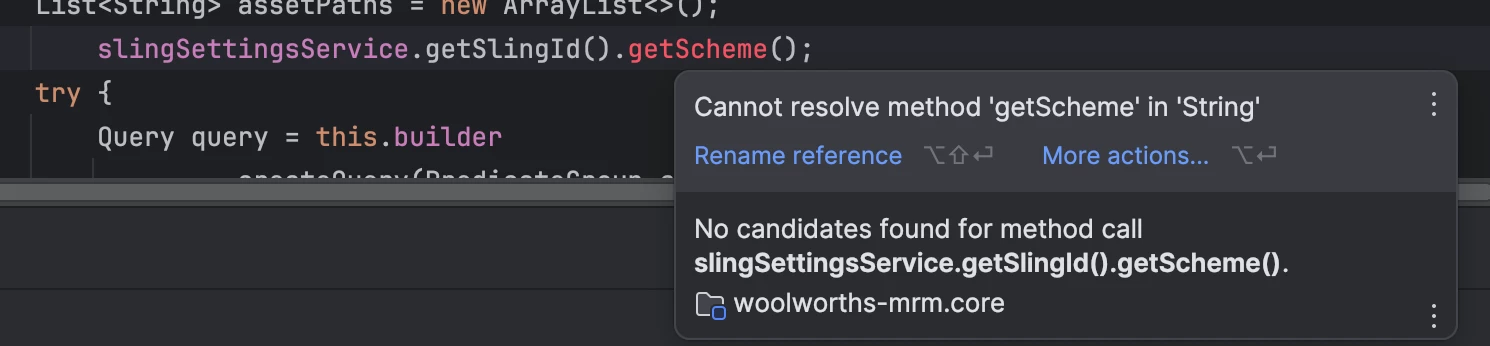
Hi RajaReddy, I tried to use the SlingSettingsService but i am getting this error. Any idea why this is coming up?

Thanks,

Bhavani Bharanidharan

Jagadeesh_Prakash
Community Advisor
Community Advisor
February 19, 2024

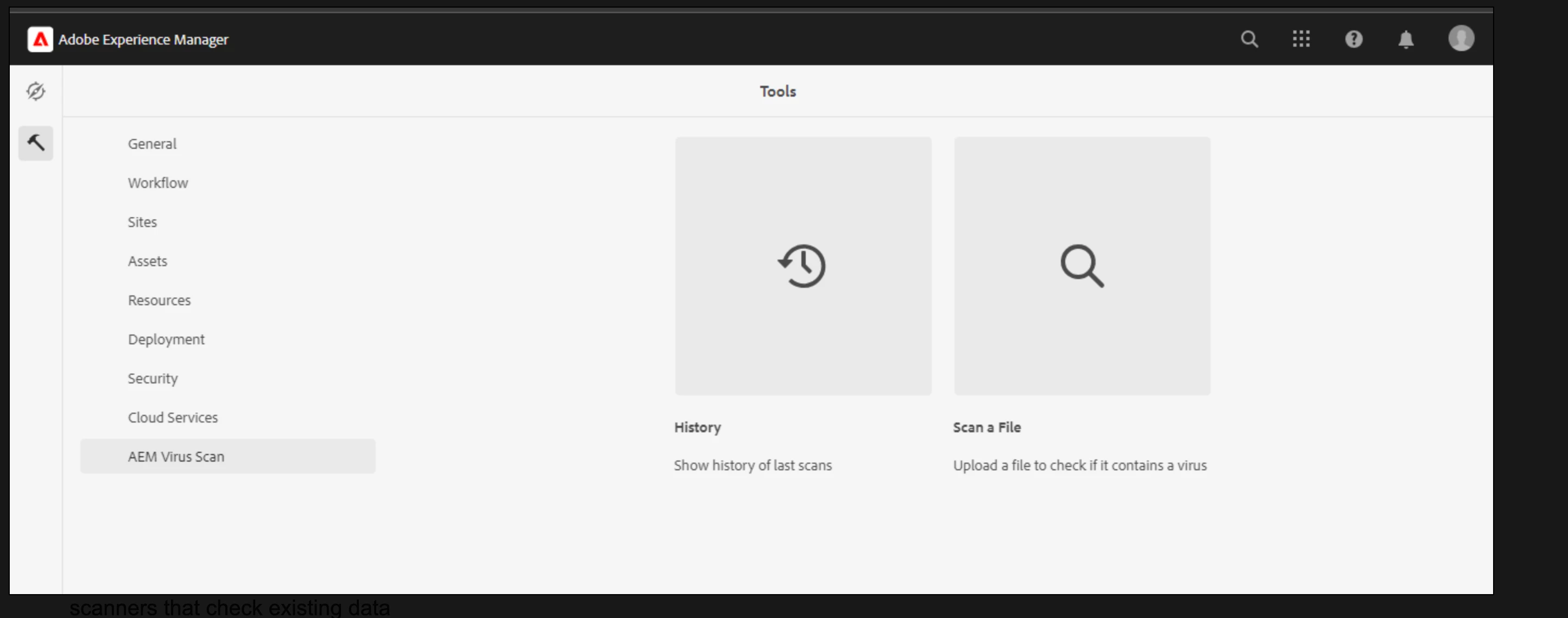
@bhavanibharani  I do have a similar ask and was able to achive it. Follow below article on virus scan that generates a report of history from var. If this is helpful let me know. So that I can help you with the coding part. 


https://technolearning-jags.blogspot.com/2023/08/aem-virus-scan-part-1.html


kautuk_sahni
Community Manager
Community Manager
February 21, 2024

@bhavanibharani Did you find the suggestions from users helpful? Please let us know if more information is required. Otherwise, please mark the answer as correct for posterity. If you have found out solution yourself, please share it with the community.

Kautuk Sahni