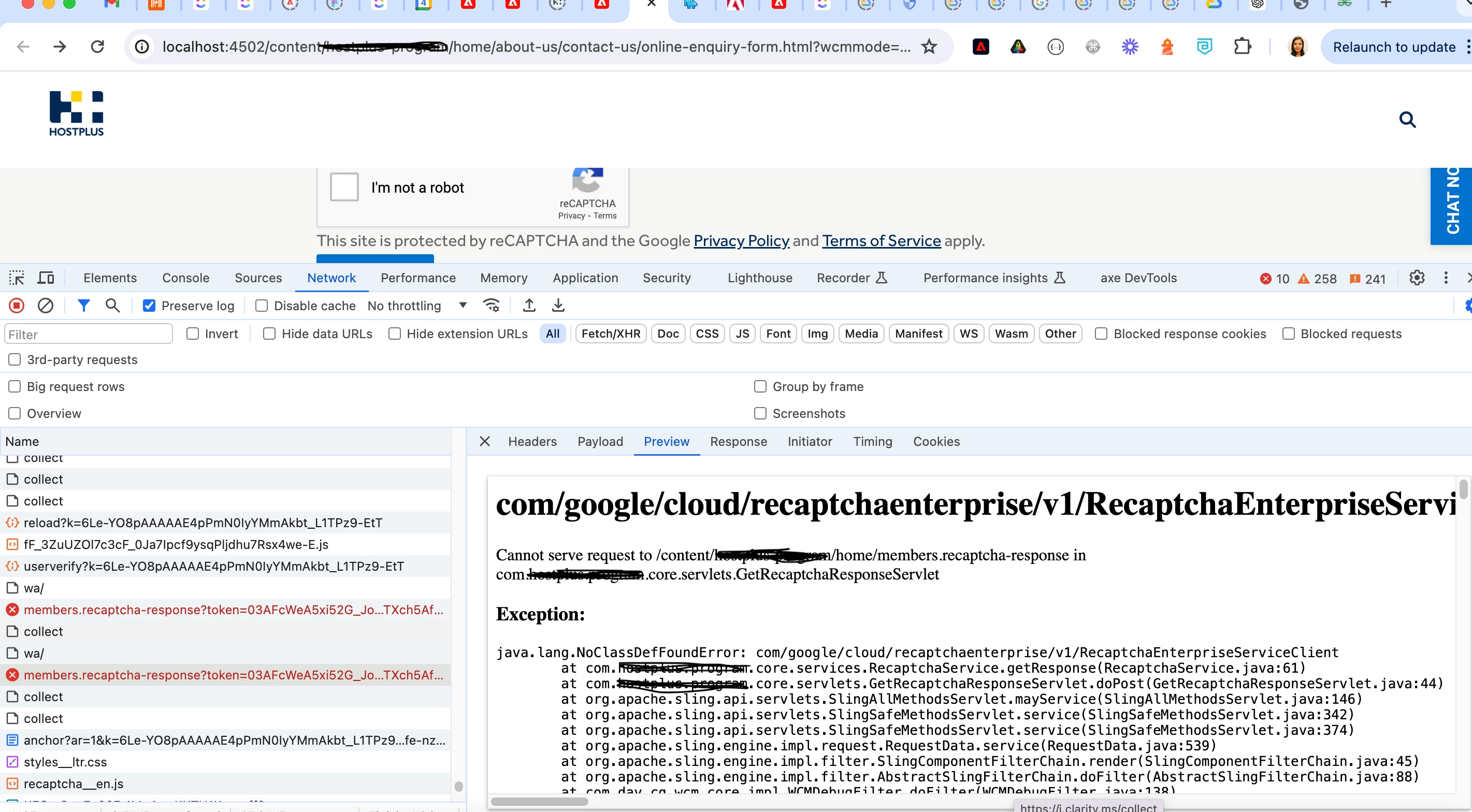
Hi @supriya-hande ,
The NoClassDefFoundError for com/google/cloud/recaptchaenterprise/v1/RecaptchaEnterpriseServiceClient indicates that the class is not available in the classpath at runtime, even though the Maven build is successful and the bundle is active. This can happen due to several reasons, such as incorrect packaging of dependencies or issues with OSGi classloading. Here are the steps you can take to resolve this issue:
Steps to Resolve the Issue
Ensure Dependency is Properly Included: Make sure that the required Google Cloud ReCaptcha Enterprise dependency is included in your core module’s pom.xml.
<dependency>
    <groupId>com.google.cloud</groupId>
    <artifactId>google-cloud-recaptchaenterprise</artifactId>
    <version>1.1.3</version>
</dependency>
Embed the Dependency in the OSGi Bundle: You need to ensure that the google-cloud-recaptchaenterprise dependency and its transitive dependencies are embedded in the OSGi bundle. This can be done using the maven-bundle-plugin or the bnd-maven-plugin.
<plugin>
    <groupId>org.apache.felix</groupId>
    <artifactId>maven-bundle-plugin</artifactId>
    <version>4.2.1</version>
    <extensions>true</extensions>
    <configuration>
        <instructions>
            <Embed-Dependency>
                google-cloud-recaptchaenterprise;scope=compile|runtime
            </Embed-Dependency>
            <Import-Package>
                !com.google.cloud.recaptchaenterprise.v1.*,
                *
            </Import-Package>
        </instructions>
    </configuration>
</plugin>
Shade the Dependency: Another approach is to shade the dependency. This means relocating the package to avoid any classloader issues. This is particularly useful if there are conflicting versions of the same dependency.
<plugin>
    <groupId>org.apache.maven.plugins</groupId>
    <artifactId>maven-shade-plugin</artifactId>
    <version>3.2.4</version>
    <executions>
        <execution>
            <phase>package</phase>
            <goals>
                <goal>shade</goal>
            </goals>
            <configuration>
                <relocations>
                    <relocation>
                        <pattern>com.google.cloud.recaptchaenterprise.v1</pattern>
                        <shadedPattern>my.shaded.google.cloud.recaptchaenterprise.v1</shadedPattern>
                    </relocation>
                </relocations>
            </configuration>
        </execution>
    </executions>
</plugin>
Check for Transitive Dependencies: Ensure all transitive dependencies required by google-cloud-recaptchaenterprise are included and properly embedded in the OSGi bundle.
Review and Update BND Instructions: The bnd-maven-plugin configuration you have might need adjustments. Ensure that the package import instructions are correct and do not unintentionally exclude necessary packages.
<plugin>
    <groupId>biz.aQute.bnd</groupId>
    <artifactId>bnd-maven-plugin</artifactId>
    <executions>
        <execution>
            <id>bnd-process</id>
            <goals>
                <goal>bnd-process</goal>
            </goals>
            <configuration>
                <bnd><![CDATA[
                Import-Package: javax.annotation;version=0.0.0,com.google.*;version=0.0.0;resolution:=optional,*
                Embed-Dependency: google-cloud-recaptchaenterprise;scope=compile|runtime
                ]]></bnd>
            </configuration>
        </execution>
    </executions>
</plugin>
Check OSGi Dependencies: Verify that the google-cloud-recaptchaenterprise library and its dependencies are correctly resolved and active in the OSGi environment. You can do this by using the AEM Web Console:
- Go to http://<aem-instance>:4502/system/console/bundles.
- Search for google-cloud-recaptchaenterprise and ensure that its bundle is active.
Example Project Structure
Here’s an example of what your core module’s pom.xml might look like with the maven-bundle-plugin configuration:
<project>
    ...
    <dependencies>
        ...
        <dependency>
            <groupId>com.google.cloud</groupId>
            <artifactId>google-cloud-recaptchaenterprise</artifactId>
            <version>1.1.3</version>
        </dependency>
        ...
    </dependencies>
    ...
    <build>
        <plugins>
            ...
            <plugin>
                <groupId>org.apache.felix</groupId>
                <artifactId>maven-bundle-plugin</artifactId>
                <version>4.2.1</version>
                <extensions>true</extensions>
                <configuration>
                    <instructions>
                        <Embed-Dependency>
                            google-cloud-recaptchaenterprise;scope=compile|runtime
                        </Embed-Dependency>
                        <Import-Package>
                            !com.google.cloud.recaptchaenterprise.v1.*,
                            *
                        </Import-Package>
                    </instructions>
                </configuration>
            </plugin>
            ...
        </plugins>
    </build>
    ...
</project>
By ensuring that the google-cloud-recaptchaenterprise dependency and its transitive dependencies are correctly embedded and resolved in your OSGi bundle, you should be able to resolve the NoClassDefFoundError. Additionally, make sure that there are no conflicting versions of the same dependency and that the build process correctly includes all necessary classes.