Getting MVN error | Community
Skip to main content
November 8, 2023
Solved

Getting MVN error

  • November 8, 2023
  • 5 replies
  • 1549 views

Hi Team,


[ERROR] Unresolvable build extension: Plugin com.day.jcr.vault:content-package-maven-plugin:0.5.1 or one of its dependencies could not be resolved: Failed to read artifact descriptor for com.day.jcr.vault:content-package-maven-plugin:jar:0.5.1: The following artifacts could not be resolved: com.day.jcr.vault:content-package-maven-plugin-parent:pom:0.5.1 (absent): Could not transfer artifact com.day.jcr.vault:content-package-maven-plugin-parent:pom:0.5.1 from/to adobe-public-releases (https://repo.adobe.com/nexus/content/groups/public😞 Connection reset -> [Help 2]

[ERROR]     Unknown packaging: content-package @ line 34, column 16


Not able to access the below AEM repo URL.

<releaseRepository-URL>https://repo.adobe.com/nexus/content/groups/public</releaseRepository-URL>

Repository URL is not available!!! What is the alternative for this?

https://repo.adobe.com/nexus/content/groups/public

 

AEM profile for accessing the AEM repo


Regards,

Shyam



This post is no longer active and is closed to new replies. Need help? Start a new post to ask your question.
Best answer by aanchal-sikka

Hello @shyamasundar-ks 


Please try by adding "adobe-public" profile to the mvn command like: mvn clean install -PautoInstallPackage,adobe-public


https://techrevel.blog/2019/10/10/content-package-maven-plugin1-0-2-could-not-be-resolved/


Also, please refer to this Thread Solved: Facing Error: The project com.adobe.aem.itc.efs:it... - Adobe Experience League Community - 574543

5 replies

aanchal-sikka
Community Advisor
aanchal-sikkaCommunity AdvisorAccepted solution
Community Advisor
November 8, 2023

Hello @shyamasundar-ks 


Please try by adding "adobe-public" profile to the mvn command like: mvn clean install -PautoInstallPackage,adobe-public


https://techrevel.blog/2019/10/10/content-package-maven-plugin1-0-2-could-not-be-resolved/


Also, please refer to this Thread Solved: Facing Error: The project com.adobe.aem.itc.efs:it... - Adobe Experience League Community - 574543

Aanchal Sikka
Jagadeesh_Prakash
Community Advisor
Community Advisor
November 8, 2023

@shyamasundar-ks  you can try using -Padobe-public in your maven command

November 8, 2023

The artifact is definitely there, you can see it listed in the maven metadata or if you access the pom directly it seems to me that there is something cutting your connection in between for whatever reason. Could be a (corporate) VPN, (corporate) firewall and/or (corporate) proxy (usually the latter).


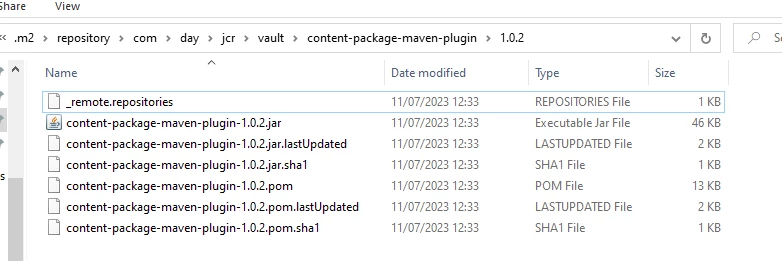
I usually work around it by downloading the artifacts I need manually (since browser access directly is usually not a problem) and by putting all relevant artifacts in your local maven repo. This way, you can bypass the download and can work in offline mode if need be.

It would look something like this in your local .m2 repo

This is for 1.0.2, but you get the idea

arunpatidar
Community Advisor
Community Advisor
November 8, 2023
kautuk_sahni
Community Manager
Community Manager
November 9, 2023

@shyamasundar-ks Did you find the suggestions from users helpful? Please let us know if more information is required. Otherwise, please mark the answer as correct for posterity. If you have found out solution yourself, please share it with the community.


Kautuk Sahni