Getting Junk Http HTML Response with status code 200 | Community
Skip to main content
October 5, 2023
Solved

Getting Junk Http HTML Response with status code 200

  • October 5, 2023
  • 5 replies
  • 2596 views


Hi,


I am facing the below issue in the PRD environment, please help me to resolve it.


Issue description:

I am calling Servlet to perform user Authentication from the Login form, It is working fine in all the lower servers.

The only problem is in PRD-publish, whereas PRD-author is working fine.


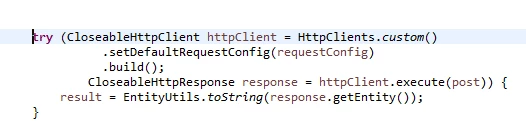
I am trying to connect API using the 


Response from AEM server, not able to connect with API

<HTML><HEAD><TITLE>Loading</TITLE></HEAD><BODY bgcolor="#ffffff"><H3 style="color: #ffffff">Loading</H3></BODY></HTML>


Regards,

Shyam

This post is no longer active and is closed to new replies. Need help? Start a new post to ask your question.
Best answer by kautuk_sahni

The fact that restarting the server resolves the issue temporarily suggests that there could be a memory leak or configuration issue or some other resource issue that is causing the server to become unstable over time.

Here are a few additional things you can try to troubleshoot the issue:

  • Increase the heap size of the JVM. This may help to mitigate the memory leak or resource issue.
  • Analyze the JVM heap dump. This can help you to identify any specific objects or threads that are consuming a lot of memory or resources.
  • Enable garbage collection logging. This can help you to identify any garbage collection issues that may be contributing to the problem.
  • Monitor the server performance. This can help you identify any spikes in memory usage, CPU usage, or disk I/O that may be causing the server to become unstable.
  • Enable debug logging for the AEM Dispatcher and the AEM Web Server. This will generate additional log messages that may help you to identify the root cause of the issue.

This is worth a case to be reported to Support. As this requires debugging. I would like to route you through Support team. 

5 replies

kautuk_sahni
Community Manager
Community Manager
October 5, 2023

@shyamasundar-ks 

Possible causes:

  • The PRD-publish server may not be able to communicate with the API server.
  • The Servlet may not be deployed to the PRD-publish server.
  • The Servlet may not be configured correctly to access the API.
  • The API may not be accessible from the PRD-publish server.
  • The PRD-publish server may not have the same security configuration as the PRD-author server.
  • The PRD-publish server may not have the same network configuration as the PRD-author server.

Additional check/Tips:

  • Make sure JDK versions match
  • Make sure Trust Store and Key Store configurations match
  • Check AEM error logs
  • Restart AEM PRD-publish server and API server
  • Make Sure they have the same security configuration
Kautuk Sahni
October 5, 2023

Hi Kautuk,


Thanks for the reply! I am providing more insight now for better understanding.


* The Servlet code is deployed in Publish-servers and it has been working fine for the last 1 year.

* The issue has been occurring for the last 2 to 3 months, but we haven't been able to find the Root cause for this issue because in the log nothing we found has an error, we are receiving Junk HTML has HttpResponse with 200 status code without connecting to API endpoints. I have cross-checked with the API team about this HTML response, they mentioned they didn't receive the request itself from AEM-publish servers during issue time.


*  Our Production build and deployment are maintained by the Adobe AMS team only. Has a temporary solution they restarted the publish servers whenever an issue occurs it will start working fine.

* I am not able to find it's an infrastructure-related issue or code issue!!! I strongly believe there won't be any code issue because It's working fine in Lower and PRD-author servers, there is no issue. The issue is only with the publish server every 15 days frequently.


Please can you guide me in the right direction? Adobe team also said it may be an issue with application check it.

 

kautuk_sahni
Community Manager
kautuk_sahniCommunity ManagerAccepted solution
Community Manager
October 5, 2023

The fact that restarting the server resolves the issue temporarily suggests that there could be a memory leak or configuration issue or some other resource issue that is causing the server to become unstable over time.

Here are a few additional things you can try to troubleshoot the issue:

  • Increase the heap size of the JVM. This may help to mitigate the memory leak or resource issue.
  • Analyze the JVM heap dump. This can help you to identify any specific objects or threads that are consuming a lot of memory or resources.
  • Enable garbage collection logging. This can help you to identify any garbage collection issues that may be contributing to the problem.
  • Monitor the server performance. This can help you identify any spikes in memory usage, CPU usage, or disk I/O that may be causing the server to become unstable.
  • Enable debug logging for the AEM Dispatcher and the AEM Web Server. This will generate additional log messages that may help you to identify the root cause of the issue.

This is worth a case to be reported to Support. As this requires debugging. I would like to route you through Support team. 

Kautuk Sahni
kautuk_sahni
Community Manager
Community Manager
October 5, 2023

@joerghoh @joerghoh @arunpatidar Can you please have a look at this case?

Kautuk Sahni
arunpatidar
Community Advisor
Community Advisor
October 5, 2023

can you please check the response headers. It seems the connection to api is not establishing?

Compare the header when you make request from postman and with servlet.

Arun Patidar
October 6, 2023

Thank you @arunpatidar for the reply. I have considered mentioned suggestion and trying to include logger for printing response header.

Sudheer_Sundalam
Community Advisor
Community Advisor
October 5, 2023

@shyamasundar-ks ,

As you have tried the other options, I would suggest to talk to Adobe CSE and request to provide a clone of the publish server for a week or two in the same network region as your currently publish instances are. While the clone is provided, request to

1) Disable all the schedulers that are set to run daily/weekly etc.,

2) Reset admin password on the clone instance to something else other than the current admin password.

3) Ability to SSH into Prod publish clone instance.


After you get a clone instance, you can enable more logging and discover any connectivity issues to API servers from this clone by running curl commands to the API urls and making sure there are no network connectivity issues.


October 6, 2023

Thank you @sudheer_sundalam for the reply.


Its really interesting, I will discuss with Adobe AMS team regarding this and update you.

kautuk_sahni
Community Manager
Community Manager
October 6, 2023

@shyamasundar-ks Did you find the suggestions from users helpful? Please let us know if more information is required. Otherwise, please mark the answer as correct for posterity. If you have found out solution yourself, please share it with the community.

Kautuk Sahni
October 6, 2023

Hi Kautuk,

Yes it helped me lot while discussing with Adobe AMS team, I showed all the troubleshooting tips given. Now we have agreed for

1) Putting more logger in code to understand better each line executing or not. 

2) Thread dump analysis, thread dump need to be taken during issue time before restarting the AEM server.

3) As @arunpatidar  suggested including logger for printing response header.

4) Adobe team suspected there may be socket issue, need to be check, but I dont have idea on this.

Thanks you so much for the instant support.

Regards,

Shyam