Form container Action Types | Community
Skip to main content
rsl_lucky
Level 4
October 29, 2021
Solved

Form container Action Types

  • October 29, 2021
  • 2 replies
  • 2783 views

Hi All,

Want to understand the Form action types provided in core Form container component.  Actions Types of Mail & Store Content functionality have try them. Can anyone let me know functionalities in action types drop-down i.e. Submit & Update order. What those action types does and how to implement ?
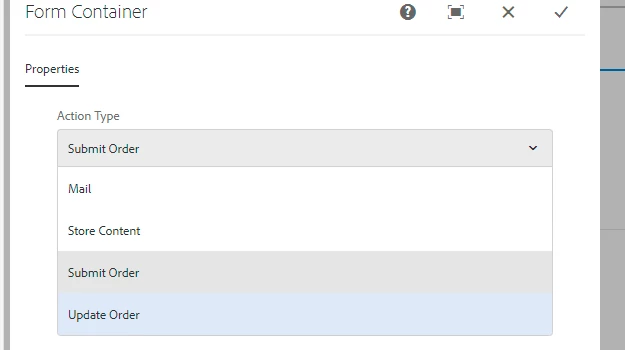
 

Thanks in Advance.

This post is no longer active and is closed to new replies. Need help? Start a new post to ask your question.

2 replies

arunpatidar
Community Advisor
arunpatidarCommunity AdvisorAccepted solution
Community Advisor
October 30, 2021
Vijayalakshmi_S
Level 10
November 1, 2021

Hi @rsl_lucky,

Submit order and Update order is related to commerce functionality, sample implementation/usage is available in we-retail site in Review Order page(/content/we-retail/us/en/user/checkout/order)and Checkout Page(/content/we-retail/us/en/user/checkout) respectively.


Respective action code is available in 

  • /libs/commerce/components/actions/submitorder
  • /libs/commerce/components/actions/updateorder
rsl_lucky
rsl_luckyAuthor
Level 4
November 1, 2021

Thanks @vijayalakshmi_s for the info shared, will check those.

Also can we customize, adding an option in drop-down to call a service that calls a third party service that returns response. Any samples around this would help ?

Vijayalakshmi_S
Level 10
November 1, 2021

For creating custom action, we need to create a resource with sling:resourceType set as foundation/components/form/action (to be listed in the action types along with OOTB actions)

You can refer OOTB Store content(/libs/foundation/components/form/actions/store) implementation and copy the same to project specific folder and amend according to your use case.

  • cq:dialog has fields that comes up when you choose Store content in the action type. Same way, if you need to capture anything from the dialog with respect to your custom action, you can have those fields created here. 
  • post.POST.jsp has the actual logic of form action - In this case, calling third party service. 
  • clientlibs - logic for View data CTA as part of Store action (You can remove or retain based on your need)

Update this thread if you need any other specific inputs.