
Solved
Folder structure alphabeticall order
how can the folders structure be alphabetically arranged in US folder?
how can the folders structure be alphabetically arranged in US folder?
The answer will depend on, whether the US folder is nt:folder or a sling:folder
nt:folder -: This node type represents a plain file system folder (it can have nt:folder and nt:file children and only a few restricted meta data properties) // so quite restricted in terms of properties and nodes.
sling:folder -: This node type is basically nt:folder + nt:unstructured in one, i.e. it can be used inside other nt:folders. // should be used more often.
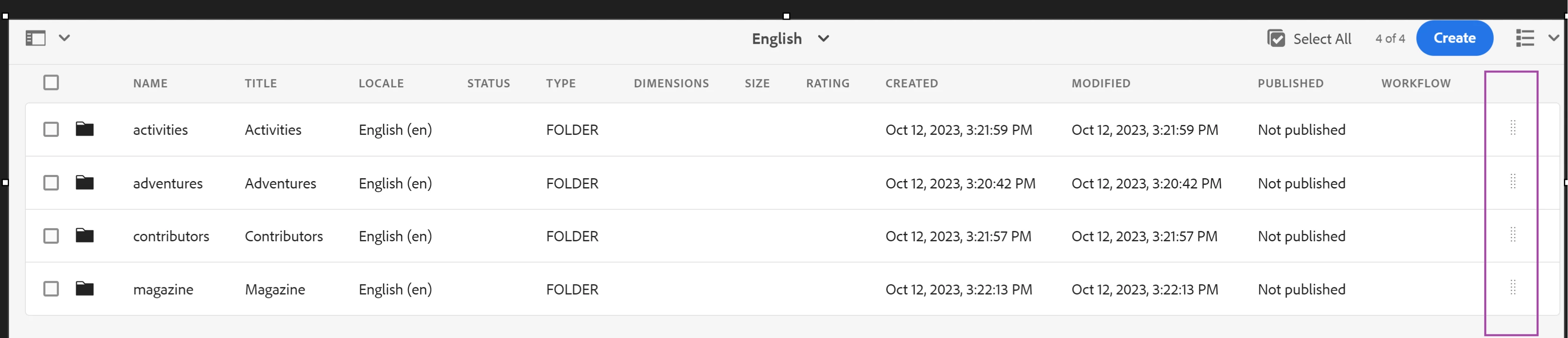
sling:orderedFolder -: The following node type is sling:folder + an ordering scheme bundled into one. The assets could be ordered in the List View by drag and dropping a handle at the right hand side of the list – as long as the parent folder was set to "Orderable" (i.e. had a "sling:OrderedFolder" type in JCR).
Enter your E-mail address. We'll send you an e-mail with instructions to reset your password.