Fixing Bundles Dependency in AEM 6.4.0 | Community
Skip to main content
Level 3
October 12, 2020
Solved

Fixing Bundles Dependency in AEM 6.4.0

  • October 12, 2020
  • 3 replies
  • 4067 views

Hi,


I have created project CIF Archetype Project, Once I build the project. I am able to see below bundles on Console - http://localhost:4502/system/console/bundles

However, their status is Installed not Active, there were some dependencies issue, I fixed all except first Bundle screenshot given below, but other bundles are still not active.

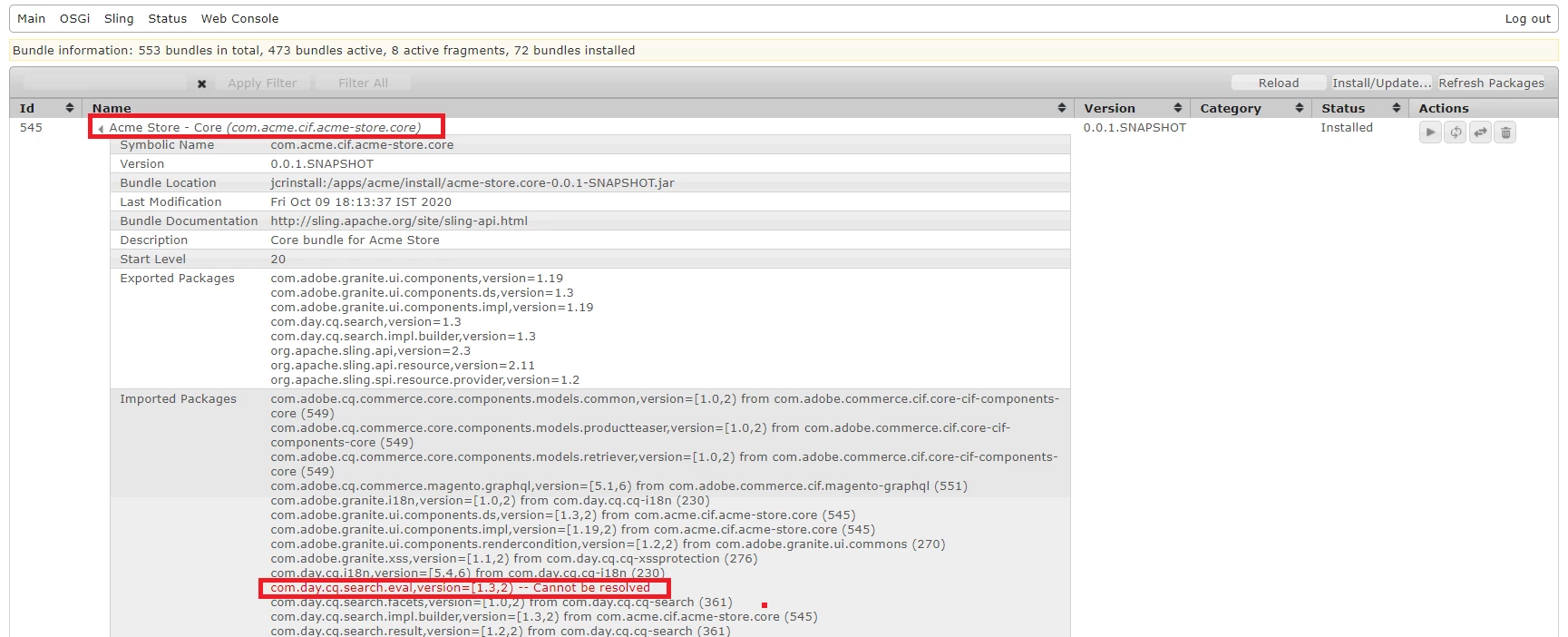


In order to fix this dependency issue I added this <Export-Packages> tag under parent pom.xml, once build it is giving below error:
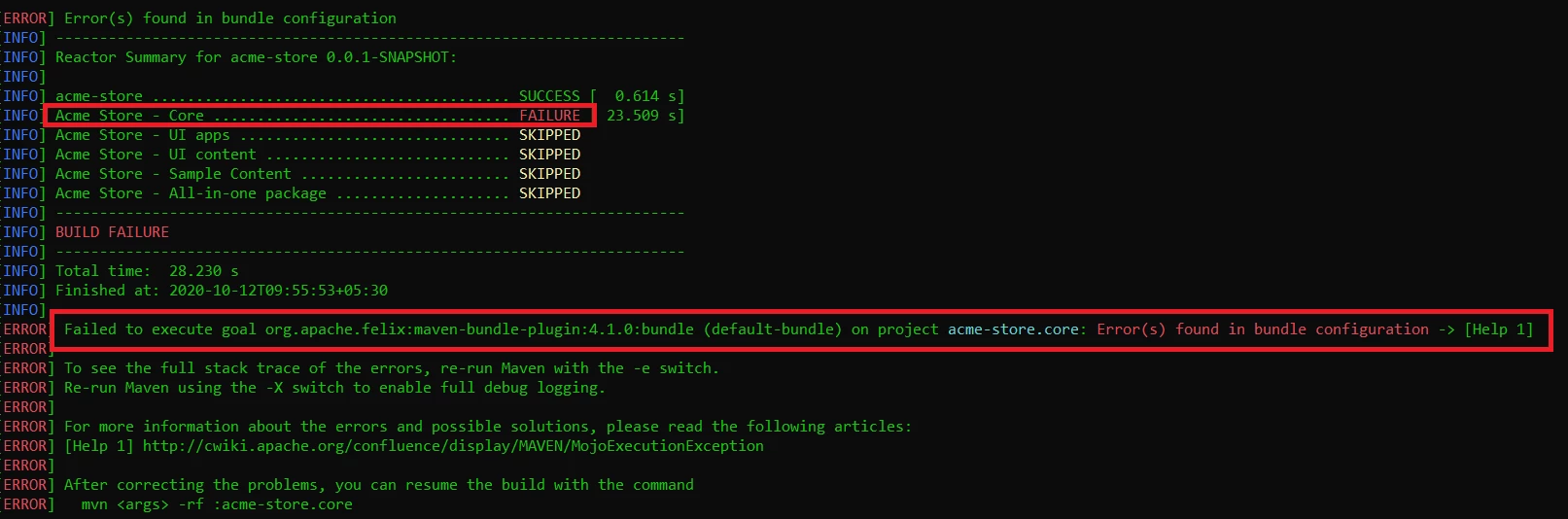


Please help to fix this issue, I am stuck with this issue for long time now, trying to achieve Magento and AEM(6.4) Integration with CIF.


Thanks,

Heena

This post is no longer active and is closed to new replies. Need help? Start a new post to ask your question.
Best answer by joerghoh

If you are using the latest maven archetype with CIF support, it mentions 6.4.8.1 as pre-requisite. See https://github.com/adobe/aem-project-archetype ("System requirements").

3 replies

Vijayalakshmi_S
Level 10
October 12, 2020

Hi @heena91,

Build error that you have highlighted says "error found in bundle configuration" implies any issue due to the recent changes done on maven-bundle-plugin definition (Should be while adding Export packages list that you have mentioned)

Root cause of bundle not being "Active" seems to be simple which is "packages that we are referring in our bundle is not available/unable to find in the instance". However steps to be taken depend on the package that we are using.

Please share the below details:

  • List of packages which was there in the "Export Packages" list before and after commencing the integration
  • List of packages which are in red/not resolved state
  • Did you add any dependency in specific. If yes, mention the same.
  • Steps that you followed as part of this integration 
Heena91Author
Level 3
October 12, 2020

Hi @Vijayalakshmi_S


Please find the required details below and suggest:


1.  List of packages:

 <Export-Package>

                           org.apache.sling.api;version=2.1,

                           org.apache.sling.api.adapter;version=2.2,

                           org.apache.sling.api.auth;version=1.0,

                           org.apache.sling.api.request;version=2.1,

                           org.apache.sling.api.resource;version=2.1,

                           org.apache.sling.api.scripting;version=2.1,

                           org.apache.sling.api.servlets;version=2.1,

                           org.apache.sling.api.wrappers;version=2.1,

                           org.apache.sling.api.wrappers.impl;version=2.1,

                           com.adobe.granite.ui.components;version=1.19,

                           com.adobe.granite.ui.components.ds;version=1.3,

                           com.day.cq.search;version=1.3,

                           com.day.cq.search.impl.builder;version=1.3,

                            com.day.cq.search.impl.util;version=1.3,

com.adobe.granite.ui.components.impl;version=1.19,

com.day.cq.search.eval;version=1.3,

com.fasterxml.jackson.core;version=2.9,

com.fasterxml.jackson.core.type;version=2.9,

com.fasterxml.jackson.databind;version=2.9,

org.apache.commons.io;version=2.6,

org.apache.sling.api.resource;version=2.11,

org.eclipse.jetty.util;version=9.4,

org.apache.sling.spi.resource.provider;version=1.2

      </Export-Package>


2. List of packages which are in red/not resolved state:


org.apache.sling.api.resource,version=[2.11,3) -- Cannot be resolved

org.apache.sling.api.resource.provider,version=[1.2,2) -- Cannot be resolved

com.adobe.granite.ui.components,version=[1.19,2) -- Cannot be resolved

com.adobe.granite.ui.components.ds,version=[1.3,2) -- Cannot be resolved

com.day.cq.search,version=[1.3,2) -- Cannot be resolved


3. Did you add any dependency in specific. If yes, mention the same - NO


4. Steps that you followed as part of this integration: https://www.adobe.io/apis/experiencecloud/commerce-integration-framework/getting-started.html#!AdobeDocs/commerce-cif-documentation/master/getting-started/02-new-cif-project.md 


Thanks,

Heena


Nikhil-Kumar
Community Advisor
Community Advisor
October 13, 2020

@heena91 - Which CIF version are you using with AEM 6.4 version ?
Not sure if the latest CIF Archetype project will work with AEM 6.4. But when I tried the same thing on AEM 6.5 and cloud it worked well.
If the dependencies is the only issue here then try creating bundle out of the dependent jar and deploy it with the project build. 

You can refer below link to deploy it along with project built:
https://aemsimplifiedbynikhil.wordpress.com/2020/08/23/resolve-dependencies-by-converting-jar-to-bundle-aem-6-5-5/ 

Thanks
Nikhil

joerghoh
Adobe Employee
joerghohAdobe EmployeeAccepted solution
Adobe Employee
October 14, 2020

If you are using the latest maven archetype with CIF support, it mentions 6.4.8.1 as pre-requisite. See https://github.com/adobe/aem-project-archetype ("System requirements").



