First Time creating Component in Touch UI | Community
Skip to main content
Level 4
February 24, 2018
Solved

First Time creating Component in Touch UI

  • February 24, 2018
  • 4 replies
  • 2536 views

Dear Team,

I am following the below link and trying to create my first Touch UI website.

Adobe Experience Manager Help | Creating your first Adobe Experience Manager Touch UI component

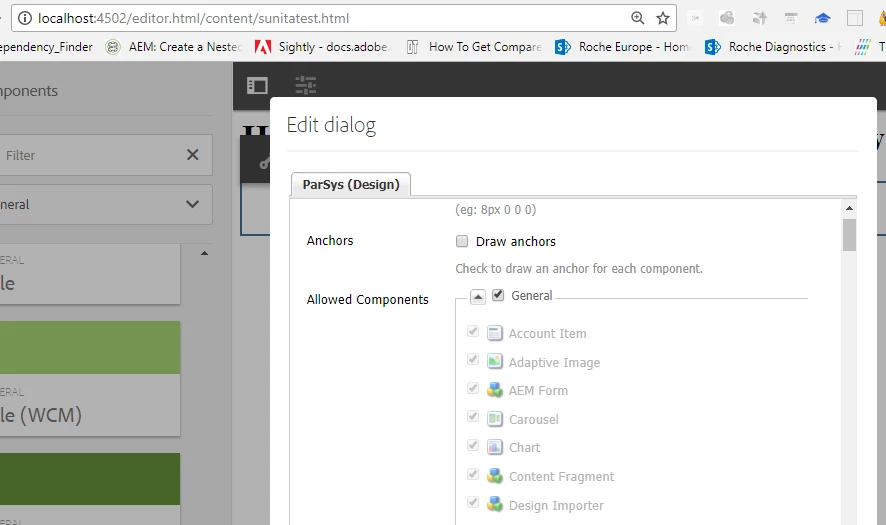
But After creating the Touch UI component , herotext2 component is not coming in Design under general group , as shown in below screenshot.

Also I am trying to attached my package here. But not able to do it. Can anybody help me on this.
This post is no longer active and is closed to new replies. Need help? Start a new post to ask your question.
Best answer by Ratna_Kumar

Hi Sunita,

I see that there is no dialog added to the component . Please add the dialog and test. Also, change the jcr:title of the property to Capital letter. It will work.

Also, you are referring old article which is 3 years back. Adobe Experience Manager Help | Creating your first Adobe Experience Manager Touch UI component

Please check this latest HELPX article which uses HTL aka Sightly and WCMUsePOJO: Creating an Adobe Experience Manager 6.3 HTL component that uses the WCMUsePojo API

Hope this helps!!

Thanks,

Ratna Kumar.

4 replies

Ravi_Pampana
Community Advisor
Community Advisor
February 24, 2018

Hi,

Can you make sure componentGroup property is added to the component as shown in below image, if the value is .hidden it wont be shown in design mode. Also sometimes the component might be present in undefined folder, if no componentGroup is mentioned. The name will be based on jcr:title

Hope it helps!

Level 4
February 25, 2018

Dear Ravi,

Thanks for your reply.

I have already added the componentGroup propertty , as shown in below screenshot. Also the value is not present i n .hidden

My herotext2 Component Screenshot

Page component screenshot.

My Template screenshot

I do not know how to attache my package in this Discussion thread. Else I can attache here.

Ratna_Kumar
Ratna_KumarAccepted solution
Level 10
February 25, 2018

Hi Sunita,

I see that there is no dialog added to the component . Please add the dialog and test. Also, change the jcr:title of the property to Capital letter. It will work.

Also, you are referring old article which is 3 years back. Adobe Experience Manager Help | Creating your first Adobe Experience Manager Touch UI component

Please check this latest HELPX article which uses HTL aka Sightly and WCMUsePOJO: Creating an Adobe Experience Manager 6.3 HTL component that uses the WCMUsePojo API

Hope this helps!!

Thanks,

Ratna Kumar.

Level 4
February 26, 2018

Thanks. After adding dialog , it is working fine.