Find the Components used on a page in AEM6.3 | Community
Skip to main content
October 3, 2018
Solved

Find the Components used on a page in AEM6.3

  • October 3, 2018
  • 2 replies
  • 3119 views

Hi Team,

We want to find out the all the components details for a page in our application. How we will get this information from  AEM instance. Like as Quey. Kindly help to me for this questions with examples

[Here is the list of all Adobe forums... https://forums.adobe.com/welcome]
[Comments is to ask about the operation of the Forum, not a specific program]
[Moved from the Comments forum to the specific Program forum... Mod]
This post is no longer active and is closed to new replies. Need help? Start a new post to ask your question.
Best answer by

Hi,

In addition to what Arun had mentioned, we can actually generate components report (AEM OOTB report) to identify what all components were used in a particular page.

In order to generate this report, you need to follow the steps below:

1) Navigate to http://localhost:4502/etc/reports/compreport.html

2) Click on edit and then enter the required Root path (page path) in order to find what all components are used in the selected page as shown in the below screenshot.

3) Now click on OK. You should be able to see the list of components that were used in the selected page.

Also you can hit http://localhost:4502/etc/reports/compreport/jcr:content/report.data.json

It'll generate JSON report. Copy paste the generated JSON output in below URL and click on JSON to excel if you'd like to generate excel sheet of the components report.

http://www.convertcsv.com/json-to-csv.htm

We hope this information helps!

Regards,

Lavanya Malyala

2 replies

arunpatidar
Community Advisor
Community Advisor
October 4, 2018

Hi,

Add ?debug=layout at the end of URL and you will see all the components and details for a page in AEM Author.

If you are looking to the components used in all the pages then you can write Query.

Arun Patidar
Accepted solution
October 4, 2018

Hi,

In addition to what Arun had mentioned, we can actually generate components report (AEM OOTB report) to identify what all components were used in a particular page.

In order to generate this report, you need to follow the steps below:

1) Navigate to http://localhost:4502/etc/reports/compreport.html

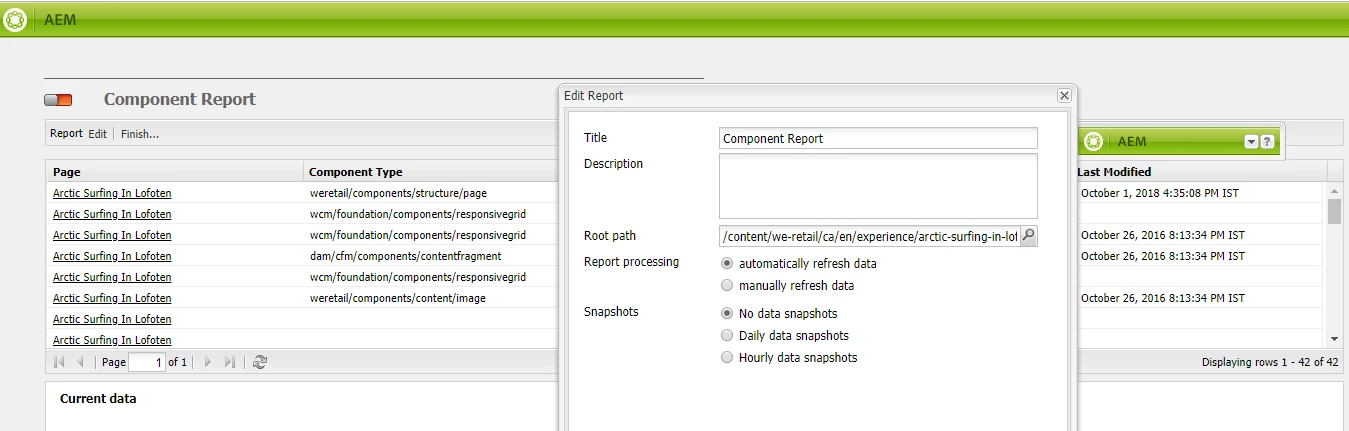
2) Click on edit and then enter the required Root path (page path) in order to find what all components are used in the selected page as shown in the below screenshot.

3) Now click on OK. You should be able to see the list of components that were used in the selected page.

Also you can hit http://localhost:4502/etc/reports/compreport/jcr:content/report.data.json

It'll generate JSON report. Copy paste the generated JSON output in below URL and click on JSON to excel if you'd like to generate excel sheet of the components report.

http://www.convertcsv.com/json-to-csv.htm

We hope this information helps!

Regards,

Lavanya Malyala