
fieldDescription property is not appearing in proper alignment? | Community
Skip to main content
RashidJorvee
Level 4
May 22, 2018
Solved

fieldDescription property is not appearing in proper alignment?

  • May 22, 2018
  • 5 replies
  • 2673 views

Hi Guys,

I am adding fieldDescription property for a textbox, when I mouseover on that tooltip, textbox description message is not appearing in proper alignment and appearing on full width of page. In HTML snippet it is creating own tooltip div with height and width. Could you please suggest what I have to do in this so it appear in proper fixed layout which is default for tooltip?
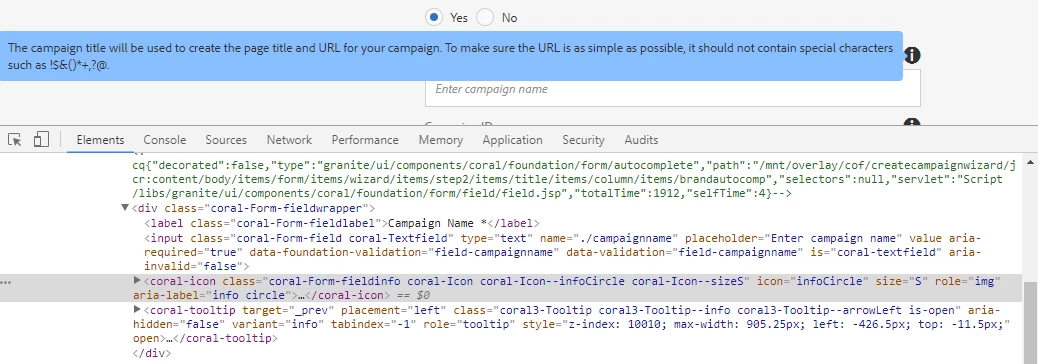
Thanks!

Rashid

This post is no longer active and is closed to new replies. Need help? Start a new post to ask your question.
Best answer by RashidJorvee

Thank you!!

I have done this by extending the following CSS class.

.

5 replies

arunpatidar
Community Advisor
Community Advisor
May 22, 2018

Hi Rashid,

I would suggest to make your own CSS rule for this tool-tip div and apply width:100%.
But if you have text which won't be fit in a single line, you will face the same problem again.

I am not sure why you want to do that. anyway t=you can play with CSS to achieve this.

Thanks

Arun

Arun Patidar
RashidJorvee
Level 4
May 23, 2018

Hi Arun,

Is there not any default layout which I can add for this which handle multi line description and show in a small tooltip only above the textbox? Like in below screen shot.

arunpatidar
Community Advisor
Community Advisor
May 23, 2018

Hi Rashid,

The above Text field description is the default behivour. I am wondering how you are creating tooltip for your radio which is full width.If you are using javascript to create tooltip for validation. you need to use the tooltip like dialog tooltip for you tooltip e.g.

fieldErrorEl = $("<span class='coral-Form-fielderror coral-Icon coral-Icon--alert coral-Icon--sizeS' data-init='quicktip' data-quicktip-type='error'>Email is not valid</span>");

Thanks

Arun

Arun Patidar
RashidJorvee
RashidJorveeAuthorAccepted solution
Level 4
May 23, 2018

Thank you!!

I have done this by extending the following CSS class.

.

arunpatidar
Community Advisor
Community Advisor
May 23, 2018

Hi Rashid,

Anyways you can write your own CSS rule for tooltip. but this will be a global change unless you don't have specific CSS selectors.

Arun Patidar