Features to be disabled | Community
Skip to main content
January 2, 2019
Solved

Features to be disabled

  • January 2, 2019
  • 5 replies
  • 1139 views

Hi All,

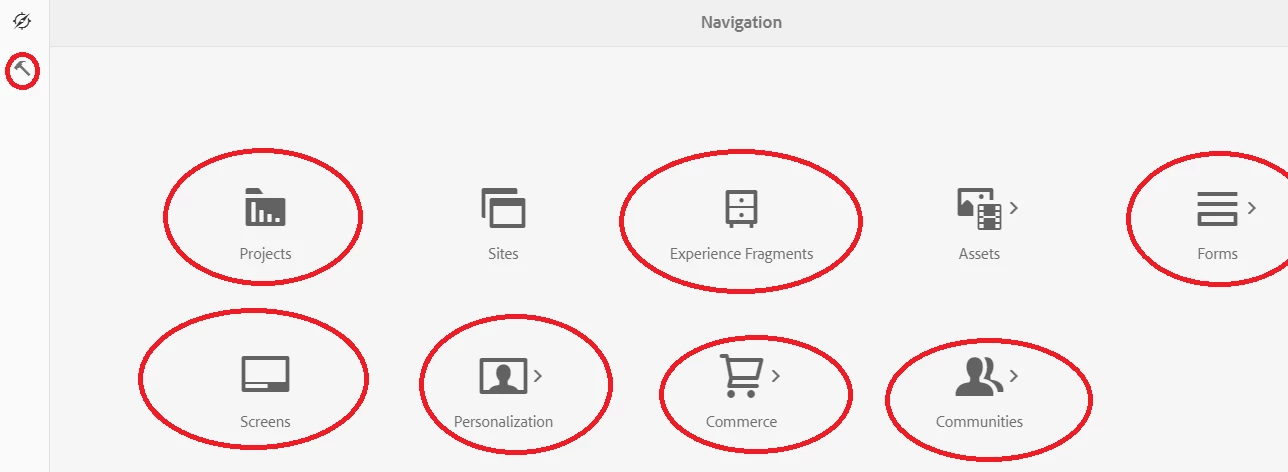
I have a requirement where I do not want the marked options in my page. How do I disable these? Any help would be much appreciated.
This post is no longer active and is closed to new replies. Need help? Start a new post to ask your question.
Best answer by arunpatidar

Hi,

Overlay /libs/cq/core/content/nav and use to sling:hideChildren hide options

https://helpx.adobe.com/experience-manager/6-2/sites/developing/using/sling-resource-merger.html

5 replies

arunpatidar
Community Advisor
arunpatidarCommunity AdvisorAccepted solution
Community Advisor
January 2, 2019

Hi,

Overlay /libs/cq/core/content/nav and use to sling:hideChildren hide options

https://helpx.adobe.com/experience-manager/6-2/sites/developing/using/sling-resource-merger.html

Arun Patidar
January 3, 2019

Hi Arun Patidar,

Thanks for your response.

Sling:hideChildren property is hiding all the marked options under in page but my requirement is to disable them. So, i need to do that through Css only.

arunpatidar
Community Advisor
Community Advisor
January 3, 2019

Ohh ok, yes then you can do it with CSS
Let me know if you need CSS rules for this.

Arun Patidar
January 3, 2019

Yes please that would help.

Thanks,

Shashank

arunpatidar
Community Advisor
Community Advisor
January 3, 2019

Hi,

To disable item you need to go for javascript. but for navigation item you need to write your own handler to disable items because there is no disable method available for nav item but tool icon can be disable.

Documentation | CoralUI

Arun Patidar
