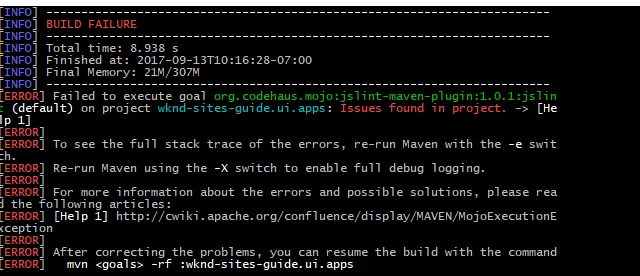
Failed to execute goal org.codehaus.mojo:jslint-maven-plugin:1.0.1:jslint (default) on project wknd-sites-guide.ui.apps: Issues found in project. -> [Help 1] | Community
Skip to main content
Level 3
September 13, 2017
Solved

Failed to execute goal org.codehaus.mojo:jslint-maven-plugin:1.0.1:jslint (default) on project wknd-sites-guide.ui.apps: Issues found in project. -> [Help 1]
  • September 13, 2017
  • 8 replies
  • 5016 views

can someone help me? thanks!

This post is no longer active and is closed to new replies. Need help? Start a new post to ask your question.
Best answer by viveksachdeva

JS Lint is more about "Good Parts" of JS(javascript - Does it make any sense to use JSLint and follow it? - Stack Overflow ). It seems the error that it shows is in bootstrap plugin JS. You should exclude plugins from the JS Lint checking. If your bootstrap JS is in one of these folders, it will be ignored. If no, you should add an exclusion rule for the same.

<configuration>

   <sourceJsFolder>src/main/content/jcr_root</sourceJsFolder>

   <failOnIssues>true</failOnIssues>

   <predefinedVars>jQuery,window,$,use,properties,pageProperties,inheritedPageProperties,component,componentContext,currentDesign,currentNode,currentPage,currentSession,currentStyle,designer,editContext,log,out,pageManager,reader,request,resource,resourceDesign,resourcePage,response,sling,slyWcmHelper,wcmmode,xssAPI</predefinedVars>

   <excludes>

   <exclude>**/extensions/**/*.js</exclude>

   <exclude>**/vendor/**/*.js</exclude>

   </excludes>

</configuration>

Hope this helps..

8 replies

Ratna_Kumar
Level 10
September 13, 2017

Hi,

Are you creating a project from scratch from this article: Adobe Experience Manager Help | Getting Started with AEM Sites - WKND Tutorial . It uses Lazybones. Please confirm.

Make sure to use the Maven 3.3.x version to create the new project using Lazybones. I have created the project and it works.

~Ratna.

viveksachdeva
Community Advisor
Community Advisor
September 13, 2017

The errors would be there just above Build Summary. Something like:

[ERROR] index.js:1:1:Expected an identifier and instead saw 'import'.

[ERROR] index.js:1:1:Stopping.  (25% scanned).

[ERROR] admin.bundle.js:1:31:'n' is not defined.

[ERROR] admin.bundle.js:1:36:Expected '{' and instead saw 'return'.

[ERROR] admin.bundle.js:1:43:'n' is not defined.

[ERROR] admin.bundle.js:1:62:'n' is not defined.

Can you check that?

Level 3
September 13, 2017

i remove this one, the execution tag, and it works now. It has problem with JS dunno why

Level 3
September 13, 2017

yes I use lazybones too, I just used this guide to create my own. So I added new js files in it. And somehow it rejects my Js in the clientlibs folder

viveksachdeva
Community Advisor
Community Advisor
September 13, 2017

It works because you have commented JS Lint checking from the build... If you dont want to follow JS Lint code quality tool, you can keep it commented but if you want to enforce the standards, then its worth taking a look at the errors that it is throwing and fix your JS code.

Level 3
September 13, 2017

this is the error on the JS, i dont know why JS Lint rejects it when I build the project, it actually works on my own created Html with JS and CSS.

viveksachdeva
Community Advisor
viveksachdevaCommunity AdvisorAccepted solution
Community Advisor
September 13, 2017

JS Lint is more about "Good Parts" of JS(javascript - Does it make any sense to use JSLint and follow it? - Stack Overflow ). It seems the error that it shows is in bootstrap plugin JS. You should exclude plugins from the JS Lint checking. If your bootstrap JS is in one of these folders, it will be ignored. If no, you should add an exclusion rule for the same.

<configuration>

   <sourceJsFolder>src/main/content/jcr_root</sourceJsFolder>

   <failOnIssues>true</failOnIssues>

   <predefinedVars>jQuery,window,$,use,properties,pageProperties,inheritedPageProperties,component,componentContext,currentDesign,currentNode,currentPage,currentSession,currentStyle,designer,editContext,log,out,pageManager,reader,request,resource,resourceDesign,resourcePage,response,sling,slyWcmHelper,wcmmode,xssAPI</predefinedVars>

   <excludes>

   <exclude>**/extensions/**/*.js</exclude>

   <exclude>**/vendor/**/*.js</exclude>

   </excludes>

</configuration>

Hope this helps..

Level 3
September 13, 2017

Many Thanks!!