Facing issues with sightly | Community
Skip to main content
partyush
Community Advisor
Community Advisor
January 27, 2023
Solved

Facing issues with sightly

  • January 27, 2023
  • 6 replies
  • 2689 views

Hi Team, 


I am working on AEM 6.5.0, I made a model after copying an existing core component titled V1, But When I tried to use that model, with my sightly it threw an error attaching a screenshot, 


Html Template: https://prnt.sc/raGquoWXKlK2


Model(Java File)  : https://prnt.sc/sRe-G82Ty13t


Error Logs: https://prnt.sc/buLk8q6q6vRt


I really appreciate any help you can provide. 

This post is no longer active and is closed to new replies. Need help? Start a new post to ask your question.
Best answer by Nupur_Jain

Hi @partyush 


You should check following in order to see if you model is even available to use:

1. Go to http://localhost:4502/system/console/bundles and check if your bundle is active or not. If not open bundle details and resolve the issues or paste issues here.

2. If bundle is active, open your bundle details and check if you are exporting the package where you have created this sling model in "Exported Packages" section or not like this:
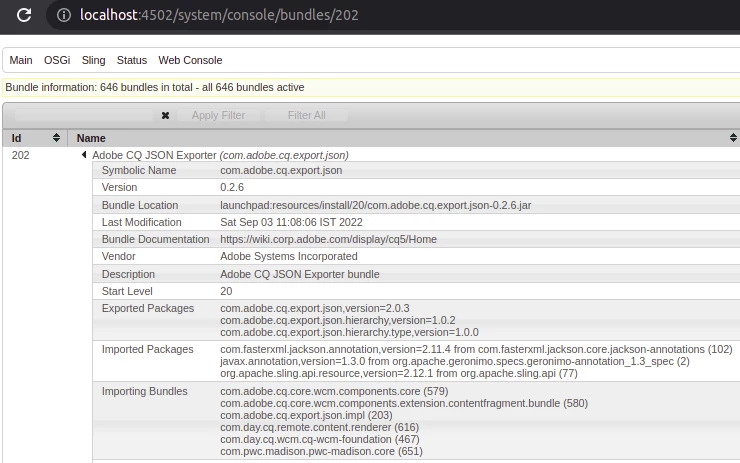
 

If it is not present, you need to add package-info.java file in that package which should be something like :

@Version("1.0")
package com.mysite.core.filters;

import org.osgi.annotation.versioning.Version;


Change Pacakge and Deploy and check.


3. If your package is in now in export packages section and still the error exists, check if you class present in http://localhost:4502/system/console/adapters where there is a list of all models. If not, check if the your package in in sling model packages in pom.xml of core. You can get more information in https://sling.apache.org/documentation/bundles/models.html

4. If you still see the error, Please paste the full error log. 


Hope it helps!

Thanks,

Nupur



6 replies

Magicr
Level 6
January 27, 2023

The error message does appear when the cms is not able is to create an instance of java object in memory.

I wonder about your html code. When you use follwong code:


<sly data-sly-use.model="com.adobe.core.models.ArticleListModel"/> <h1>This is article list component</h1>

 instead of yours, will the same error message appear?


partyush
Community Advisor
partyushCommunity AdvisorAuthor
Community Advisor
January 30, 2023

No need to wonder, This piece of code is added for testing.


DEBAL_DAS
New Member
January 27, 2023

Could you please check the OSGi bundle status whether it is in Active state associated with com.adobe.core.models.ArticleListModel via /system/console/bundle 

Debal Das, Senior AEM Consultant
Umesh_Thakur
Community Advisor
Community Advisor
January 27, 2023

Can you try to move your model to some other package other than adobe one?

Hope this helps

Umesh Thakur

manjunathdj
New Member
January 27, 2023

@partyush  -

https://sling.apache.org/documentation/bundles/models.html

You need to include package in pom.xml sling model to be picked up 


partyush
Community Advisor
partyushCommunity AdvisorAuthor
Community Advisor
January 30, 2023

Hi, can you suggest to me the best way to add this, 

Like I want to  know, whether this dependency will goes under my project POM or my CORE pom, and where it should get added in the code.

Asutosh_Jena_
Community Advisor
Community Advisor
January 28, 2023

Hi @partyush 


You are facing this issue with all the model classes you have written on the same project or only with this specific one? If it's with all, then definitely it's with the package definition.


Nupur_Jain
Adobe Employee
Nupur_JainAdobe EmployeeAccepted solution
Adobe Employee
January 28, 2023

Hi @partyush 


You should check following in order to see if you model is even available to use:

1. Go to http://localhost:4502/system/console/bundles and check if your bundle is active or not. If not open bundle details and resolve the issues or paste issues here.

2. If bundle is active, open your bundle details and check if you are exporting the package where you have created this sling model in "Exported Packages" section or not like this:


If it is not present, you need to add package-info.java file in that package which should be something like :

@Version("1.0")
package com.mysite.core.filters;

import org.osgi.annotation.versioning.Version;


Change Pacakge and Deploy and check.


3. If your package is in now in export packages section and still the error exists, check if you class present in http://localhost:4502/system/console/adapters where there is a list of all models. If not, check if the your package in in sling model packages in pom.xml of core. You can get more information in https://sling.apache.org/documentation/bundles/models.html

4. If you still see the error, Please paste the full error log. 


Hope it helps!

Thanks,

Nupur