External client lib script is not working during a page creation from existed template | Community
Skip to main content
October 12, 2021
Solved

External client lib script is not working during a page creation from existed template

  • October 12, 2021
  • 3 replies
  • 3267 views

I created a custom script for input validation which checks if another input has value and if it
has the current input should be disabled.This behavior is validated by external script that's
connected through "extraClientlibs" property in "jcr:root" of the current template "_cq_dialog"
content. And the script works only on those components that have already been created or if it
is edited with templates properties but when you create a new one the script does not work at the
time of its creation.

Could you help me with this issue?

https://drive.google.com/file/d/1yHQMS2pm2ItFQUB5MV3d4kd-il14nvra/view?usp=sharing 

https://drive.google.com/file/d/1Oxwv6qq2hoLz5Ekq-e6yJ_IjgBlPs-FG/view?usp=sharing 

https://drive.google.com/file/d/12L7XYprJZY5KI44GzBZvA12N84fKNyn1/view?usp=sharing 

https://drive.google.com/file/d/1E9hC1GLopU_qI8UvEFFqmPlsT8v9A-m8/view?usp=sharing

This post is no longer active and is closed to new replies. Need help? Start a new post to ask your question.
Best answer by Anudeep_Garnepudi

@alex86 

Instead of extraClientlibs, try creating a node under .../tabs/promo/items and add property sling:resourceType : granite/ui/components/coral/foundation/includeclientlibs and js : toggleinput 

This way your clientlib will be included along with your tab doesn't matter create page or page properties.

-AG

3 replies

Sanjay_Bangar
Community Advisor
Community Advisor
October 12, 2021

Hi @Alex86 ,

                    did you checked the  what are dependency  required to  execute that script?

Can you please try to call explicitly in your new component.

please check the below url

https://docs.adobe.com/docs/en/aem/6-2/develop/components/components-touch-optimized.html

// see below snippet 

cq: dialog: { jcr: primaryType: "nt:unstructured", jcr: title: "Page", extraClientlibs: ["category1","category2"], mode: "edit", sling: resourceType: "cq/gui/components/authoring/dialog"}

To have your client library loaded solely for your component dialog (i.e. it will not be loaded for another component) you need to set the property extraClientLibs of your dialog to the category name of the client library you have just created. This is advisable if your client library is quite big and/or your field is specific to that dialog and will not be needed in other dialogs. To have your client library loaded for all dialogs, set the category property of your client library to cq.authoring.dialog. 

I hope this would help you.


Regards,

Sanjay


Alex86Author
October 12, 2021

Hi @sanjay_bangar , 


Your link does not work for me, could you please check it. Could you please explain in more detail where the client library for all dialogs is loaded and the category property of your client library is set to cq.authoring.dialog.


Thanks,

Alex.

Sanjay_Bangar
Community Advisor
Community Advisor
October 12, 2021

Hi @alex86 ,

       I am saying ,once you have created new component then you need to set the property extraClientLibs of your cq: dialog to the category name of the client library you have just created.


Kishore_Kumar_
October 12, 2021

Hi @alex86 ,


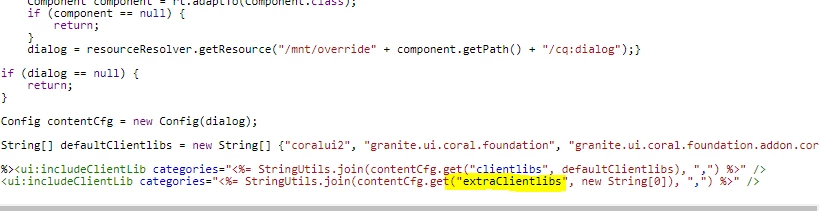
extraClientlibs properties won't work during page creation.


Please check the urls differences.


1. During page creation
http://localhost:4502/mnt/overlay/wcm/core/content/sites/createpagewizard.html/content/wknd 


/libs/wcm/core/content/sites/createpagewizard/jcr:content/head/clientlibs resource type is  /libs/granite/ui/components/coral/foundation/includeclientlibs


and it doesn't support extraClientlibs. Only the initial clientlibs categories whatever configured will be supported.


2. Viewing page properties after page creation.
http://localhost:4502/mnt/overlay/wcm/core/content/sites/properties.html?item=/content/wknd 


/libs/wcm/core/content/sites/properties/jcr:content/head/dialogclientlibs resourceType is /libs/cq/gui/components/siteadmin/admin/properties/includeclientlibs


and this has a support for extraClientlibs which you can see in its includeclientlibs.jsp


So if you don't want the "Bonus Id" field to be enabled on page creation, you can add cq:showOnCreate-false property to it.

Alex86Author
October 12, 2021

Hey @kishore_kumar_

Thank you for detailed explanation.
Unfortunately I need either "Bonus Id" or "Promocode". It depends on content manager choice during the page creation - my existed script just blocks another input if any of these both is filled in. Hence, could you say - is it a way to add my script to the initial clientlibs and define some specific "granite:class" as selector for this custom clientlib category? It's obviously that this script shouldn't affect any other templates or components

Anudeep_Garnepudi
Community Advisor
Anudeep_GarnepudiCommunity AdvisorAccepted solution
Community Advisor
October 12, 2021

@alex86 

Instead of extraClientlibs, try creating a node under .../tabs/promo/items and add property sling:resourceType : granite/ui/components/coral/foundation/includeclientlibs and js : toggleinput 

This way your clientlib will be included along with your tab doesn't matter create page or page properties.

-AG

Alex86Author
October 13, 2021

@anudeep_garnepudi 
Thank you so much! It works, you saved my time 🎉