Experience Fragment Pathfield is not opening on click of EDIT | Community
Skip to main content
Level 2
July 5, 2022
Solved

Experience Fragment Pathfield is not opening on click of EDIT
  • July 5, 2022
  • 1 reply
  • 934 views

1-> In editable template 
2-> I added experience fragment in layout container.
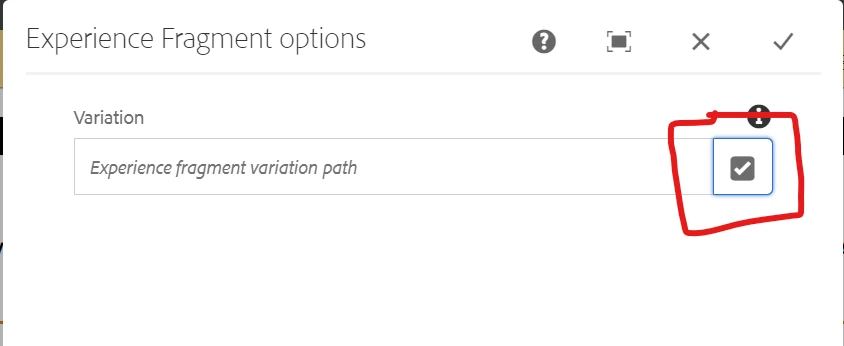
3-> on edit of Experience fragment dialog i am not able to author.   
on click of this pathfield it's not opening.

is there any property to add in editable template for making that pathfield to work 
Thanks in advance 
This post is no longer active and is closed to new replies. Need help? Start a new post to ask your question.
Best answer by ShaileshBassi

@sigarambotla_hemanthku The clientlibs in AEM consist of JS and CSS and in some instances they get cached; which as would be obvious; causes issues.

To remove this cache and rebuild the clientlibs, the following link is quite useful:

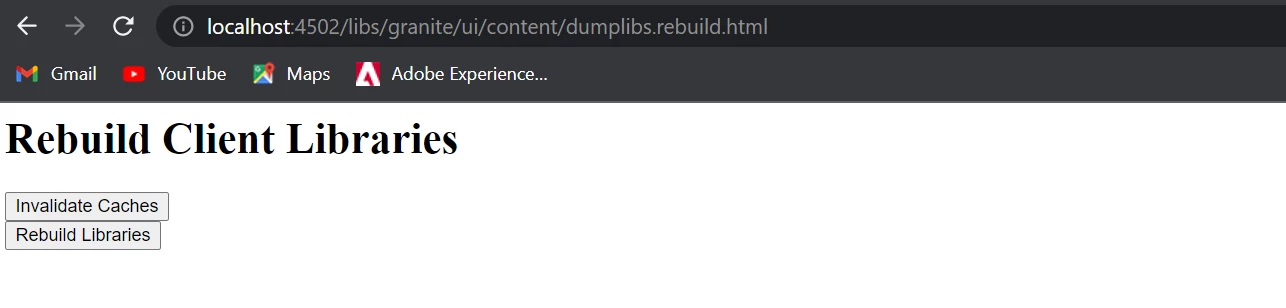
<domain-name>/libs/granite/ui/content/dumplibs.rebuild.html

There are individual buttons to invalidate the cache and rebuild the libraries on this page.

For faster access, there is a query parameter for each process that can be appended to the URL:

Invalidate Caches:  ?invalidate=true

Rebuild Libraries:   ?rebuild=true

Hope this helps!

Thanks

1 reply

ShaileshBassi
Community Advisor
Community Advisor
July 5, 2022

@sigarambotla_hemanthku There is no property to be added in the editable template to explicitly make it work.

I tried out the same and it is working as designed.


Can you check at your end, if there is any JS error that you are seeing, which is blocking the pathfield popup to be opened.

Thanks

Level 2
July 5, 2022

@shaileshbassi 
yes as you said it's throwing some js error on click of pathfield PFA as ref


ShaileshBassi
Community Advisor
ShaileshBassiCommunity AdvisorAccepted solution
Community Advisor
July 5, 2022

@sigarambotla_hemanthku The clientlibs in AEM consist of JS and CSS and in some instances they get cached; which as would be obvious; causes issues.

To remove this cache and rebuild the clientlibs, the following link is quite useful:

<domain-name>/libs/granite/ui/content/dumplibs.rebuild.html

There are individual buttons to invalidate the cache and rebuild the libraries on this page.

For faster access, there is a query parameter for each process that can be appended to the URL:

Invalidate Caches:  ?invalidate=true

Rebuild Libraries:   ?rebuild=true

Hope this helps!

Thanks