Exclude project level clientlibs | Community
Skip to main content
Madhur-Madan
Community Advisor
Community Advisor
April 13, 2023
Solved

Exclude project level clientlibs

  • April 13, 2023
  • 1 reply
  • 858 views

Hi everyone,

I am a specific requirement where I need to overlay OOTB page component and remove the project level clientlibs (clientlib-site, clientlib-base) from it. Can someone suggest the way to disable it on the overlayed page component.


Thanks
This post is no longer active and is closed to new replies. Need help? Start a new post to ask your question.
Best answer by Sady_Rifat

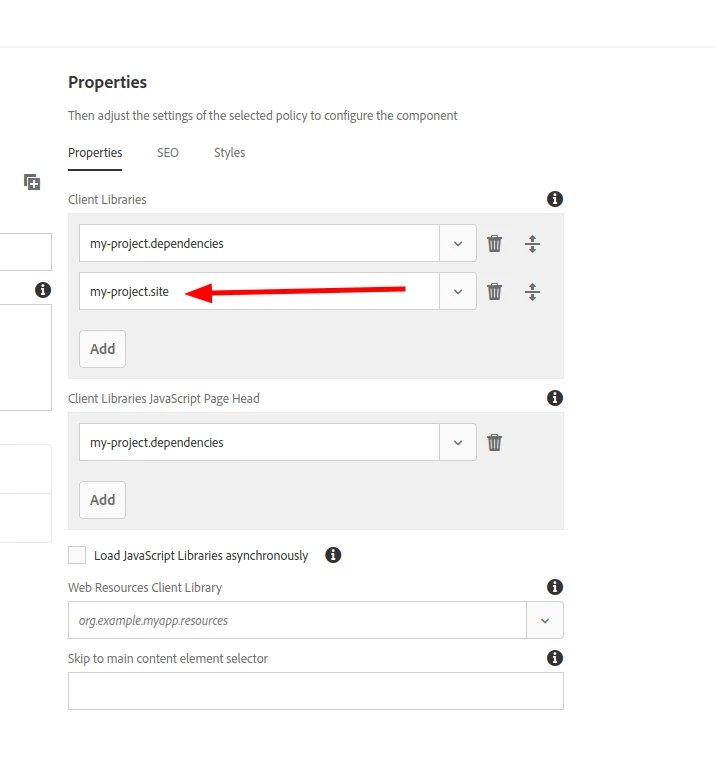
I think the problem is in your page policy.
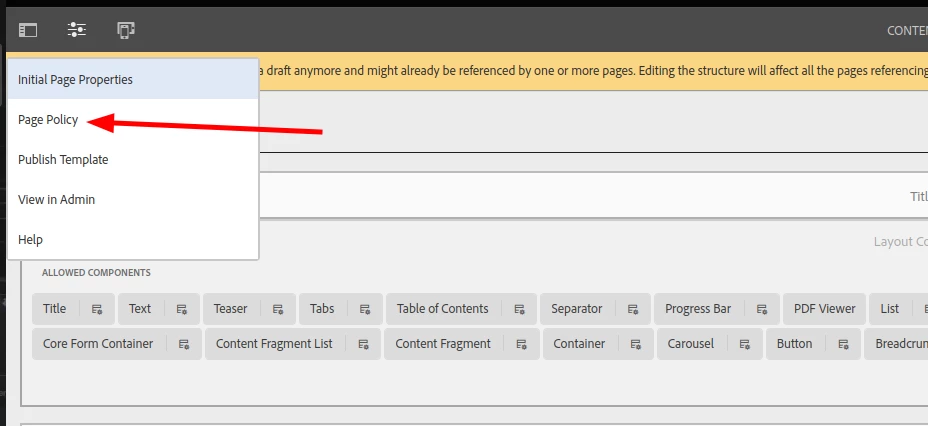
Go to the Edit Template > Page Policy


Remove the clientlib you want to remove.


1 reply

Sady_Rifat
Community Advisor
Community Advisor
April 13, 2023

Hello @madhur-madan ,
You can create a new page component where in customheaderlibs.html and customfooterlibs.html just remove those clientlibs and using that page component create a new template.
Page component resourceSuperType will be:

sling:resourceSuperType="core/wcm/components/page/v3/page"


Madhur-Madan
Community Advisor
Community Advisor
April 13, 2023

@sady_rifat  I have already done that. Even though the styles are not getting added to the page but if I see the "view page source" I can still see the scripts added to the page.

Sady_Rifat
Community Advisor
Sady_RifatCommunity AdvisorAccepted solution
Community Advisor
April 13, 2023

I think the problem is in your page policy.
Go to the Edit Template > Page Policy


Remove the clientlib you want to remove.