Error: Refusing to install package adobe/aem650:core-cif-components-apps:1.3.0. required dependencies missing: [day/cq60/product:cq-ui-wcm-editor-content:(1.0.138,)] | Community
Skip to main content
September 21, 2020
Solved

Error: Refusing to install package adobe/aem650:core-cif-components-apps:1.3.0. required dependencies missing: [day/cq60/product:cq-ui-wcm-editor-content:(1.0.138,)]
  • September 21, 2020
  • 3 replies
  • 4360 views

Hi,


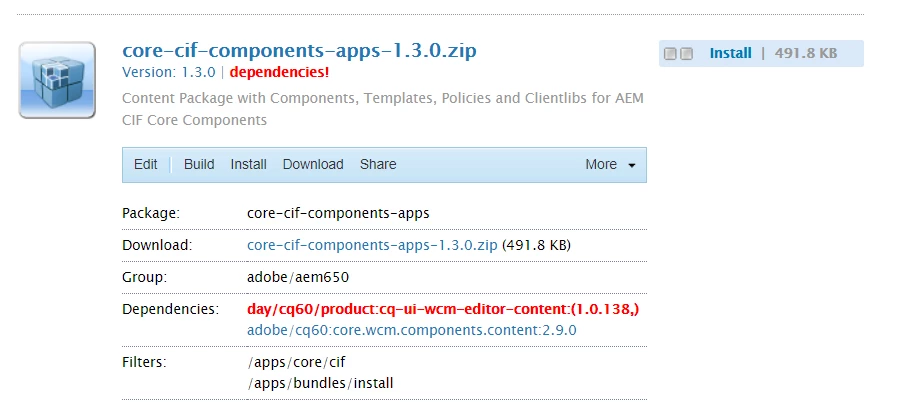
Getting below dependency error while installing package in CRX Package Manager. Have no idea how to handle this.


Please suggest.


Error: Refusing to install package adobe/aem650:core-cif-components-apps:1.3.0. required dependencies missing: [day/cq60/product:cq-ui-wcm-editor-content:(1.0.138,)]


Thanks,

Heena

This post is no longer active and is closed to new replies. Need help? Start a new post to ask your question.
Best answer by vanegi

You need to add those package (cq-ui-wcm-editor-content:(1.0.138,)) as dependency to fix this error.


3 replies

vanegi
Adobe Employee
vanegiAdobe EmployeeAccepted solution
Adobe Employee
September 21, 2020

You need to add those package (cq-ui-wcm-editor-content:(1.0.138,)) as dependency to fix this error.


Varun_Shakya
Community Advisor
Community Advisor
September 22, 2020

which version of AEM you are using . Check the compatible AEM version with core-cif components


https://github.com/adobe/aem-core-cif-components/blob/CIF-1181/VERSIONS.md


Heena06Author
September 24, 2020
Hi Varun_Shakya I m using AEM 6.4.0 version, not sure which version of CIF Connector and Magento I should use
rasheed445
June 12, 2021

How could you solved this error