Error on quick start aem 6.4 | Community
Skip to main content
eliash27546545
Level 2
July 5, 2018
Solved

Error on quick start aem 6.4

  • July 5, 2018
  • 20 replies
  • 12020 views

Hey

After creating an AEM project following the steps on this link Getting Started with AEM Sites Part 1 - Project Setup

i lunched the free trial aem version 6.4 and registered, when i am trying to browse http://localhost:4502/sites.html i am getting this error:

org.apache.sling.scripting.jsp.jasper.JasperException: Unable to compile class for JSP: An error occurred at line: 267 in the jsp file: /libs/granite/core/components/login/login.jsp Type mismatch: cannot convert from Object to String 264 ...

Can anyone help me

Thanks

This post is no longer active and is closed to new replies. Need help? Start a new post to ask your question.
Best answer by kautuk_sahni

Can you confirm if you have 2 JRE in your system (even if you are giving correct details in JAVAHOME or PATH variable)?

If so, go to registry -> HKEY_LOCAL_MACHINE\SOFTWARE\JavaSoft\Java Runtime Environment and check the currentVersion, it should be the latest and compatible version.

20 replies

Adobe Employee
July 5, 2018

Looks like you are running the AEM 6.4 jar with an unsupported version of JVM. Please go through Technical Requirements for more details.

smacdonald2008
Level 10
July 5, 2018

What Java version is your Java HOME variable referencing?

eliash27546545
Level 2
July 6, 2018

Java version: 1.8.0_171, vendor: Oracle Corporation

Java home: C:\Program Files\Java\jdk1.8.0_171\jre

Adobe Employee
July 6, 2018

Only 64bit version is supported. Can you check?

eliash27546545
Level 2
July 6, 2018

yes i am using the 64bit

Adobe Employee
July 6, 2018

Can you try with 1.8.0_131 and let me know if that works.

eliash27546545
Level 2
July 9, 2018

no its not working

Ratna_Kumar
Level 10
July 9, 2018

Hi,

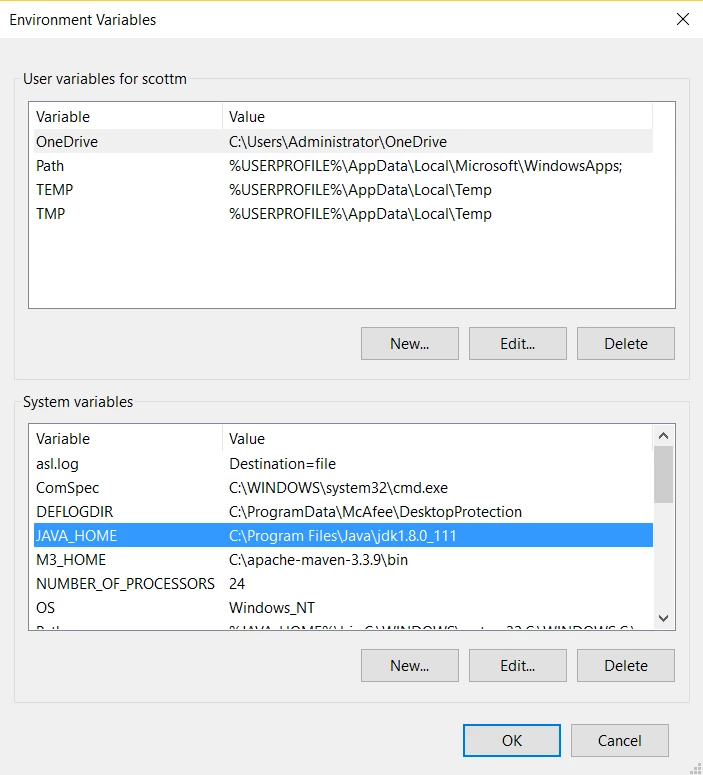
The java home you have given is wrong. You have given JAVA_HOME till jre i.e., inside jdk1.8.0_171 - This is wrong

Please give java_home and path as per the below.

JAVA_HOME: C:\Program Files\Java\jdk1.8.0_171.

path : C:\Program Files\Java\jdk1.8.0_171\bin

Please change the JAVA_HOME from C:\Program Files\Java\jdk1.8.0_171\jre to C:\Program Files\Java\jdk1.8.0_171. It will work.

Hope this helps!!

Thanks,

Ratna Kumar.

eliash27546545
Level 2
July 9, 2018

i am already doing this,  i sent u the java home version from the output of mvn -version cmd

smacdonald2008
Level 10
July 9, 2018

In your thread - it shows:

Java home: C:\Program Files\Java\jdk1.8.0_171\jre

Change to JDK - ie