
Solved
Error on AEM 6.5 Author when "View as published" for a SPA project
On AEM 6.5 Author, a SPA based project.
Core components 2.8.0, SPA Project Core 1.0.6
We can Edit the page but when choosing "View as Published" (either the page or experience fragment), the below error shows up (only for spa project, non-spa projects load fine).
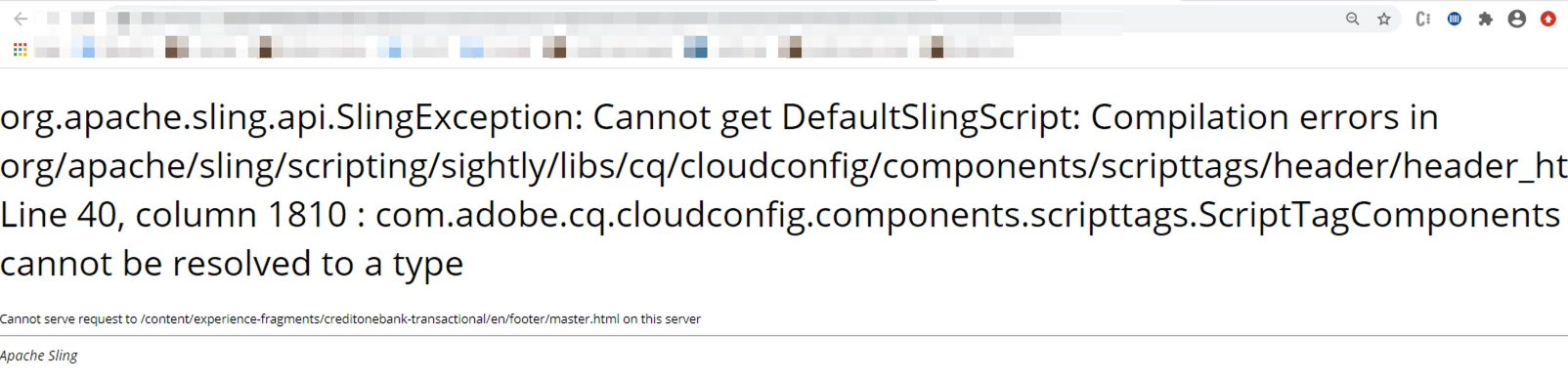
In logs..
18.09.2020 07:41:53.462 *ERROR* [192.168.19.27 [1600440113446] GET /content/experience-fragments/myproject/en/footer/master.html HTTP/1.1] com.adobe.aem.spa.project.core.internal.impl.utils.HierarchyUtils SPA root page not found, returning null
18.09.2020 07:41:53.480 *ERROR* [192.168.19.27 [1600440113446] GET /content/experience-fragments/myproject/en/footer/master.html HTTP/1.1] org.apache.sling.engine.impl.SlingRequestProcessorImpl service: Uncaught SlingException
org.apache.sling.scripting.sightly.SightlyException: org.apache.sling.api.SlingException: Cannot get DefaultSlingScript: Compilation errors in org/apache/sling/scripting/sightly/libs/cq/cloudconfig/components/scripttags/header/header_html.java:
Line 40, column 1810 : com.adobe.cq.cloudconfig.components.scripttags.ScriptTagComponents cannot be resolved to a type
If we go this path /libs/cq/cloudconfig/components/scripttags/header/header.html and remove the below lines, the above error does not come.
<sly data-sly-use.tagcomponents="com.adobe.cq.cloudconfig.components.scripttags.ScriptTagComponents"
     data-sly-list="${tagcomponents.scriptTagComponentsHeader}">
    <sly data-sly-test="${item.componentReference}" data-sly-resource="${'cloudconfig-footer' @ resourceType=item.componentReference}" />
</sly>
The site was working properly, but seeing this recently. What can be going wrong?