Error Message when changed optional field to mandatory for metadata schema. | Community
Skip to main content
April 30, 2018
Solved

Error Message when changed optional field to mandatory for metadata schema.

  • April 30, 2018
  • 12 replies
  • 13098 views

Hi All,

   We have a Asset metadata schema with various fields , Many of them are optional. Now we are trying to make few fields as required, and expectation was it gives an error if any those mandatory fields are is not authored for new assets  . But it is showing a error message (REQUIRED METADATA IS MISSING) for the existing assets. Is there a way to not to display such error for the already existing assets ?
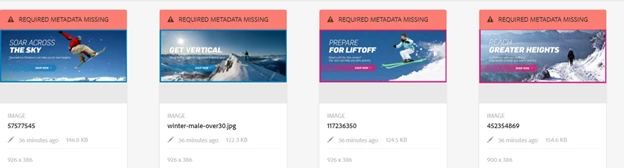
Thanks in Advance.

This post is no longer active and is closed to new replies. Need help? Start a new post to ask your question.
Best answer by shroti

Hi,

Not sure which AEM version you are talking about here, my reply assumes it is for 6.4 (though most of it will be applicable even for previous versions too).

-> expectation was it gives an error if any those mandatory fields are is not authored for new assets  .

For this definition of "new assets" needs to be shape out first, to keep it simple, I am considering assets which are ingested in last 24 hours are new assets.

-> Is there a way to not to display such error for the already existing assets ?

Yes. AFAIK there is no config to achieve this but you can overlay[0], there is a method with name hasValidMetadata at line no. 353. Just update the method and add condition to return true only for assets which are ingested(jcr:created) 24 hour before.

[0]/libs/dam/gui/coral/components/admin/contentrenderer/card/common/card-banner.jsp

12 replies

smacdonald2008
April 30, 2018

Can you show us which property you changed.

shrotiAdobe EmployeeAccepted solution
Adobe Employee
May 1, 2018

Hi,

Not sure which AEM version you are talking about here, my reply assumes it is for 6.4 (though most of it will be applicable even for previous versions too).

-> expectation was it gives an error if any those mandatory fields are is not authored for new assets  .

For this definition of "new assets" needs to be shape out first, to keep it simple, I am considering assets which are ingested in last 24 hours are new assets.

-> Is there a way to not to display such error for the already existing assets ?

Yes. AFAIK there is no config to achieve this but you can overlay[0], there is a method with name hasValidMetadata at line no. 353. Just update the method and add condition to return true only for assets which are ingested(jcr:created) 24 hour before.

[0]/libs/dam/gui/coral/components/admin/contentrenderer/card/common/card-banner.jsp

May 2, 2018

Thanks a lot Ashu. Overlaying card-banner.jsp worked like a charm.
you can mark as correct answer.

May 9, 2018

Hi Ashu,

The approach which you have provided , works fine. But I see same error shows up if I am trying to use filters and options.
hanks in Advance.

Adobe Employee
May 10, 2018

The cards rendered on Search Page has different code and including CardBanner using absolute URL. Please check the component at [2] Line no. 54

You should overlay this as well, and refer to /card-banner.jsp overlaid in /apps.

Considering you are asking this for AEM 6.3, since this has been fixed in 6.4.

[2]/libs/dam/gui/coral/components/admin/contentrenderer/card/assetomnisearch/assetomnisearch.jsp#L54

May 10, 2018

Thanks for reply Ashu. I forgot to mention AEM version , We are using 6.2.

Adobe Employee
May 11, 2018

Fine it will be Line #52 if AEM 6.2 + latest CFP.

/libs/dam/gui/coral/components/admin/contentrenderer/card/assetomnisearch/assetomnisearch.jsp#L52

May 11, 2018

I have overlayed /libs/dam/gui/coral/components/admin/contentrenderer/card/assetomnisearch/assetomnisearch. jsp and I have referred card-banner.jsp with the apps path . Still no luck. I am  still seeing the error on using filters.
I am on AEM 6.2 with CFP 14.


Regards,

pradeep.

Adobe Employee
May 12, 2018

Yes it may not work as I can see card's path is hardcoded to /libs at [1]. The "/libs/" should be removed from [1] to allow overlaying. You can log a product's enhancement request to get it done. Thanks

[1]/libs/granite/omnisearch/content/metadata/asset

May 14, 2018

Hi ashu4pma,

thanks for replying . I will create a day care ticket and will update here based on the response from adobe.