Equivalent Touch UI class for .cq-wcm-edit | Community
Skip to main content
ashishkhadpe
Level 3
August 27, 2020
Solved

Equivalent Touch UI class for .cq-wcm-edit

  • August 27, 2020
  • 3 replies
  • 1212 views

Hi All,


We have few mark up defined in our CSS library as below in CQ edit mode : 


.cq-wcm-edit .formBuilder .section.hiddenField,
.cq-wcm-edit .formBuilder .section.hiddenFieldMulti {
    display: block;
}


I assume that .cq-wcm-edit only works with AEM classic UI. Any help on how we can migrate this to touch UI or any similar class we can use to define.
This post is no longer active and is closed to new replies. Need help? Start a new post to ask your question.
Best answer by Nupur_Jain

Hi @ashishkhadpe 


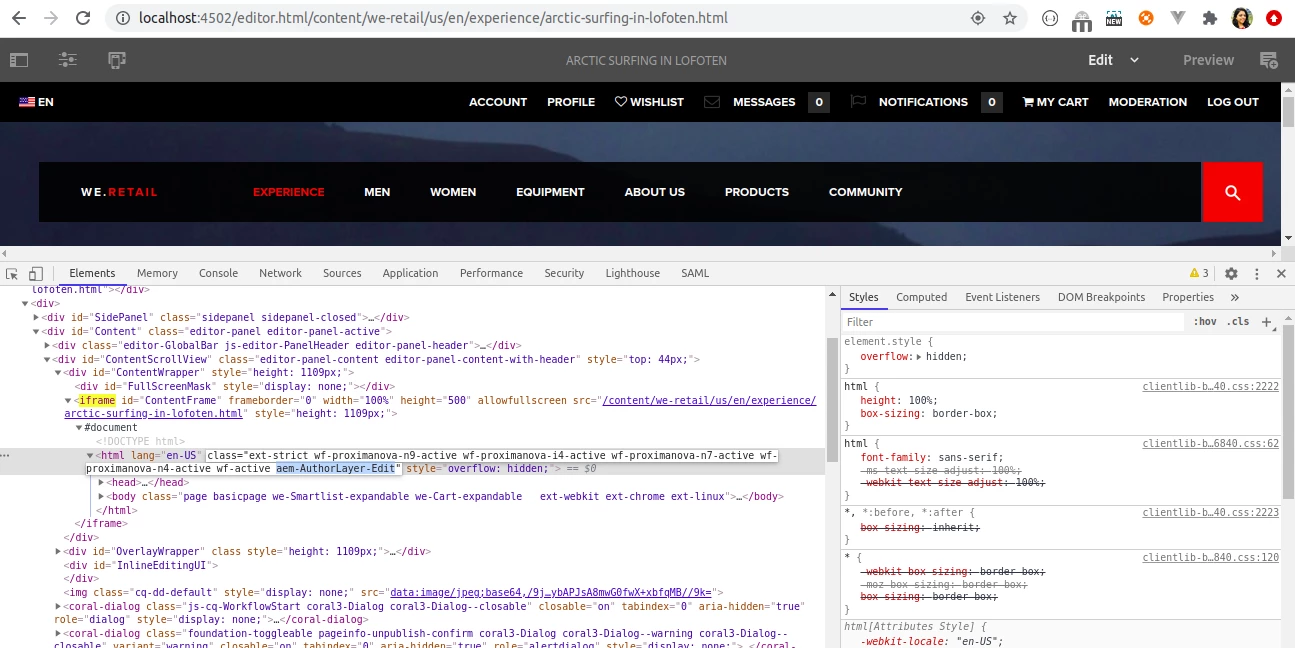
Just like .cq-wcm-edit, there is a class ". aem-AuthorLayer-Edit" added to <html> node of the page added in iframe in Touch UI mode.


You can easily use this class to replace classic based css.


Hope it helps!

Thanks!

Nupur

3 replies

Nupur_Jain
Adobe Employee
Nupur_JainAdobe EmployeeAccepted solution
Adobe Employee
August 27, 2020

Hi @ashishkhadpe 


Just like .cq-wcm-edit, there is a class ". aem-AuthorLayer-Edit" added to <html> node of the page added in iframe in Touch UI mode.


You can easily use this class to replace classic based css.


Hope it helps!

Thanks!

Nupur

Suraj_Kamdi
Community Advisor
Community Advisor
August 27, 2020

@ashishkhadpe Hello Ashish you need to use coral classes to achieve the same functionality for touch UI dialogs?

arunpatidar
Community Advisor
Community Advisor
August 27, 2020

you can use .cq-Editable-dom class for touch UI edit mode

e.g.

.teaser.cq-Editable-dom { margin: 10px 0px; }


Arun Patidar