Enabled minifaction in AEM6.4 seems not be working | Community
Skip to main content
Magicr
Level 6
September 7, 2021
Solved

Enabled minifaction in AEM6.4 seems not be working

  • September 7, 2021
  • 3 replies
  • 2176 views

Hello,


I've got a request for minify css and javascript files on an AEM6.4 instance. My research in the Internet gave me following sources:


https://experienceleague.adobe.com/docs/experience-cloud-kcs/kbarticles/KA-16544.html?lang=us-en

https://experienceleague.adobe.com/docs/experience-manager-64/developing/introduction/clientlibs.html?lang=en#format-and-examples


The result is the following screenshot from my configuration
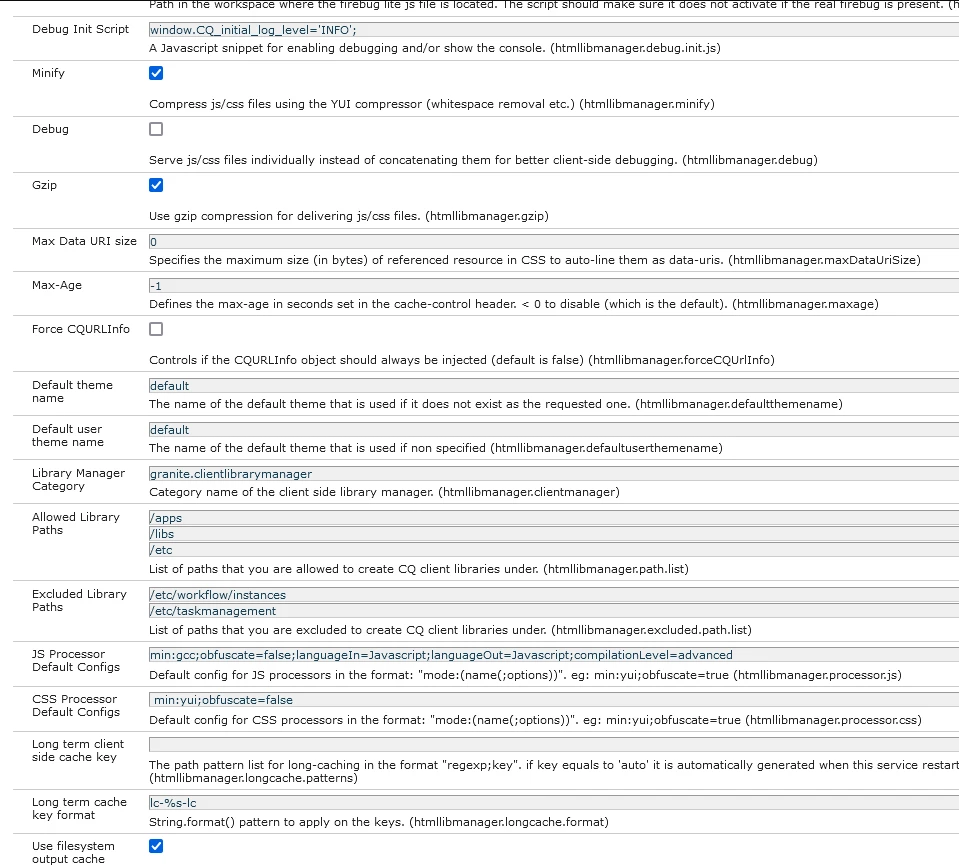


After this I tested it. As concerned to the css files this configuration works, but not for js files. Below an example:
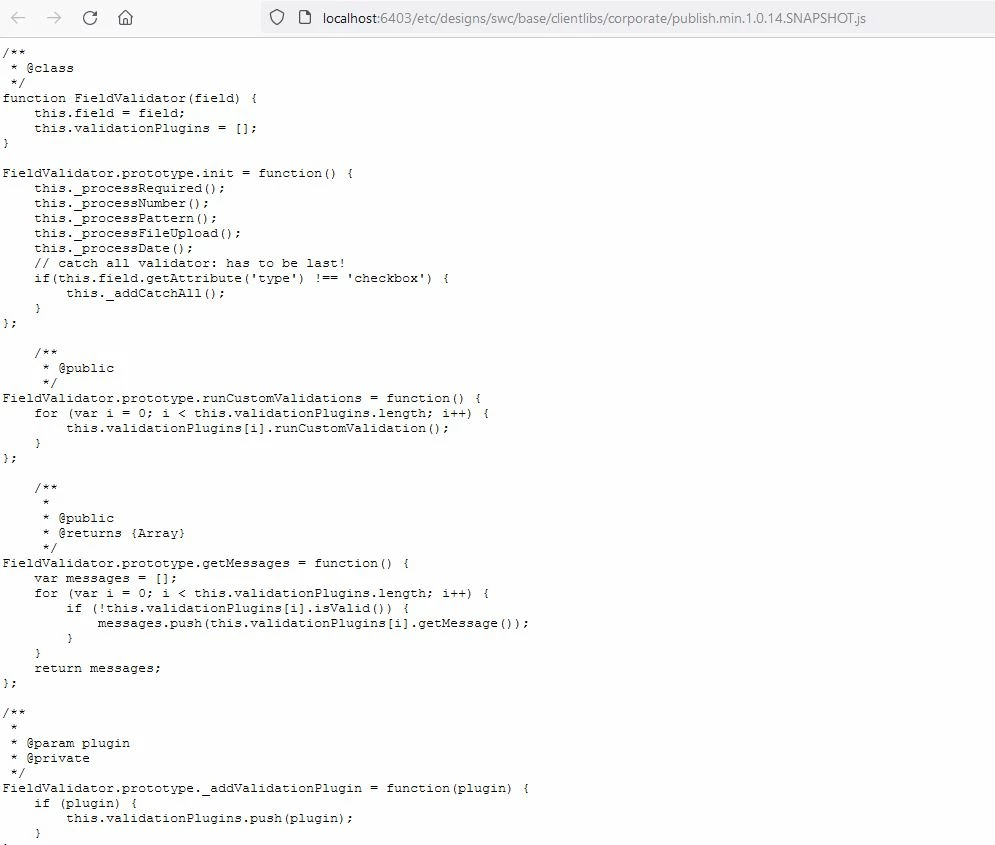
Can somebody tell me what's going wrong?


Thanks in advanced for any answers.

This post is no longer active and is closed to new replies. Need help? Start a new post to ask your question.
Best answer by kchaurasiya

@magicr , Please check the link below.


ClientLib Minification in AEM 

3 replies

kchaurasiya
kchaurasiyaAccepted solution
Level 5
September 7, 2021

@magicr , Please check the link below.


ClientLib Minification in AEM 

Magicr
MagicrAuthor
Level 6
September 13, 2021

Thanks for your answer. I tried it as you suggested and it does not work either. Here the content of my .content.xml file:


<?xml version="1.0" encoding="UTF-8"?>
<jcr:root xmlns:sling="http://sling.apache.org/jcr/sling/1.0" xmlns:cq="http://www.day.com/jcr/cq/1.0" xmlns:jcr="http://www.jcp.org/jcr/1.0"
jcr:primaryType="cq:ClientLibraryFolder"
sling:resourceType="widgets/clientlib"
allowProxy="{Boolean}true"
htmllibmanager.minify="{Boolean}true"
htmllibmanager.gzip="{Boolean}true"
categories="[xxx.yyyy.zzzz.publish]"
jsProcessor="[min:gcc;languageIn=ECMASCRIPT_15;languageOut=ECMASCRIPT_15;compilationLevel=advanced]"
cssProcessor="[min:yui]"
embed="[common.form,coma.analytics.adobelaunch,coma.analytics.siteentry]"/> 

Are there mistakes in there?

Magicr
MagicrAuthor
Level 6
September 13, 2021

The css-Option does work, the js option not.

Ritesh_Mittal
Community Advisor and Adobe Champion
September 7, 2021

Hi @magicr ,


I see there might be an issue with your configuration. There is no languageIn as 'Javascript' as you have specified in "JS Processor Default Configs" property. Also, check if your script is having some issue 

Check here to minimize -

https://www.freeformatter.com/javascript-minifier.html


Check this thread, almost same issue.

https://experienceleaguecommunities.adobe.com/t5/adobe-experience-manager/aem-6-5-2-js-files-are-not-minified-with-gcc-and-yui/td-p/362173

Magicr
MagicrAuthor
Level 6
September 7, 2021

Thanks for your answer.

I changed the configuration from languageIn=Javascript;languageOut=Javascript to languageIn=ECMASCRIPT_15;languageOut=ECMASCRIPT_15 and it doesn't still work. As you suggested I checked my Javascript at freeformatter.com and it showed me a couple of errors due tue modern language version of ES6. This compiler blamed mostly the word let.

After that I looked at the internet what the abbreviation 'gcc' means. This stands for Google closure compiler. The site of this -https://closure-compiler.appspot.com- offers an compiler where you can minify your code either. On this site there where no problems with my Javascript to minify it. 


At one linked post was mentioned to check the logs for errors from gcc processor. After correcting the mistake in configuration I changed the log level to debug. No errors where printed out in error.log. The Javascript still not minified.

Rohit-Negi
Level 3
September 7, 2021

Hi @magicr 


Can you try to parse your JS first with some online tool such as:https://www.freeformatter.com/javascript-minifier.html

May be your JS have some issues.


Magicr
MagicrAuthor
Level 6
September 7, 2021

Thanks for your answer.

As you suggested I checked my Javascript at freeformatter.com and it showed me a couple of errors due tue modern language version of ES6. This compiler blamed mostly the word let.

After that I looked at the internet what the abbreviation 'gcc' means. This stands for Google closure compiler. The site of this -https://closure-compiler.appspot.com- offers an compiler where you can minify your code either. On this site there where no problems with my Javascript to minify it. 


At one linked post was mentioned to check the logs for errors from gcc processor. In configuration I changed the log level to debug. No errors where printed out in error.log. The Javascript still not minified.