Emulator not working while editing template | Community
Skip to main content
November 22, 2022

Emulator not working while editing template

  • November 22, 2022
  • 4 replies
  • 2306 views

When we click on any emulator for device i.e. iPhone8 etc., its not working and following error is displayed in developer console -
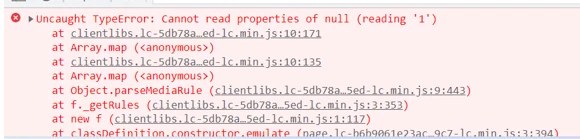
Tried removing custom clientlibs but didnt help.

Also, page component is present in OSGI config.

Please suggest.

This post is no longer active and is closed to new replies. Need help? Start a new post to ask your question.

4 replies

SantoshSai
Community Advisor
Community Advisor
November 22, 2022

Hi @aa84 ,

Please refer this article if it helps: https://levelup.gitconnected.com/aem-customize-emulators-in-layout-mode-288f951d96c5

Regards,

Santosh

Santosh Sai
AA84Author
November 22, 2022

Thanks for your reply @santoshsai

I took a look at that article, it talks about customizing breakpoints. We are not using custom and having issues with OOTB ones.

We are facing the same issue while we are trying to create a new template with no custom components.

Please suggest.

February 1, 2023

We are also facing the same issue on AEM 6.5.12. Is there a resolution to this one @aa84 @santoshsai  

March 25, 2023

@aa84 I am facing the same issue. Can you tell me if you could fix the issue and what was the resolution? Thank you.

AA84Author
March 25, 2023

@test1234567 , the problem was with our custom javascript, which was causing emulator to break.

March 26, 2023

Thanks for your reply. Actually we don't have any custom javascript implementation for emulator. Not sure what to check.

March 18, 2025

We faced a similar issue. In our case, again the issue was with one the custom components scss files . To be precise , it was due to custom media query mixins. 
In each case it might be different, but device emulator client lib code is OOTB one , so the cause of the issue mostly is due to the custom code.