embed property in client libs | Community
Skip to main content
rgravisankar
Level 2
October 8, 2021
Solved

embed property in client libs

  • October 8, 2021
  • 2 replies
  • 4084 views

Hello Everyone,


Hope all being safe!!


I have one basic question on embed properties in client libs folder.  I have below scenario,

Clientlib A embed Clientlib B which embed Clientlib C, I can see Clientlib A and Clientlib B loaded fine. But not Clientlib C embedded in this case. Can someone explain here. Thanks in advance.

This post is no longer active and is closed to new replies. Need help? Start a new post to ask your question.
Best answer by BimmiSo

Hi @rgravisankar 


Embed - This defines the categories which will be combined to the current clientlib. AEM will merge all clientlibs into the current clientlib. This is usually used for minimizing requests and for accessing clientlibs which are not supposed to be exposed to public.


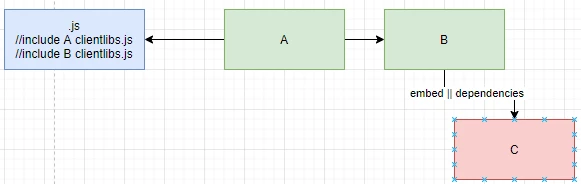
Take note that the embed property is NOT transitive – If Clientlib A embeds Clientlib B which embeds Clientlib C, then only Clientlib A and B will be included in the page. Clientlib A and B will be combined into one CSS and JS files as well. In order to include Clientlib C, it must be added to the embed property of Clientlib A as well.


Hope this helps!!
Thanks

2 replies

BrianKasingli
Community Advisor and Adobe Champion
October 8, 2021

You will find that only clientlib-a && clientlib-b only exist when calling clientlib-a.css because, the child properties for clientlib-b, "dependencies" or "embed" are to be ignored. This is how the clientlib resolving engine works; this is normal.


Solution: create a new client library as the parent with the correct config for embed + dependencies of whatever you need.


In the diagram, you can see clientlib-b, references to "dependencies" or "embed" is ignored. The output of the clientlib is with A + B.


rampai
Community Advisor
Community Advisor
October 9, 2021

Hi @rgravisankar,


In addition to what @briankasingli pointed out, you can see this article that explains the concepts better. There is just one correction to the above answer though. A dependency added in embed will not be ignored. Only embed is ignored if added to another embed.


https://khakiout.wordpress.com/2016/02/23/aem-clientlibs-difference-between-dependencies-and-embed/amp


Basically if you want to embed multiple categories then you would need to embed all in the same clientlib that you want since embed is not transitive. Dependencies are transitive. 


So clientibA with embed to [clientlibB, clientlibC] will load all with just one network call. (C+B+A)


ClientLibA with dependencies to clientlibB and clientlibB with dependencies to clientlibC will eventually lead to three calls but load all. (C) + (B) + (A)


ClientLibA with dependencies to clientlibB and clientlibB with embed to clientlibC will eventually lead to two calls but load all. (C+B) + (A)


ClientLibA with embed to clientlibB and clientlibB with dependencies to clientlibC will again lead to two calls but load all. (C) + (B+A)


And 


ClientLibA with embed to clientlibB and clientlibB with embed to clientlibC will again lead to one calls but load only A and B. (B+A)


The article explains this with diagrams. 


Thanks, 

Ram

BimmiSoAdobe EmployeeAccepted solution
Adobe Employee
October 11, 2021

Hi @rgravisankar 


Embed - This defines the categories which will be combined to the current clientlib. AEM will merge all clientlibs into the current clientlib. This is usually used for minimizing requests and for accessing clientlibs which are not supposed to be exposed to public.


Take note that the embed property is NOT transitive – If Clientlib A embeds Clientlib B which embeds Clientlib C, then only Clientlib A and B will be included in the page. Clientlib A and B will be combined into one CSS and JS files as well. In order to include Clientlib C, it must be added to the embed property of Clientlib A as well.


Hope this helps!!
Thanks