Email service send mail with file attachments | Community
Skip to main content
Level 2
March 22, 2022
Solved

Email service send mail with file attachments

  • March 22, 2022
  • 1 reply
  • 2769 views

Hi All,


could you help me to find  "how to attach file without upload file in DAM and direct attach to email and send ".

Best answer by JeevanRaj

Hi @ritesh01 


  • Use <input> element with type as file to upload a file and pass it on to a servlet.
    <form id="submitForm"action="/bin/servlets/submitForm"method="POST"novalidate="novalidate"enctype="multipart/form-data">
    <label for="name">Name</label><input name="userName"type="text"class="fieldInner"id="name"required>
    <input name="file"value="Choose File"type="file"class="chooseFileInner"required/>
    <input type="submit"id="applied"value="Submit"/>
    </form>
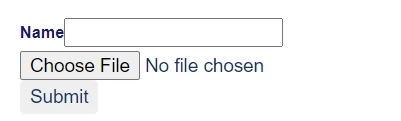
  • Write a sling servlet that receives the file as an inputstream. You can attach this to org.apache.commons.mail.HtmlEmail
    Below is working piece of servlet code.
    try {
    RequestParameter attach = request.getRequestParameter("file");
    InputStream ip = attach.getInputStream();
    HtmlEmail email = new HtmlEmail();
    //MailTemplate mailTemplate = MailTemplate.create(templatePath, session);
    //HtmlEmail email = mailTemplate.getEmail(StrLookup.mapLookup(new HashMap<String, String>(parameters)), HtmlEmail.class);
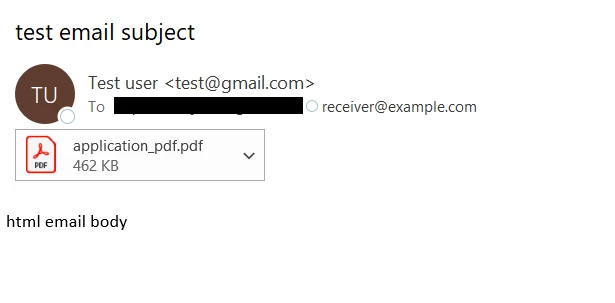
    ByteArrayDataSource fileDS = new ByteArrayDataSource(ip, "application/pdf");
    email.attach(fileDS, "application/pdf", "This is your attached file.");
    email.addTo("receiver@example.com");
    email.setSubject("test email subject");
    email.setMsg("text email body");
    email.setHtmlMsg("<html><head></head><body><p>html email body</p></body></html>");
    email.setFrom("sender@example.com","TestUser");
    // Declare a MessageGateway service
    MessageGateway<Email> messageGateway;
    messageGateway = messageGatewayService.getGateway(HtmlEmail.class);
    messageGateway.send(email);
    } catch (EmailException e) {
    e.printStackTrace();
    }
    Note: SMTP has to be configured in order for aem to send emails. This is an OOTB configuration.

Thanks

1 reply

JeevanRaj
Community Advisor
JeevanRajCommunity AdvisorAccepted solution
Community Advisor
March 22, 2022

Hi @ritesh01 


  • Use <input> element with type as file to upload a file and pass it on to a servlet.
    <form id="submitForm"action="/bin/servlets/submitForm"method="POST"novalidate="novalidate"enctype="multipart/form-data">
    <label for="name">Name</label><input name="userName"type="text"class="fieldInner"id="name"required>
    <input name="file"value="Choose File"type="file"class="chooseFileInner"required/>
    <input type="submit"id="applied"value="Submit"/>
    </form>

  • Write a sling servlet that receives the file as an inputstream. You can attach this to org.apache.commons.mail.HtmlEmail
    Below is working piece of servlet code.
    try {
    RequestParameter attach = request.getRequestParameter("file");
    InputStream ip = attach.getInputStream();
    HtmlEmail email = new HtmlEmail();
    //MailTemplate mailTemplate = MailTemplate.create(templatePath, session);
    //HtmlEmail email = mailTemplate.getEmail(StrLookup.mapLookup(new HashMap<String, String>(parameters)), HtmlEmail.class);
    ByteArrayDataSource fileDS = new ByteArrayDataSource(ip, "application/pdf");
    email.attach(fileDS, "application/pdf", "This is your attached file.");
    email.addTo("receiver@example.com");
    email.setSubject("test email subject");
    email.setMsg("text email body");
    email.setHtmlMsg("<html><head></head><body><p>html email body</p></body></html>");
    email.setFrom("sender@example.com","TestUser");
    // Declare a MessageGateway service
    MessageGateway<Email> messageGateway;
    messageGateway = messageGatewayService.getGateway(HtmlEmail.class);
    messageGateway.send(email);
    } catch (EmailException e) {
    e.printStackTrace();
    }

    Note: SMTP has to be configured in order for aem to send emails. This is an OOTB configuration.

Thanks

ritesh01Author
Level 2
March 23, 2022

Single file working fine but I have added multiple files and added for loop it moves infinity loop can you help me 

JeevanRaj
Community Advisor
Community Advisor
March 23, 2022

I have not tried multiple files. I'll give it a try and let you know how it goes.