Eclipse "Import from Server..." function corrupts the JCR | Community
Skip to main content
Level 3
February 13, 2018
Solved

Eclipse "Import from Server..." function corrupts the JCR

  • February 13, 2018
  • 7 replies
  • 6260 views

Executing the "Import from Server" function corrupts the JCR, by leaving out attributes of jcr:content.

Example showing /content/dam/myproject before (right) and after import (left):
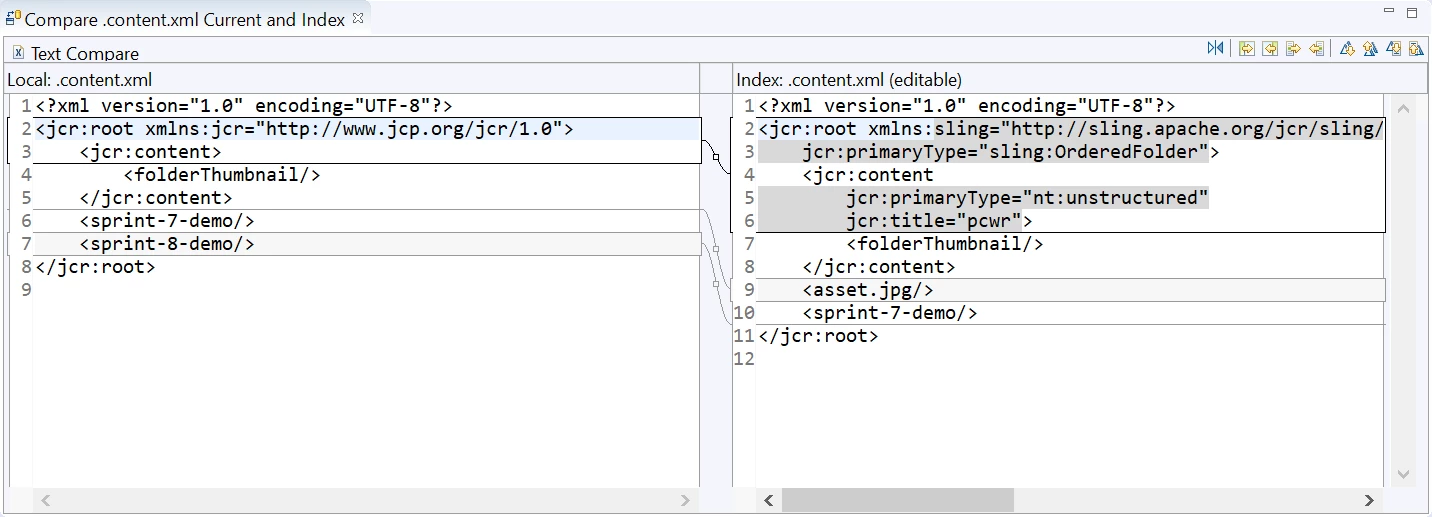
What could cause this and what's the solution?

Eclipse version: Neon.3

Sling IDE Plug-in: 1.2.0

AEM: 6.3 with SP1, CFP2

This post is no longer active and is closed to new replies. Need help? Start a new post to ask your question.
Best answer by alexr21

ThanksJulio Tobar​ for pin-pointing the root cause of the issue. I relayed your explanation to the Sling IDE Tools project and they immediately pushed a fix (upgrade File Vault to 3.1.42) to the 1.2.1-SNAPSHOT version of the plugin as of this morning.

7 replies

smacdonald2008
Level 10
February 14, 2018

Can you post the step you did to see if this can be reproduced.

Julio_Tobar
Level 3
February 14, 2018

I ran into a similar issue and it turns out to be a problem with "File Vault" tool provided by Jackrabbit. The version of the tool I had the problem with was 3.1.18 and I had to either degrade to a previous version (3.1.16) or get a more recent build (3.1.42). To be 100% the issue comes from this tool you can:

1) install fileVault in your system (expand the tools from AEM_HOME/crx-quickstart/opt/filevault into any other folder you choose) and configure your PATH to also include this application

3) using "vlt" command do a check out

4) modify some content in the file system and do a check in

5) modify same content using CRXDE lite and do an "update"

6) take a look into .content.xml files and see if there are properties missing, if so, we are 100% sure the issue comes from the file vault version you have. If not, we need to look into other things.

alexr21Author
Level 3
February 14, 2018

Julio Tobar​ I see that I have filevault-3.1.38. I quick Google search did not reveal where other versions can be downloaded. I did find an alternate version "VaultClipse" at http://www.aemcq5tutorials.com/tutorials/configure-filevault-vlt-tool-in-cq/ which I will try next.

smacdonald2008​ the step to reproduce is to use the Import from server... option below:

alexr21Author
Level 3
February 14, 2018

Apparently the vaultClipse project is defunct:

Julio_Tobar
Level 3
February 15, 2018

Let me elaborate on the issue, as I see it, and then give you my recommendation for fixing it.

Issue:

Apache Jackrabbit FileVault tool is responsible for Synchronizing files in the File System with content in the JCR repository. Sadly, FileVault version 3.1.38 has a bug that serializes .content.xml file (-the one that contains the node properties-) almost empty.

Since AEM plugin for Eclipse uses Sling-Ide-Tooling internally (AEM Developer Tools for Eclipse ), and Sling-Ide-tooling uses Apache Jackrabbit FileVault tool behind the scenes (sling-ide-tooling/impl-vlt/src/org/apache/sling/ide at master · apache/sling-ide-tooling · GitHub ), we end up having that same issue (-almost empty .content.xml files-) when using AEM plugin for Eclipse.

solution:

The way I resolved my issue back then, since I was using FileVault directly and not the AEM plugiin for Eclipse at the time, was to get a new build of Jackrabbit FileVault tool. You can try to build a new version of AEM plugin for Eclipse (GitHub - apache/sling-ide-tooling: Apache Sling IDE Tools ) or Have a ticket raised with Adobe asking for a newer version of the plugin.

Regards,

alexr21AuthorAccepted solution
Level 3
February 19, 2018

ThanksJulio Tobar​ for pin-pointing the root cause of the issue. I relayed your explanation to the Sling IDE Tools project and they immediately pushed a fix (upgrade File Vault to 3.1.42) to the 1.2.1-SNAPSHOT version of the plugin as of this morning.

Julio_Tobar
Level 3
February 19, 2018

Great alexr2​. Thank you so much for letting us know this fixed the issue!

Regards,