Eclipse: new AEM sample Multi-Module Project gives two types of errors | Community
Skip to main content
September 25, 2017
Solved

Eclipse: new AEM sample Multi-Module Project gives two types of errors

  • September 25, 2017
  • 9 replies
  • 4009 views

Hello community!

I am trying to generate AEM project via Eclipse.

I followed an article (AEM Developer Tools for Eclipse ) to set up AEM developer tool installed on my Java EE version of Eclipse 4.7.0

As bottom of the tutorial says, newly installed AEM developer tool may gives you Maven update issue.

So I followed the step to resolve the issue; however, while updating the maven, I got following issue.
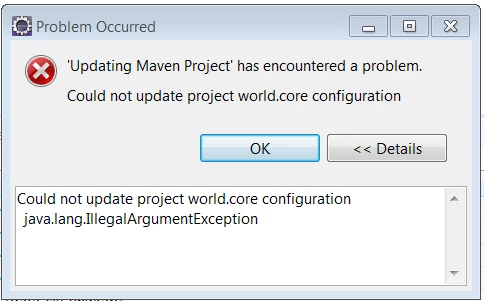
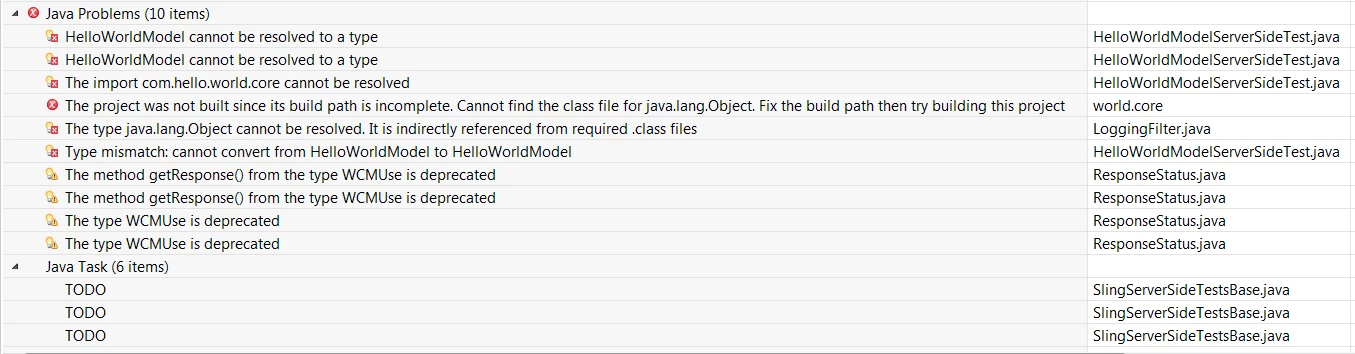
I try to create the project with archtype 11.
However, if I use lower than 11, I will get "The server does not support version 2.4 of the J2EE Web module specification" error message.

also this article has work around for server compatibility issue (Eclipse Development tools error )

I prefer resolve the problem without going through work around.

Dose anybody know fix for this issue ?

Thank you for your time!

Ryu

This post is no longer active and is closed to new replies. Need help? Start a new post to ask your question.

9 replies

kautuk_sahni
Community Manager
Community Manager
September 26, 2017

Hi,

Can you please remove following code from the src/main/archetype/core/pom.xml

// <executions> <execution> <id>bundle-manifest</id> <phase>process-classes</phase> <goals> <goal>manifest</goal> </goals> </execution> </executions>

More about it :- Project is creating in broken state · Issue #78 · Adobe-Marketing-Cloud/aem-eclipse-developer-tools · GitHub

~kautuk

Kautuk Sahni
smacdonald2008
smacdonald2008Accepted solution
September 26, 2017
September 27, 2017

Hello kautuksahni and @smacdonald2008

Thank you for the replays!

For kautuksahni, I tried to remove the ​executions section from my pom.xml but still I got another errors afterward.

For smacdonald2008​ I had to re install java and AEM on my machine yesterday so I haven't tested out the method. I will try today and I will keep posted!

Thanks for the helps!

Ryu

September 27, 2017

Hello smacdonald2008

I have tried the method you mentioned and it generated project without any issue; however ....

when I build the package I have following error and I cannot go further

I found many bug report on google but could not find solution for this issue.

Do you know how to fix this or just server issue as some people reported ? 

[INFO] --- content-package-maven-plugin:0.0.24:package (default-package) @ example-project.ui.apps ---
[INFO] Embedding --- Embedded: groupId=com.myco,artifactId=example-project.core,filter=false,excludeTransitive=false,target=/apps/my-aem-project/install/ ---
[INFO] Embedding com.myco:example-project.core:jar:0.0.1-SNAPSHOT (from C:\inetpub\wwwroot\Code\+others\AEM\myMobileMoneyPass\core\target\example-project.core-0.0.1-SNAPSHOT.jar) -> jcr_root/apps/my-aem-project/install/example-project.core-0.0.1-SNAPSHOT.jar
[INFO] Embedding --- Sub Packages: groupId=com.adobe.acs,artifactId=acs-aem-commons-content,filter=true,excludeTransitive=false ---
[INFO] ------------------------------------------------------------------------
[INFO] Reactor Summary:
[INFO]
[INFO] My AEM Project - Reactor Project ................... SUCCESS [  0.231 s]
[INFO] My AEM Project Bundle .............................. SUCCESS [  2.234 s]
[INFO] My AEM Project Content Package ..................... FAILURE [  1.668 s]
[INFO] ------------------------------------------------------------------------
[INFO] BUILD FAILURE
[INFO] ------------------------------------------------------------------------
[INFO] Total time: 6.234 s
[INFO] Finished at: 2017-09-27T10:33:16-07:00
[INFO] Final Memory: 18M/276M
[INFO] ------------------------------------------------------------------------
[ERROR] Failed to execute goal com.day.jcr.vault:content-package-maven-plugin:0.0.24:package (default-package) on project example-project.ui.apps: java.util.zip.ZipException: invalid LOC header (bad signature) -> [Help 1]
[ERROR]
[ERROR] To see the full stack trace of the errors, re-run Maven with the -e switch.
[ERROR] Re-run Maven using the -X switch to enable full debug logging.
[ERROR]
[ERROR] For more information about the errors and possible solutions, please read the following articles:
[ERROR] [Help 1] http://cwiki.apache.org/confluence/display/MAVEN/MojoExecutionException
[ERROR]
[ERROR] After correcting the problems, you can resume the build with the command
[ERROR]   mvn <goals> -rf :example-project.ui.apps

Thanks!

Ryu

smacdonald2008
September 27, 2017

So you can build the sample project as shown in the Lazybone project.

Scott's Digital Community: Creating an Adobe Experience Manager project using Lazybones

Have you introduced custom Java packages into your project that results in the error

September 27, 2017

No I haven't edited anything.

Just testing purpose, I generated the project via lazybone, imported to eclipse then did built as

I have been googleing now and java_home laso points to jdk so I'm not sure what causing the error ...

Ratna_Kumar
September 27, 2017

Hi,

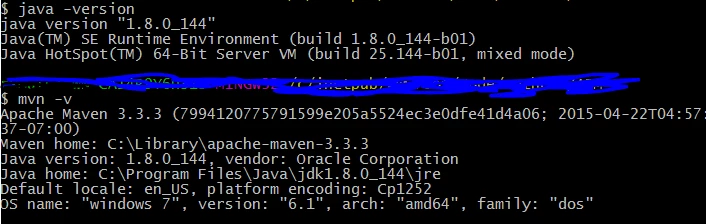
May I know, which version of Java and Maven you are using.

Please try to use latest Maven version with Java/JDK 1.8. It works for me.

Thanks,

Ratna.

September 27, 2017

Hello Ratna Kumar

Sure.

I have following set up

thanks!

September 27, 2017

Hello!

I have an update for the issue.

I found an article on stack overflow java - Failed to start component - ZipException: invalid LOC header (bad signature) - Stack Overflow
and try to remove .m2 folder then build the package.

It worked!

I think some of jar file was outdated so it spilled Zip Exceotion

thank you for the help everyone!