Dynamic mega menu with image and multifield from the page properties | Community
Skip to main content
Level 2
November 23, 2021
Solved

Dynamic mega menu with image and multifield from the page properties

  • November 23, 2021
  • 1 reply
  • 1141 views

Hi All,

            We have requirement to display  the like page title , image ,image cta and one multifield in the navigation when we hover the tab like below and apart from that we need to display child pages as well.
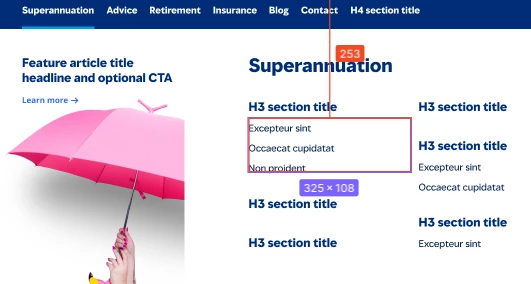
 

I have given one approach to my client

All the field like image and H3 section multifield should be authored in the page properties and  in the dialog when we authored parent page path then in the naviagtion it will display the child pages as well as content.


does anyone worked on same requirement if yes then what are the steps need to follows

This post is no longer active and is closed to new replies. Need help? Start a new post to ask your question.
Best answer by Kishore_Kumar_

Hi @savi50 ,


I haven't tried but I guess you have to overlay core Navigation Component and need to add additional fields in below html.


/libs/core/wcm/components/navigation/v1/navigation/itemContent.html


And also i guess you need to extend Navigation Model(com.adobe.cq.wcm.core.components.models.Navigation) for additional fields if required.

1 reply

Kishore_Kumar_
Kishore_Kumar_Accepted solution
Level 9
November 23, 2021

Hi @savi50 ,


I haven't tried but I guess you have to overlay core Navigation Component and need to add additional fields in below html.


/libs/core/wcm/components/navigation/v1/navigation/itemContent.html


And also i guess you need to extend Navigation Model(com.adobe.cq.wcm.core.components.models.Navigation) for additional fields if required.

savi50Author
Level 2
November 24, 2021

Hi @kishore_kumar_ ,

        do you know where i get this sling model to extend and one more thing in this html we can able to retrieve title of the child pages only and if we want another field  like image,multifield.

/libs/core/wcm/components/navigation/v1/navigation/itemContent.html