Dynamic drop down for AEM 6.4 multifield | Community
Skip to main content
vijays80591732
November 19, 2018
Solved

Dynamic drop down for AEM 6.4 multifield

  • November 19, 2018
  • 10 replies
  • 9451 views

Hi All,

1) I have an requirement to create a touchUI multifield component in AEM 6.4.

2) That multifield component will have an dropdown field and the dropdown values should be dynamic. For an instance I have this two page /content/cellular & /content/cellular/en/homepage.

3) I have an template called rootpage. This template is having template level CQ:dialog which is having textfield as an multifield and I have authored some three textfield values called "one", "two", "three".

4) Now I have created a touch UI multifield component with dropdown (select) and I have drag and drop the component in /content/cellular/en/homepage.

5) If I edit the multifield component in homepage, I should see those values "one", "two", "three" in multifield dropdown which I have authored in root page /content/cellular.

I have referred this Adobe Experience Manager Help | Using an WCMUsePojo class to populate an Experience Manager Touch UI Select Field but seems it will going to work out for my requirement.

I think this below way but have some few doubts and I didn't get any examples as well in adobe forums.

1) I will have one sling servlet and registered as resourcetype.

2) For the multifielddropdown I should call the servlet. But I don't know how to call the servlet. Because drop down should have the select resourcetype and I cannot override that.

3) That slingservlet will read the textfield (multifield values) from /content/cellular and return as an Jsonarray.

4) I can consume the JSon array from servlet and display it in multifield drop down component in /content/cellular/en/homepage. . But I don't know how to get the JSON array in multifield dropdown. In classic UI we have an property called "option" but touch UI we don't have that I believe.

Can any guys give some inputs on this.

@@Arun Patidar smacdonald2008kautuksahni

Thanks,

Vijay

This post is no longer active and is closed to new replies. Need help? Start a new post to ask your question.
Best answer by arunpatidar

Hi,

As suggested by Scott and Ratna, In touch Ui, you can get dynamic dropdown from datasource, which actually resource or servlet registered by resourceType, In that servlet you can read home page node which will be part of dropdown. You can use JCR API in servlet to get options for dropdown.

Classic Ui dropdown populated by JOSN, same can be done for Touch UI as well using servlet like below:

aem63app-repo/DatasourceJson.java at master · arunpatidar02/aem63app-repo · GitHub 

for touch UI you can created options property to provide json path and sling:resourceType to mention sling servlet registered path in datasource node.example: "sling.servlet.resourceTypes=/apps/aem63lab/dailog/dropdown/json"

10 replies

smacdonald2008
November 19, 2018

In the Granite API, to populate a Granite Select type - you use a DataSource object , as shown in this article:

Adobe Experience Manager Help | Using an WCMUsePojo class to populate an Experience Manager Touch UI Select Field

You can use Java in the WCMUsePojo to construct a DataSource object .

.You can add business logic in Java to construct the values you want to display in the dropdown. If you want to read child resources - you can do so in Java logic.

//Creating the Map instance to insert the countries

final Map<String, String> countries = new LinkedHashMap<String, String>();

countries.put("in", "India");

countries.put("us", "United States");

countries.put("aus", "Australia");

countries.put("pak", "Pakistan");

countries.put("sri", "Srilanka");

As you can see - you populate a Java MAP object to construct a DataSource object.

smacdonald2008
November 19, 2018
Ratna_Kumar
November 19, 2018

Hi Vijay,

As Scott mentioned, you can use the WCMUsePojo to construct a Datasource object to populate the dropdown. Here is the HELPX article: Adobe Experience Manager Help | Using an WCMUsePojo class to populate an Experience Manager Touch UI Select Field

There is no need of binding he servlet and bind to a resourceType to populate dropdown.

Thanks,

Ratna Kumar.

arunpatidar
Community Advisor
arunpatidarCommunity AdvisorAccepted solution
Community Advisor
November 19, 2018

Hi,

As suggested by Scott and Ratna, In touch Ui, you can get dynamic dropdown from datasource, which actually resource or servlet registered by resourceType, In that servlet you can read home page node which will be part of dropdown. You can use JCR API in servlet to get options for dropdown.

Classic Ui dropdown populated by JOSN, same can be done for Touch UI as well using servlet like below:

aem63app-repo/DatasourceJson.java at master · arunpatidar02/aem63app-repo · GitHub 

for touch UI you can created options property to provide json path and sling:resourceType to mention sling servlet registered path in datasource node.example: "sling.servlet.resourceTypes=/apps/aem63lab/dailog/dropdown/json"

Arun Patidar
smacdonald2008
November 19, 2018

Nice job Arun - this code compiled nicely!

smacdonald2008
November 19, 2018

This article was updated to show use of a Sling Servlet to create a DataSource object to populate a Select field:

Building Experience Manager Components using Granite/Coral Resource Types

vijays80591732
November 20, 2018

Hi Arun,

Thanks for your inputs here.

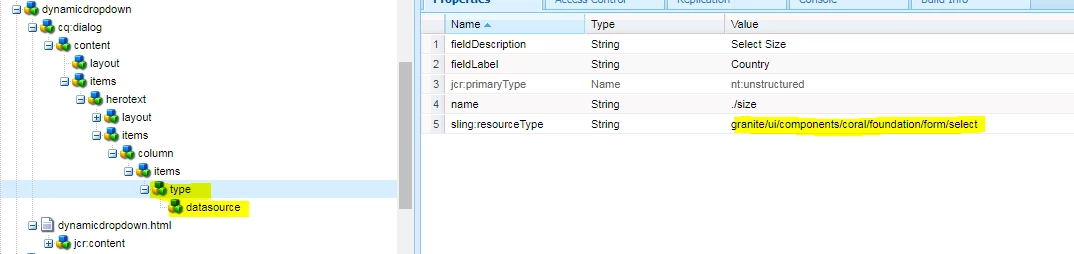
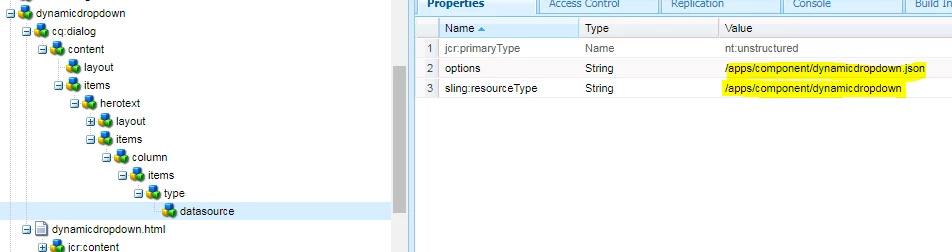
I created a servlet using resource type and I'm calling the servlet resource type in my datasource sling:resourceType and options is resourcetype.json. Under select component I'm having the datasource. When I use this component in my page the servlet is not getting triggered. But the same servlet is working fine when using resourcepaths. I'm not sure where I did the mistake. I'm providing you the screenshot and code snippet. can you correct me where I'm wrong? I want to get the the JSon response which is coming from servlet and display as  an dropdown values in the component and I don't want to use any external .json file. Thanks in Advance.

Servlet:

@Component(service = Servlet.class, immediate = true, property = {

    Constants.SERVICE_DESCRIPTION + "=Dynamic dropdown",

    "sling.servlet.resourceTypes=" + "/apps/component/dynamicdropdown",

    "sling.servlet.extensions=" + "json",

    "sling.servlet.methods=" + "GET"

})

public class DynamicDropDown extends SlingAllMethodsServlet {

  private static final Logger LOG = LoggerFactory.getLogger(DynamicDropDown.class);

  @Override

  protected void doGet(SlingHttpServletRequest request,

      final SlingHttpServletResponse response) throws ServletException, IOException {

    LOG.info("DynamicDropDown servlet in..");

    response.setHeader("Access-Control-Allow-Origin", "*");

    response.setContentType("application/json");

    response.setCharacterEncoding("UTF-8");

    LOG.info("DynamicDropDown servlet out..");

    try {

      String[] americastates = {"0=Alabama","1=Alaska","2=Arizona"};

      String country = "country";

      JSONArray stateJsonArray = new JSONArray();

      if (country.length() > 0) {

        if ("country".equalsIgnoreCase(country)) {

          stateJsonArray = new JSONArray();

          for (String state: americastates) {

            stateJsonArray.put(state);

          }

        }

        response.setContentType("application/json");

        response.getWriter().write(stateJsonArray.toString());

      }

    } catch (Exception e) {

      LOG.error(e.getMessage(), e);

    }

  }

}

Screenshots:

Thanks,

Vijay

arunpatidar
Community Advisor
Community Advisor
November 21, 2018

try to remove from "sling.servlet.extensions=" + "json", servlet code?

Arun Patidar
vijays80591732
November 22, 2018

Hi Arun,

Servlet didn't workout for me. So I completed using Javaclass where I'm having my logic and I'm calling the service from the datasource and it's working now. I'm not sure why the servlet is not working for me. Thanks Arun for your guidance.

Regards,

Vijay

AdobeID24
July 16, 2019

how did you call the service from datasource node .? if you can provide screenshot it will,be helpful