drop down is not retaining value in composite multifield | Community
Skip to main content
Level 2
February 22, 2018

drop down is not retaining value in composite multifield

  • February 22, 2018
  • 3 replies
  • 3965 views

I am using granite/ui/components/coral/foundation/form/select inside coral multifield.

If I select any value in drop-down and submit the dialog, value is stored in jcr:content  but if I open the dialog again drop-down does not populate stored value.

I am working on AEM 6.3 SP1 Cumulative package 2, coral ui 3 and for multifield I am using acs-commons-3.14

This post is no longer active and is closed to new replies. Need help? Start a new post to ask your question.

3 replies

smacdonald2008
Level 10
February 22, 2018

When you use granite/coral multifield - you do not need to use ACS-Commons.

smacdonald2008
Level 10
February 22, 2018

See this article - we have a Select field that does hold a value:

Creating a Granite/Coral 6.3 Multifield HTL component for Adobe Experience Manager

smacdonald2008
Level 10
February 22, 2018

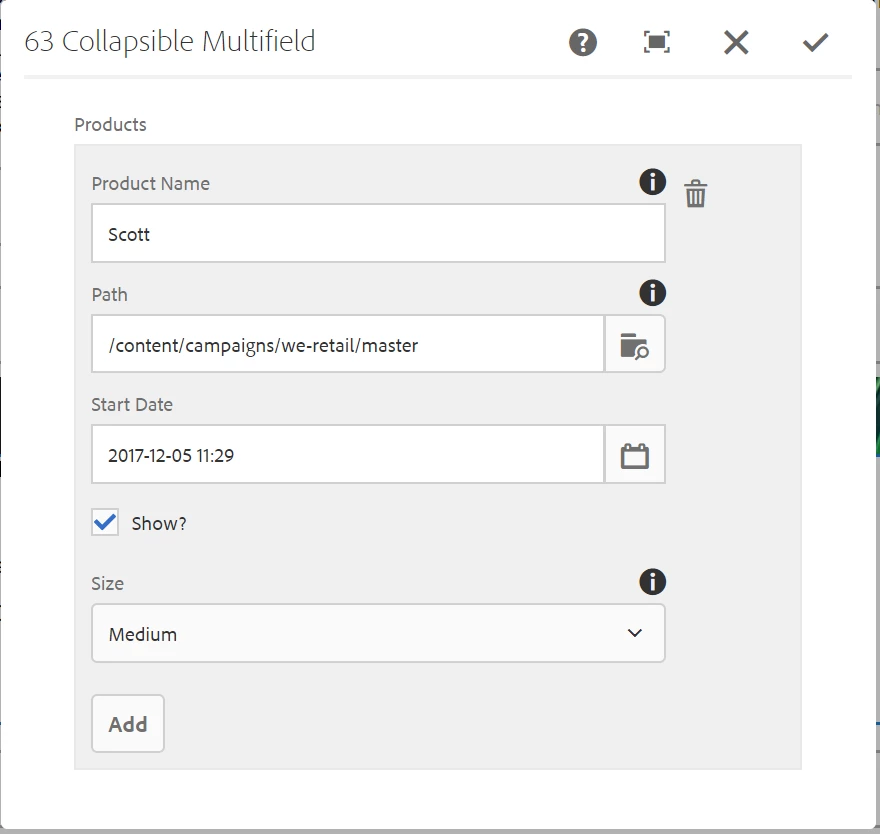
Just tested the package in this article and the Select field in the MF is holding the value when you close and re-open the dialog. See the SIZE field. As mentioned in this article - when using the Granite/MF type - you do not need to use ACS-Commons like you do when using the Granite Multifield.

hpathanAuthor
Level 2
February 27, 2018

It is working fine on my environment, but it is storing multi-field value is in node structure.  I want to store multi-field value in json format for that we are using acs-common.

Abhishekty
August 29, 2019

Hi, I have same case I am using drop down in multifield but after authoring and saving drop-down value has changed as first one.

(after saving drop-down not return selected one.)

I need to use acs-common genericlist,

can you please suggest me ?

<testDropDown

   jcr:primaryType="nt:unstructured"

   fieldLabel="Test Heading"

   sling:resourceType="granite/ui/components/coral/foundation/form/select"

   name="./dropDwonTest">

   <datasource

   jcr:primaryType="nt:unstructured"

   sling:resourceType="acs-commons/components/utilities/genericlist/datasource"

   path="/etc/acs-commons/lists/test/testIndex"/>

   </testDropDown>