Drag component is overlapping with Form Component | Community
Skip to main content
November 28, 2022
Solved

Drag component is overlapping with Form Component

  • November 28, 2022
  • 1 reply
  • 515 views

I have a page which was created using static template(In the template I have Form start and Form end components)

In my page the Drag component is overlapping with Form start component.

And also when I add component I am not able to edit Form start component because the component is coming on top and covering Form start component.

Can anyone help me to fix the issue.


Thanks,

Vani.
This post is no longer active and is closed to new replies. Need help? Start a new post to ask your question.
Best answer by Avinash_Gupta_

Hi @vani1012


Why don't you use  AEM core form container component. Foundation Component has been deprecated. Adobe recommends leveraging the Core Components instead.


https://experienceleague.adobe.com/docs/experience-manager-65/authoring/siteandpage/default-components-foundation.html?lang=en#form-component 


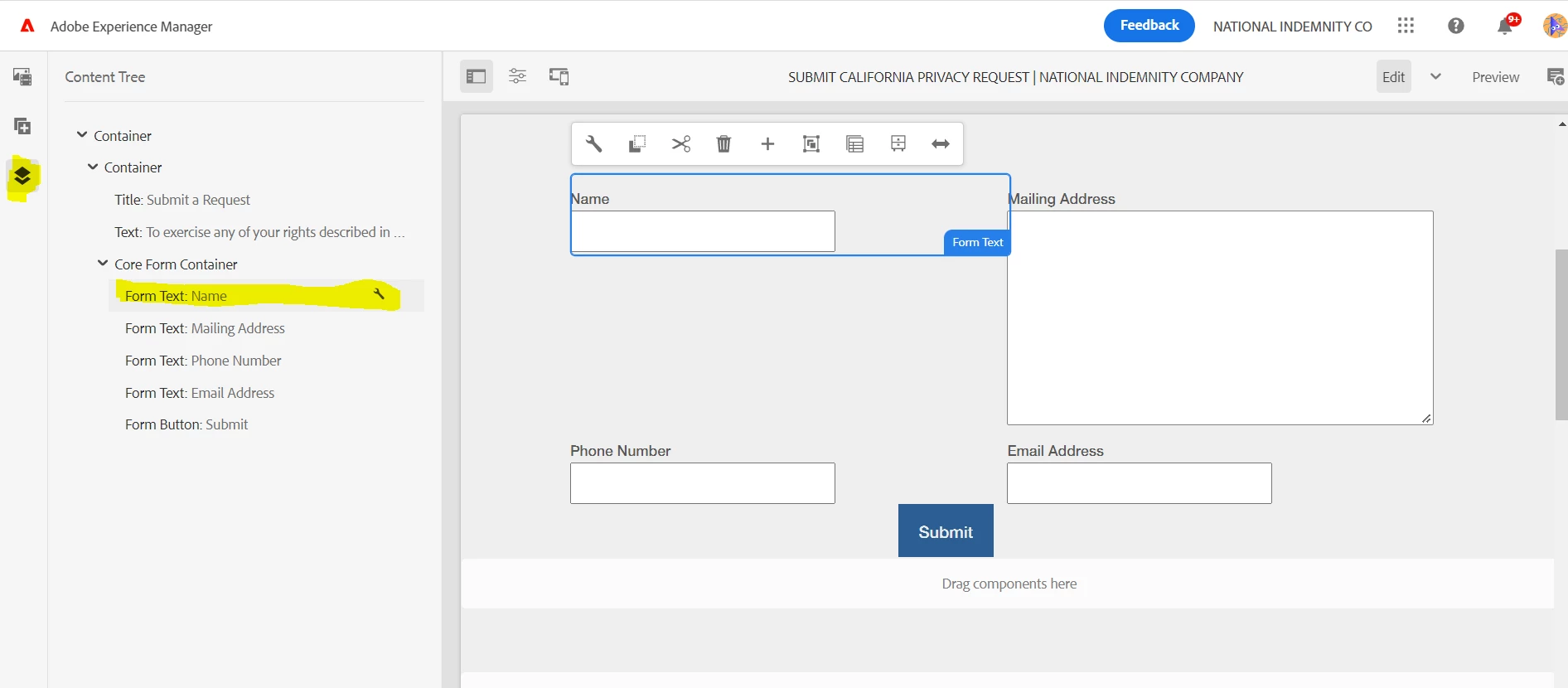
In case you are having trouble to edit the component, go to the components content tree at the left hand side and try to edit the component using the wrench icon.


Hope this helps.

1 reply

Avinash_Gupta_
Community Advisor and Adobe Champion
Avinash_Gupta_Community Advisor and Adobe ChampionAccepted solution
Community Advisor and Adobe Champion
November 28, 2022

Hi @vani1012


Why don't you use  AEM core form container component. Foundation Component has been deprecated. Adobe recommends leveraging the Core Components instead.


https://experienceleague.adobe.com/docs/experience-manager-65/authoring/siteandpage/default-components-foundation.html?lang=en#form-component 


In case you are having trouble to edit the component, go to the components content tree at the left hand side and try to edit the component using the wrench icon.


Hope this helps.