dispatcher on iis server | Community
Skip to main content
This post is no longer active and is closed to new replies. Need help? Start a new post to ask your question.

4 replies

Adobe Employee
September 17, 2019

When configuring dispatcher for IIS, make sure that you deselect Invoke Handler Only If Request Is Mapped To.

KB: Installing Dispatcher

Paragraph: Integrating the Dispatcher ISAPI Module - IIS 8.5 and 10

Step  5 - 8

AdobeID24
AdobeID24Author
Level 5
September 17, 2019

Yup.. Followed the same...

Adobe Employee
September 17, 2019

Adding to what Leo indicated, also make sure the .dll file is accessible

AdobeID24
AdobeID24Author
Level 5
September 17, 2019

The. dll file contaiing floder -----properties ---security ----full control to user and adminstrator given.....?? That's enough??

I have seen in some of article where adding IISAppPool\defauktAppPool.... Please suggest

Adobe Employee
September 17, 2019

Hey,

You should always use the latest dispatcher version. Try with the dispatcher-iis-windows-x64-4.3.2.zip which was released in Jan, 2019. Download the latest version from AEM Dispatcher Release Notes

Regards,

Vishu

AdobeID24
AdobeID24Author
Level 5
September 17, 2019

tried with that also ...no luck ..any other work around

Adobe Employee
September 17, 2019
Adobe Employee
September 17, 2019

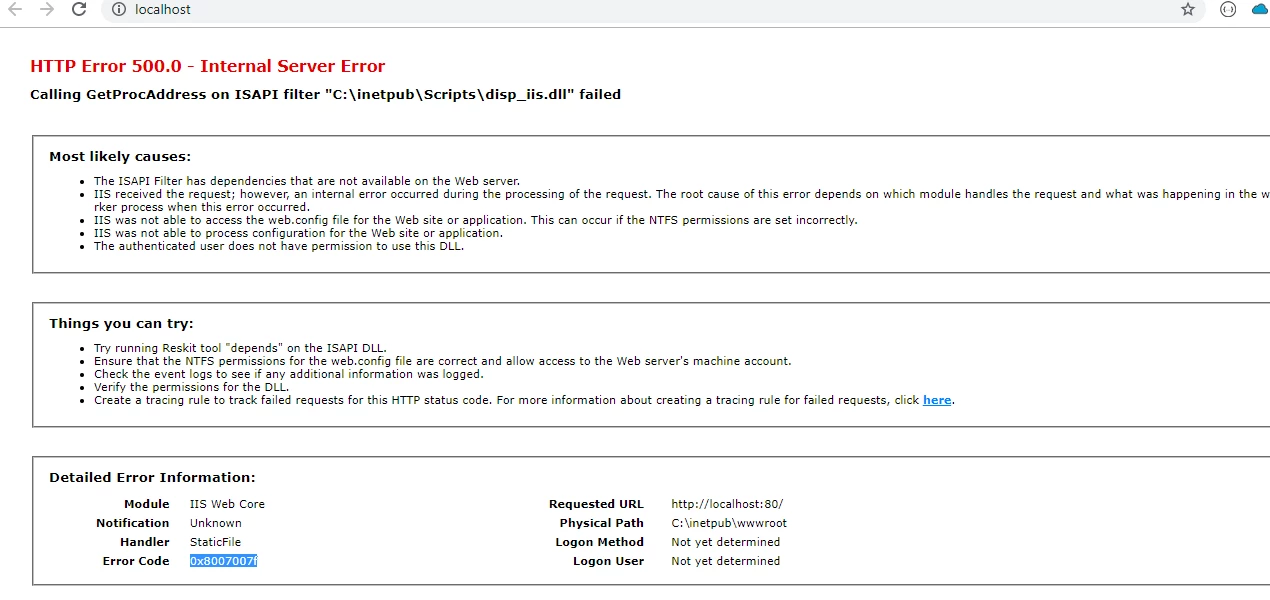
You need to make sure that you have placed the dll file at the location you specified in your configuration:

C:\inetpub\Scripts\disp_iis.dll

Then make sure that the user running the w3wp.exe process has full access to the .dll file.

Also, important to note that the link you used to download the disaptcher is an old version of the dispatcher (4.2.3) The latest version (4.3.2) can be found here:

AEM Dispatcher Release Notes

AdobeID24
AdobeID24Author
Level 5
September 18, 2019

I have changed ini file and added script path= /scripts/.dllfilename .... And configpath= full dispatchwr. Any file location .......

My w3wp.exe user...checked with task manager...that user I added in the security tab of dll file and the docroot file..and given full control .. ...

Still getting the same error....

Turn on or off windows feature...

Isapi extension is checked..

And all other necessary feature is enabled....

Asp. Net also required?  Even I have tried with both scenerio it didn't work....

AdobeID24
AdobeID24Author
Level 5
October 7, 2019

Good to hear that!


Dispatcher on IIS server

hey gaurav can u help me on that issue ?