Disabling Smart Tags in AEM as a Cloud Service | Community
Skip to main content
Level 3
March 17, 2023

Disabling Smart Tags in AEM as a Cloud Service

  • March 17, 2023
  • 4 replies
  • 2247 views

Hi Team,


I want to disable the smart tagging on AEM as cloud service, I have tried below things so far :

1. I tried to manage the tags on folders so it should not apply some unwanted tags to newly uploaded assets but it is not working.

2. I tried to disable the smart tagging form folder properties but it is removing complete smart tagging for the folder. 
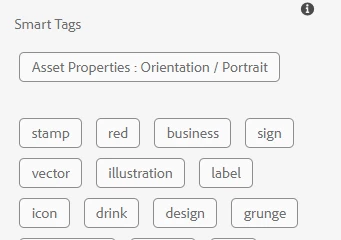


From the above image I just dont want the tags names 'Asset Properties: Orientation/ Portrait', how can I restrict the smart tagging feature to just not assigned these tags but only tags like 'stamp', 'red', 'business' etc.


Thanks.

This post is no longer active and is closed to new replies. Need help? Start a new post to ask your question.

4 replies

somen-sarkar
Community Advisor
Community Advisor
March 17, 2023

Hi,

Could you check if the smart content service configurations  is enabled ?  Pls check the below link :-

https://experienceleague.adobe.com/docs/experience-manager-64/assets/managing/config-smart-tagging.html?lang=en#configure-smart-content-service


Thanks,

Somen

Rohit_Utreja
Community Advisor
Community Advisor
March 17, 2023

Hi @sdusane 

Please have a look at the link below. It describes, how to manage these tags using the smart tag feature.

 https://experienceleague.adobe.com/docs/experience-manager-cloud-service/content/assets/manage/smart-tags.html?lang=en#manage-smart-tags-and-searches

DPrakashRaj
Community Advisor
Community Advisor
March 19, 2023

It seems this property “Asset Properties: Orientation/ Portrait' is not the ootb smart tags and I guess it’s coming as the part of trained smart tags. Can you check if you have this tags in your aem tags and if yes then it will confirm that it’s a trained tags. So try to train the smart content service to not have this tag.


https://experienceleague.adobe.com/docs/experience-manager-64/assets/administer/enhanced-smart-tags.html?lang=en

SDusaneAuthor
Level 3
March 21, 2023

Hi All,


Thanks for the help!

I am using AEM as a Cloud Service so some of the replies are not useful.

I have already followed the below link for smart tagging : 

https://experienceleague.adobe.com/docs/experience-manager-cloud-service/content/assets/manage/smart-tags.html?lang=en#manage-smart-tags-and-searches


Please let me know if there is any other way.


Thanks,
SD

December 20, 2023

@sdusane - Were you able resolve this? We are have the similar issue to disable Smart Tags in AEM as a Cloud Service for entire DAM. 

December 21, 2023

Hi Hemanth,


My requirement was different, I just want to disable the smart tags for some folders.

To disable the smart tags for entire DAM then you can disable the smart tagging feature with below steps 

Go to AEM DAM > Parent folder where you want to disable the smart tagging > properties > Asset Processing > select disable for all the smart tags dropdowns and Save.


Thanks

SD


@SDusane - Thank you so much for getting back. We are exploring the same approach, but we wanted to confirm if we could manage this through OSGi configuration.