Dialog Image preview picker not displaying binoculars icon | Community
Skip to main content
Level 3
November 1, 2022
Solved

Dialog Image preview picker not displaying binoculars icon

  • November 1, 2022
  • 2 replies
  • 1087 views

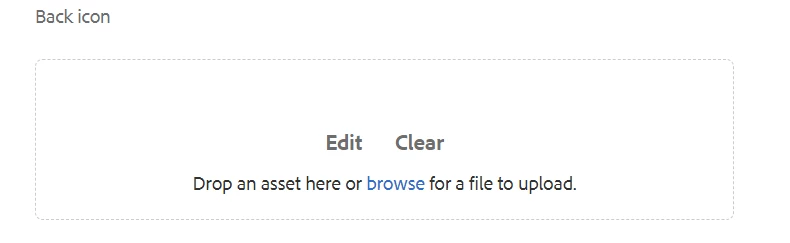
not able to see preview icon(which looks like a binoculars) for browsing dam content(Images), only able to see edit and clear option. xml format is like below 


<backicon
jcr:primaryType="nt:unstructured"
sling:resourceType="cq/gui/components/authoring/dialog/fileupload"
autoStart="{Boolean}false"
class="cq-droptarget"
fieldLabel="Back icon"
fileNameParameter="./fileNameBackIcon"
fileReferenceParameter="./fileReferenceBackIcon"
mimeTypes="[image]"
multiple="{Boolean}false"
name="./backicon"
title="Back icon"
uploadUrl="${suffix.path}"
useHTML5="{Boolean}true"/>
 

This post is no longer active and is closed to new replies. Need help? Start a new post to ask your question.
Best answer by arunpatidar

I don't know the version but in 6.4 the code for picker is not present so it maybe it is supported from AEMaaCS or AEM 6.5 


In /libs/cq/gui/components/authoring/dialog/fileupload/render.jsp 


<button type="button" class="cq-FileUpload-picker" is="coral-button" variant="quiet" aria-haspopup="dialog"><%= xssAPI.encodeForHTML(i18n.getVar("Pick")) %></button>


2 replies

Lokesh_Vajrala
Community Advisor
Community Advisor
November 1, 2022

There is the browse text (highlighted in blue color), which opens the asset picker modal when you click on it. Also, you can drop assets into the file upload container.

You will notice the pick button after you drop/select an asset.

Level 3
November 2, 2022

@lokesh_vajrala blue color browse button will take author to upload images from local computer not from Dam, I want preview picker icon through which we can browse /content/dam folder in AEM server.

arunpatidar
Community Advisor
Community Advisor
November 2, 2022

Hi,

Can you compare the dialog configuration where is it available?

I am using core component image V3 in AEMaaCS and I can see the picker button.


It might be possible that you are not in the correct version of AEM. 


Arun Patidar
Level 3
November 2, 2022

@arunpatidar Please let me know, from which version of AEM, preview picker icon is available for use.

arunpatidar
Community Advisor
arunpatidarCommunity AdvisorAccepted solution
Community Advisor
November 2, 2022

I don't know the version but in 6.4 the code for picker is not present so it maybe it is supported from AEMaaCS or AEM 6.5 


In /libs/cq/gui/components/authoring/dialog/fileupload/render.jsp 


<button type="button" class="cq-FileUpload-picker" is="coral-button" variant="quiet" aria-haspopup="dialog"><%= xssAPI.encodeForHTML(i18n.getVar("Pick")) %></button>


Arun Patidar