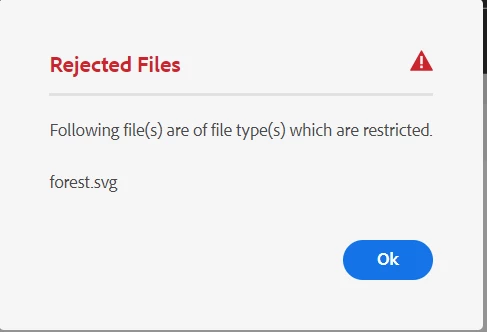
Dam file upload restriction Allowed MIME Types image/svg+xml in AEMaacs | Community
Skip to main content
This post is no longer active and is closed to new replies. Need help? Start a new post to ask your question.
Best answer by kautuk_sahni

@lone_ranger , I have asked the PM for this topic to assist you here.


@lone_ranger , I had discussions with the internal team, it could be an issue with the assets or something else (eg Bug), but there is nothing obvious from what we see. This requires some debugging and I would route you to AEM Support. Please open a support ticket for this one. If possible, please share with me the Asset (do not share that here | DM me or Email me).

3 replies

krishna_sai
Community Advisor
Community Advisor
July 20, 2023

Hi @lone_ranger , can you check this doc and see if svg's mimetype is allowed in the configurations
https://experienceleague.adobe.com/docs/experience-manager-cloud-service/content/assets/admin/configure-asset-upload-restrictions.html?lang=en

Hope this helps,
Krishna

Level 4
July 21, 2023

Hi @krishna_sai ,

yes it's allowed

i am allowing these files


aanchal-sikka
Community Advisor
Community Advisor
July 20, 2023

Hello @lone_ranger 


I guess you have already followed the documentation on 

Configure asset upload restrictions | Adobe Experience Manager


May be allow all Image types first. Upload the image, and cross-verify if the mimetype matches the one you allowed. And then refine it further

Aanchal Sikka
Level 4
July 21, 2023

Hi @aanchal-sikka 

I have checked  using this image/* it's allowing me to upload same svg file 
but when using image/svg+xml it's not working as it is suggested by adobe.

tried application/svg+xml not working too.


thanks

DPrakashRaj
Community Advisor
Community Advisor
July 21, 2023

By default Aem doesn’t block .svg file from being uploaded on aem. Check your custom configs if you have only allowed certain file type to upload only. This configs are different on aem cloud and aem on premise or ams


Level 4
July 21, 2023

using only OOTB restriction.
no custom restriction

kautuk_sahni
Community Manager
kautuk_sahniCommunity ManagerAccepted solution
Community Manager
August 3, 2023

@lone_ranger , I have asked the PM for this topic to assist you here.


@lone_ranger , I had discussions with the internal team, it could be an issue with the assets or something else (eg Bug), but there is nothing obvious from what we see. This requires some debugging and I would route you to AEM Support. Please open a support ticket for this one. If possible, please share with me the Asset (do not share that here | DM me or Email me).

Kautuk Sahni